
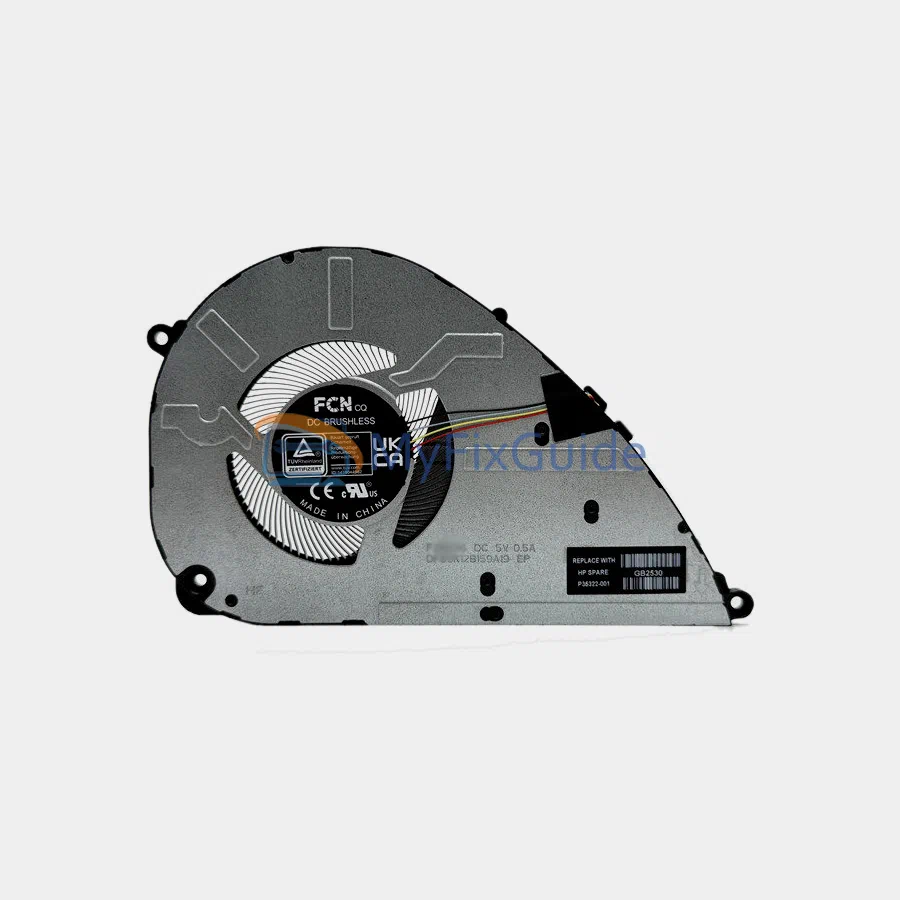
New CPU Cooling fan for HP OmniBook 5 flip 14-fp0000 series laptops.
Features:
1. Before shipping, each fan is strictly tested to ensure that it works properly.
2. This fan has a 4-wire connector.
Specifications:
Voltage: 5V
Electric current: 0.5A
Condition: New
Warranty: One year
Part Number:
P35322-001
Compatible laptops:
OmniBook 5 flip 14-fp0000 series
OmniBook 5 flip 14-fp0000ca
OmniBook 5 flip 14-fp0007ca
OmniBook 5 flip 14-fp0008ca
OmniBook 5 flip 14-fp0010ca
OmniBook 5 flip 14-fp0013dx
OmniBook 5 flip 14-fp0016ca
OmniBook 5 flip 14-fp0023dx
OmniBook 5 flip 14-fp0057nr
Omnibook 5 flip 14t-fp000
Replacement Tips:
1. Please compare the image, part number, and shape with your fan and make sure it matches your original fan.
2. To make sure you purchase the correct parts, please check that the model name matches exactly with the compatible list.
3. After you remove the bottom cover, you need to disconnect the battery cable from the motherboard first and then start removing the fan. This is to avoid static electricity damage to your laptop.
4. Remove all the screws that secure the heatsink and fan to the motherboard. Disconnect the fan cable from the motherboard, then carefully lift and separate the cooling assembly from the motherboard.
5. You need to remove the old thermal grease left on the CPU with a cleaning cloth and apply the new thermal grease to the CPU.
Reviews
There are no reviews yet