
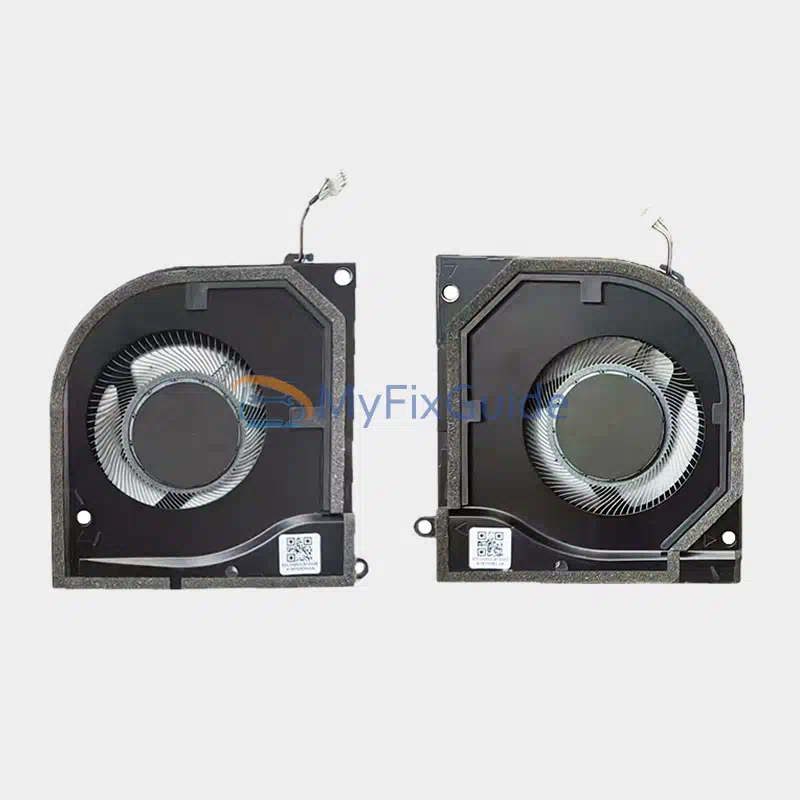
New CPU Cooling fan and GPU fan for HP OMEN Transcend 14-fb0000 series laptops. This product includes a CPU fan and a GPU fan.
Features:
1. Before shipping, each fan is strictly tested to ensure that it works properly.
2. This fan has a 4-wire connector.
Specifications:
Voltage: 12V
Electric current:
Condition: New, Original
Warranty: One year
Part Number:
N84254-001
Compatible laptops:
OMEN Transcend 14-fb0000 Series
OMEN Transcend 14-fb0000ca
OMEN Transcend 14-fb0008ca
OMEN Transcend 14-fb0013dx
OMEN Transcend 14-fb0018ca
OMEN Transcend 14-fb0023dx
OMEN Transcend 14-fb0097nr
OMEN Transcend 14-fb0667nr
OMEN Transcend 14-fb0761nr
OMEN Transcend 14-fb1010ca
OMEN Transcend 14-fb1013dx
OMEN Transcend 14-fb1020ca
OMEN Transcend 14-fb1023dx
OMEN Transcend 14-fb1030ca
OMEN Transcend 14-fb1047nr
OMEN Transcend 14t-fb000
OMEN Transcend 14t-fb100
Replacement Tips:
1. Please compare the image, part number, and shape with your fan and make sure it matches your original fan.
2. To make sure you purchase the correct parts, please check that the model name matches exactly with the compatible list.
3. After you remove the bottom cover, you need to disconnect the battery cable from the motherboard first and then start removing the fan. This is to avoid static electricity damage to your laptop.
4. Remove all the screws that secure the heatsink and fan to the motherboard. Disconnect the fan cable from the motherboard, then carefully lift and separate the cooling assembly from the motherboard.
5. You need to remove the old thermal grease left on the CPU with a cleaning cloth and apply the new thermal grease to the CPU.


Reviews
There are no reviews yet