
In the business laptop segment, many brands are continuously introducing their best laptops. Lenovo remains one of the key players in this segment, offering multiple laptop lineups designed to meet the needs of different types of users and buyers. The laptop we will review is from Lenovo’s ThinkPad X1 Carbon series.
The laptop we are going to review in this article is the Lenovo ThinkPad X1 Carbon Gen 14 Aura Edition, the 2026 version of this series. This model has always been one of Lenovo’s most prominent and important business laptops. It is not designed to chase higher performance or bold design trends. Instead, it mainly focuses on portability, typing comfort, security, and reliability.
This year, Lenovo has launched several variants of this model. The unit we are reviewing is powered by an Intel Core Ultra 7 356H CPU, while higher and lower configurations are also available with different Intel Core Ultra series CPUs.
Specifications
| Screen | 14″ 2.8K (2880 x 1800), OLED, Anti-Glare/Anti-Reflection/Anti-Smudge, Non-Touch, HDR 500 True Black, 100%DCI-P3, 500 nits, VRR 30-120Hz, Low Blue Light |
| Processor | Intel Core Ultra 7 356H Processor (up to 4.70 GHz, 16 Cores, 16 Threads, 18 MB Cache) |
| Wireless Connection | Intel WiFi 7 802.11AX (2 x 2), Bluetooth 5.4 |
| Graphics card | Intel Graphics, up to 40 TOPS |
| Memory | 32 GB LPDDR5X-8533MT/s (Soldered) |
| Storage | 1 TB SSD M.2 2280 PCIe NVMe Gen4 |
| Ports | 1x USB-A (USB 5Gbps), Always On 3x Thunderbolt 4, with USB PD 15-65W and DisplayPort 2.1 1x HDMI 2.1, up to 4K/60Hz 1x Headphone/microphone jack (3.5mm) |
| Battery | 58WH, 65W AC adapter |
| OS | Windows 11 Pro |
| Weight | 0.998 kg (2.20 lbs) |
Design
At first glance, anyone can tell that it is a ThinkPad X1 Carbon because of its familiar design. It has the same matte black finish, red TrackPoint, slim body, and minimal branding that keep the classic X1 Carbon identity alive. The lid is made of carbon fiber, the keyboard deck is made of fiberglass, and the bottom cover is made of a magnesium-aluminum alloy. Using different materials helps the laptop achieve a strong balance between rigidity and lightness.
Let’s have a look at the laptop’s dimensions: 312.5 x 215.75 x 7.7mm. The laptop maintains a slim, compact body with a thickness of just 7.7mm. On the other hand, the laptop weighs around 0.998kg. The version we are reviewing is the one with 4G LTE support (a Nano SIM card can be inserted into the SIM slot). In non-LTE versions, the weight is around 984g, even lighter. For charging, Lenovo includes a compact 65W USB-C power adapter that weighs just 149g, further enhancing the notebook’s portability. Overall, portability is one of the strongest points of this laptop, making it a perfect choice for office users.
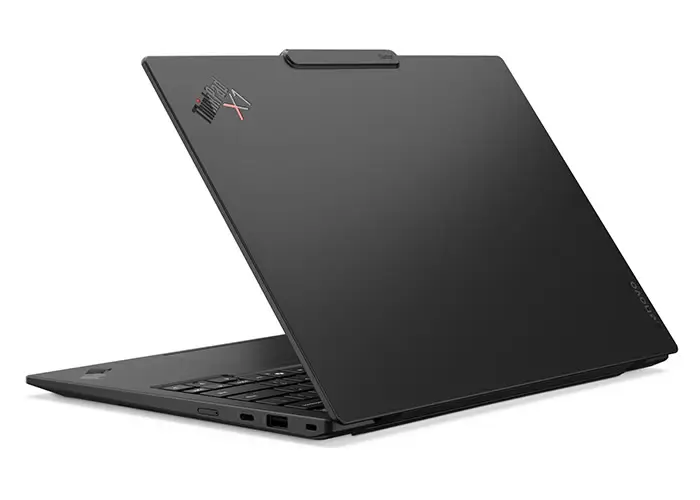
The hinge is also quite practical. The laptop can be opened with one hand, and the display can be folded back to 180°, allowing the user to share the screen in meetings, presentations, and shared desk situations.
On opening the laptop, you will notice a small raised camera housing at the top center of the display. It contains the webcam and other sensors. While this design may not look very sleek to everyone, it serves a practical purpose by allowing Lenovo to include a better camera system without making the screen bezels too thick.
Display
The laptop comes with a 14-inch OLED display, manufactured by Samsung. It has the following specifications:
- 2.8K (2880 x 1800) Resolution and 120Hz Refresh Rate
- Non-Touch
- Anti-Glare, Anti-Reflection, and Anti-Smudge
- 88.8% Screen-to-Body Ratio
- 16:10 Aspect Ratio and 100,000:1 Contrast Ratio
- 100% Coverage for DCI-P3 Color Gamut
- 85° Viewing Angle
- DisplayHDR, True Black 500 and Eyesafe 2.0 Certified
The best thing about this 14-inch OLED panel is that it offers 2.8K resolution and a 120Hz refresh rate. It is a matte OLED panel, which is still uncommon in today’s laptops.
It makes everyday office use more comfortable than a traditional glossy OLED panel by delivering an anti-glare viewing experience.
However, it is worth mentioning that the anti-glare coating works well for reducing reflections, but on light backgrounds, the display can look slightly “greasy” because of the matte surface treatment. This is less noticeable in dark mode.
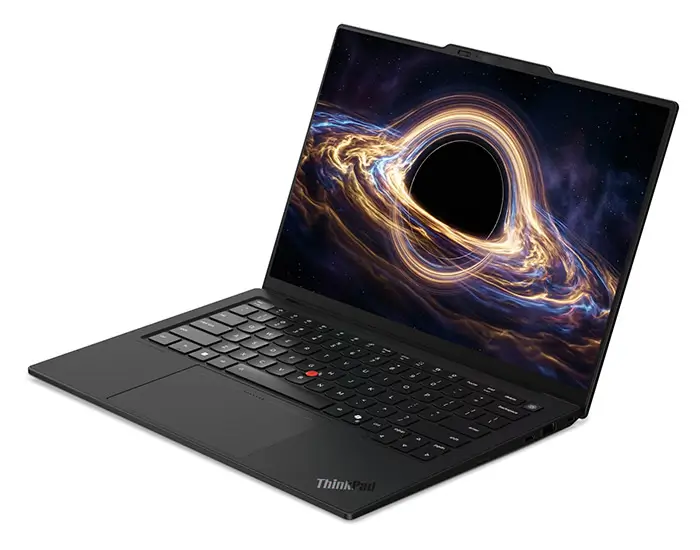
The same ThinkPad X1 Carbon Gen 14 model is also available in other display variants, including IPS and touch-enabled panels. The one we are reviewing is the OLED one and non-touch. We also conducted benchmark testing on this display.
Brightness Test:
In terms of brightness, the maximum measured value in SDR mode was 505 nits, while in HDR mode it reached 1096 nits.
Color Gamut Coverage:
For this test, we used the Spyder X display benchmarking application. Upon completion, it was found that the display covers 100% of the DCI-P3 color gamut, matching the official claim.
Color Accuracy Test:
In Display-P3 mode, the maximum Delta E was 3.76, while the average was 1.82.
In DCI-P3 mode, the maximum Delta E was 4.01, while the average was 1.77.
It has been observed that for normal business work, media streaming, browsing, and office use, the screen may look excellent, but for professional-level color grading, users may want calibration.
Overall, the testing showed that the display delivers an excellent experience for everyday business and entertainment use, though professionals requiring precise color reproduction may need to calibrate it first.
Keyboard and TouchPad
The keyboard layout in the ThinkPad X1 Carbon Gen14 doesn’t have any noticeable upgrades, so long-time users will likely experience the same typing comfort. The company has also kept the same old name for this keyboard, i.e., 6-row Spill-Resistant keyboard.
The keyboard still has the same white LED backlighting, does not have a numeric keypad, has adequately sized arrow keys and a TrackPoint in the center. It is worth noting that the red TrackPoint cap also supports a double-tap shortcut menu for quick functions. Additionally, the key travel is 1.5mm/1.35mm, depending on the key row. The power button is located at the top left and has an integrated fingerprint sensor, allowing the user to log in to Windows with a single touch.
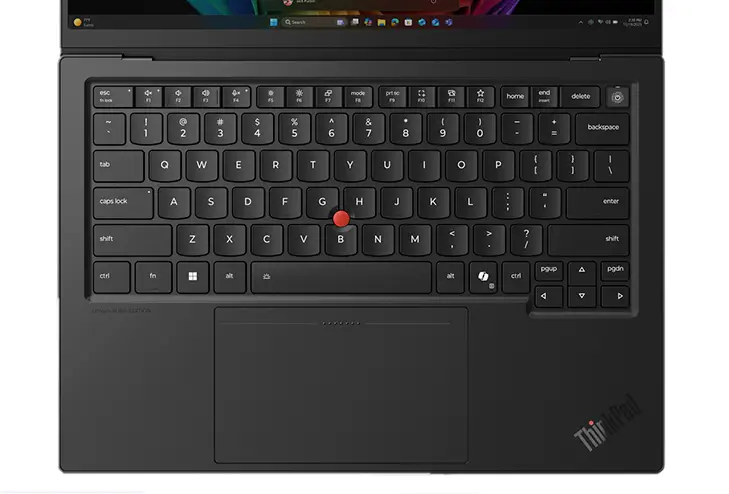
Below the keyboard is the traditional TrackPad, featuring a touchpad with three physical buttons positioned above it. It is a long-standing ThinkPad design intended to offer a mouse-like level of control, although an external mouse provides the best overall experience. For users who prefer a clean touchpad, the company has also provided a haptic touchpad option.
Overall, the keyboard and touchpad setup maintain the familiar ThinkPad experience, offering comfortable typing, useful shortcuts, and a choice between classic and modern touchpad designs.
Ports and Connectivity
When it comes to port selection, a business notebook should offer a good variety of connectivity options to accommodate different office peripherals and accessories. Despite its slim body, the ThinkPad X1 Carbon Gen 14 Aura Edition includes a good number of ports, making it well-equipped for a wide range of professional and everyday connectivity needs. It has the following ports:
1x USB-A (up to 5Gbps file transfer speed)
3x USB-C Thunderbolt 4 ports (supports USB PD 15-65W and DisplayPort 2.1)
1x HDMI 2.1 (supports 4K@60Hz)
1x 3.5mm Headphone Jack
1x Nano-SIM card slot (available in selected variants)
1x Kensington Lock Slot
It is worth noting that the variant we are reviewing comes with a Nano-SIM card slot, allowing users to access the internet using data SIMs. Moreover, it supports up to 4G LTE, while some variants also support 5 G.
The laptop comes with an Intel Wi-Fi 7 BE211 (802.11be 2×2) wireless card that supports Bluetooth 5.4. It also supports Intel vPro technology on supported configurations, providing enhanced security, remote manageability, and enterprise-grade features for business users.
Battery
Inside the laptop, the company has installed a 58Wh rechargeable Li-ion battery, only 1Wh larger than the 57Wh battery used in the ThinkPad X1 Carbon Gen 13. Despite this small increase in capacity, improved CPU efficiency and power optimization have resulted in a significant boost in battery life.
In our battery test, the battery lasted 12 hours and 15 minutes. During the test, we used various Microsoft Office applications, including Word, Excel, and PowerPoint, as well as web browsing and video streaming. Compared to the ThinkPad X1 Carbon Gen 13, which lasted only 8 hours and 18 minutes in the same test, the difference is significant.
To charge this 58Wh battery, the company provides a 65W USB-C nano GaN AC adapter (supports PD 3.0 charging). According to the official claim, the charger can charge the battery to 80% in just 1 hour.
For a 14-inch laptop with an OLED display, the battery life is quite good. However, many competitors are providing larger batteries in the same body size.
RAM and SSD
The variant we are reviewing comes with 32 GB of RAM and a 1TB PCIe 4.0 SSD. The 32 GB RAM is dual-channel LPDDR5x-8533 memory (manufactured by SK Hynix) that is soldered onto the motherboard and cannot be upgraded. While the lack of upgradeability may be a drawback for some users, soldered memory offers advantages such as higher operating speeds, lower power consumption, and improved signal integrity, all of which contribute to better overall system performance.
RAM Benchmark:
We also did a RAM benchmark test, and we got the following results:
- 108 GB/s Read Speed
- 119 GB/s Write Speed
- 120 GB/s Copy Speed
- Latency Rate: 91.5ns
On the other hand, we have a 1TB PCIe 4.0 SSD (Samsung PM91Cb). Since the laptop has only one SSD slot, the current SSD will be replaced to upgrade storage. It is worth noting that the laptop also supports PCIe 5.0 SSDs and up to 2TB of storage.
Storage Benchmark:
In the storage benchmark test, we used CrystalDiskMark, and we got the following results:
- Sequential Read Speed: 7,045 MB/s
- Sequential Write Speed: 5,860 MB/s
- 4K Random Read Speed: 392.8 MB/s
- 4K Random Write Speed: 295.5 MB/s
Overall, both the memory and storage provided excellent performance, as shown in benchmarks, ensuring fast multitasking, quick application launches, and a smooth daily user experience. While not intended for workstation-class workloads, their performance is more than adequate for demanding office, productivity, and professional tasks.
Audio and Webcam
At the top of the display, the laptop has a 10MP ultrawide webcam with IR, a privacy shutter, a ToF sensor, fixed focus, and noise reduction. On paper, it’s a pretty solid setup for video meetings, though the fixed focus might not be as flexible as an autofocus camera. The camera also works with Windows Hello, so you can log in to Windows quickly.
A dual-microphone array with 360-degree far-field pickup helps capture voices more clearly during meetings, even when the user is not sitting directly in front of the laptop. For audio output, Lenovo has included dual 2W stereo speakers with Dolby Atmos, delivering clear dialogue and a reasonably immersive sound experience for calls, presentations, and media playback.
CPU
The ThinkPad X1 Carbon Gen 14 Aura Edition comes with a wide range of Intel Core Ultra processor options. Whether your work mainly involves everyday office tasks or more demanding productivity applications, there is a configuration available to suit your needs.
The model we are reviewing is powered by an Intel Core Ultra 7 356H and also has Intel Xe3 integrated graphics. The CPU is based on Panther Lake architecture and has the following specifications:
- 3nm Manufacturing Process
- 16 Cores and 16 Threads
- 4 P-Cores (4.7 GHz Peak Frequency and 1.9GHz Base Frequency)
- 8 E-Cores (3.5GHz Peak Frequency and 1.5GHz Base Frequency)
- 4 LP E-Cores (3.3GHz Peak Frequency and 1.5GHz Base Frequency)
- 25W Base TDP
- 18 MB Intel Smart L3 Cache
- Intel Xe3 Integrated Graphics
As the CPU belongs to the Intel H-series, we can expect strong performance in benchmark tests.
- Cinebench R23: 2,019 pts on Single-Core and 17,358 pts on Multi-Core
Overall, the CPU benchmark results were impressive for a business laptop. Next, let’s take a look at the graphics performance.
Integrated Intel Graphics 4 Xe3 GPU:
The Intel Graphics 4 Xe comes as integrated graphics with 4 Xe3 cores, 4 ray tracing cores, and a clock rate of up to 2450 MHz. The following are its benchmarks:
- 3DMark Time Spy: 3,045
- 3DMark Fire Strike Extreme: 3,105
- 3DMark Steel Nomad: 2,516
- 3DMark Superposition 1080p Extreme: 1,652
The integrated Intel GPU delivered very weak performance compared with competing GPUs such as AMD’s Radeon 890M. It is suitable for basic office work, video playback, and light graphics tasks, but demanding creative workloads and modern games are clearly outside its comfort zone.
Gaming Test
Gaming is not the primary focus of this notebook, but to understand the limits of its integrated graphics, we still carried out a few gaming tests. It is worth mentioning that all these tests were carried out in 1080p resolution and low image quality settings:
- Black Myth Wukong: Average 23 FPS
- Cyberpunk 2077: Average 38 FPS
- Shadow of the Tomb Raider: Average 68 FPS
- Final Fantasy 14: Average 55 FPS
Overall, the results confirm that the laptop can handle lighter and esports titles reasonably well, but demanding AAA games remain largely unplayable even at low settings.
Cooling System
The cooling system of the Lenovo ThinkPad X1 Carbon consists of a single heat pipe and dual fans, using an internal flow design. During benchmark testing, the CPU’s power consumption rose to 61W while the temperature reached 94°C. In the external environment, the room temperature was 26°C, the hottest part of the keyboard reached 43.2°C, while the common keys stayed around 35.5°C.
When it comes to noise, the measured noise was 43dB (decibels) in a normal environment under full load. At lower load, the system was almost silent. This is something that matters more than raw benchmark numbers for office users. In meetings, classrooms, travel lounges, and shared workspaces, the X1 Carbon stays quiet and refined.
Final Verdict
The ThinkPad X1 Carbon Gen 14 Aura Edition 2026 is a high-end business ultrabook for users who prioritize portability, build quality, keyboard feel, quiet operation, security, and long battery life. It is not designed to be a gaming laptop or a creator workstation. Instead, it focuses on being one of the best business laptops for travel.
For executives, consultants, managers, students, and professionals who need a reliable Windows laptop for office work, meetings, travel, remote work, presentations, and communication, the X1 Carbon Gen 14 Aura Edition is an excellent choice. It is expensive and has limited GPU performance, but the overall package is refined, lightweight, and highly practical.
If your priority is a premium business laptop that feels professional every time you open it, the ThinkPad X1 Carbon Gen 14 Aura Edition 2026 remains one of the strongest options in its class.
Pros:
Lightweight Body and Premium Texture
Low Fan Noise and Quiet System
Good Keyboard Typing Experience
Cons:
Smaller Battery, could be better
Doesn’t support color gamut switching
Higher Price