
Lenovo offers a wide variety of laptops catering to all kinds of users, from gaming to business. In the business sector, the company has introduced several product lines, such as ThinkBook and IdeaPad. However, the discussion would be incomplete without mentioning the ThinkPad lineup, one of Lenovo’s main business segments.
For decades, the company has used very specific designs in this lineup, such as giving a matte-black body, utilitarian design, deep-travel keyboards, and TrackPoint navigation. Even though we have seen significant evolution in business laptops toward being thinner, sleeker, and lifestyle-oriented devices, the ThinkPad has remained the same and faithful to its traditional identity.
The laptop we are going to review today is the ThinkPad X9 15p Gen 1 Aura Edition, which is a significant upgrade over previous models. It’s not just a simple refresh with updated plastics or a thinner body, but a bold reinterpretation of ThinkPad’s formula in years. Arguably, it’s even more radical than the experimental ThinkPad Z series that preceded it. This laptop not only targets office users but also creative professionals, hybrid workers, users seeking long-term reliability, and premium laptop users.
Successor to the X9 15 – Not A Minor Refresh
From its name, you might think that it is merely an updated version of the ThinkPad X9 15. However, it received a major upgrade to support new technology. The original X9 15 is already quite different from traditional models, thanks to its slim, lightweight profile and excellent battery life. The X9 15p has taken things much further by introducing Intel’s new PTL platform, a substantially revised thermal architecture, higher-performance integrated graphics, an expanded battery, and a far more ambitious industrial design direction.
Specifications
| Screen | 15.3ʺ 2.8K (2880 x 1800) OLED, antireflective, 1100 nits(HDR peak), 500 nits(SDR typical), 120Hz variable refresh rate, 100% DCI-P3, 16:10 aspect ratio, TÜV Rheinland Certified, add-on film touch (AOFT) touchscreen |
| Processor | Intel Core Ultra X7 368H Processor with vPro (E-cores up to 3.80 GHz, P-cores up to 5.00 GHz with Turbo Boost, 16 Cores, 16 Threads, 18 MB Cache) |
| Wireless Connection | Intel Wi-Fi 7 802.11BE (2 x 2), Bluetooth® 5.4 |
| Graphics card | Intel Arc B390 |
| Memory | 32GB LPDDR5X, 9600MT/s (Soldered) |
| Storage | 1 TB PCIe Gen 5.0 x4 NVMe M.2 SSD |
| Ports | Left: 2 x USB-C (Thunderbolt 4, 40Gbps) with Power Delivery & DisplayPort 1 x HDMI 2.1 (supports resolution up to 4K@60Hz) 1 x Headphone/mic combo jackRight: 1 x USB-C (Thunderbolt 4, 40Gbps) with Power Delivery & DisplayPort 1 x USB-A (USB 10Gbps) 1 x SD card reader |
| Battery | 88 Wh battery, 100W dual-port GaN AC adapter |
| OS | Windows 11 Home |
| Weight | 1.5kg / 3.08lbs |
Appearance: The Most Unconventional ThinkPad in Years
At first glance, the ThinkPad X9 15p barely resembles the older models. The traditional classic matte black texture is now gone. Instead, the company has applied a Thunder Gray aluminum finish. To achieve a more premium feel, the company has used stamped aluminum combined with CNC edge finishing and fine sandblasting, giving a noticeably more premium tactile feel than previous models.
The most prominent element of design is the rear “Engine Bay” design. Instead of a flat underside, Lenovo has created a raised three-section rear module containing the heat dissipation system. It may look a bit weird, but it is similar to the Pixel’s camera bars (in older models like Pixel 6/7). The elevated section allows larger fans, better airflow, and improved thermal performance without compromising the laptop’s dimensions, i.e., 339.5 x 228.5 x 7.25 (front)/7.65 (rear).
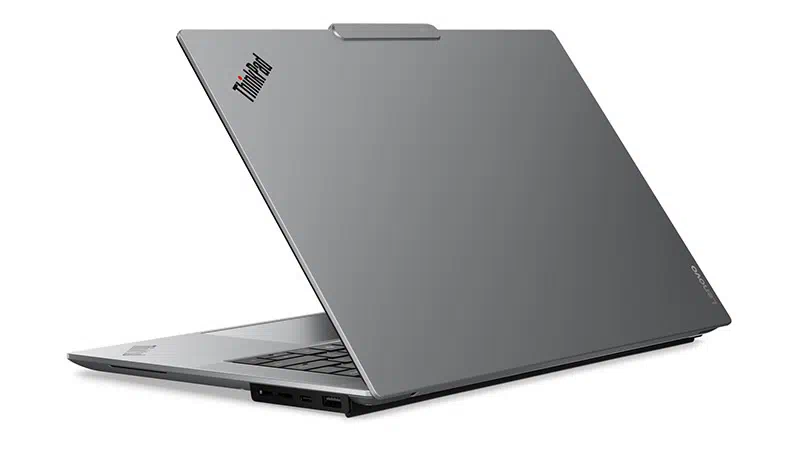
Comparing with the X9 15, the laptop is slightly heavier. The reason for this is the high-performance Intel H-series CPU, large 88WHr battery, and a large cooling system. The laptop weighs around 1.55kg, but considering these factors, the weight seems justified.
As a whole, the laptop feels clean, modern, and quite different from other business laptops.
Display: One of the Laptop’s Major Strengths
The ThinkPad X9 15p comes with a 15.3-inch 2.8K resolution 120Hz OLED display with touch support. The company has also provided a non-touch variant at a lower price. The screen has the following specifications (which look very impressive):
- 2880 x 1800 resolution (WQXGA+)
- 120Hz Refresh Rate
- OLED Panel
- 500nit standard brightness (up to 1100nits HDR peak brightness)
- Touch Support
- Anti-Reflective ARAF coating
The specifications on paper alone don’t define the display’s quality. We need to review it.
Usually, with OLED screens, we have seen that the display becomes a fingerprint magnet and a reflective mirror under bright lighting conditions. However, in the case of this laptop, thanks to Lenovo’s ARAF coating, reflections and fingerprint visibility have been significantly reduced, making the screen experience even more comfortable in bright light.
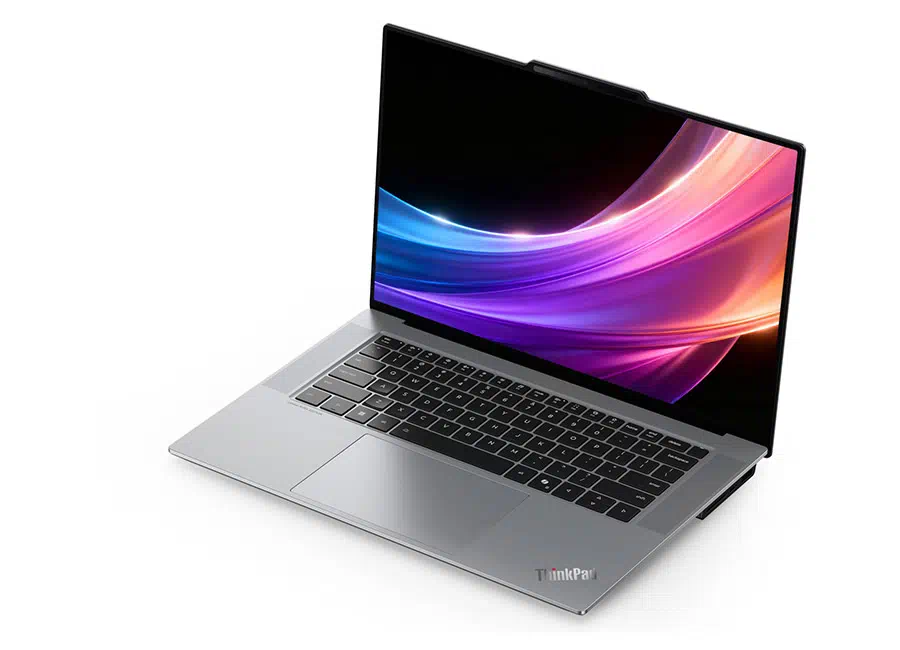
To test the screen, we also used the SpyderX, through which we found out that the display covers:
- 100% sRGB color gamut
- 89% DCI-P3 color gamut
- 99.5% Adobe RGB color gamut
Overall, it has outstanding color accuracy in both DCI-P3 and sRGB modes. For users such as photographers, designers, and video editors, the display is suitable for professional-level creative work. The display features a 16:10 aspect ratio and a 91% screen-to-body ratio. Compared to most 16-inch laptops, it is easier to carry, while still offering noticeably more screen space than a typical 14-inch laptop.
In addition, the display supports touch and uses AOFT (add-on film touch), meaning subtle grip patterns remain visible under certain lighting conditions. The display isn’t a dealbreaker, but it slightly diminishes what is otherwise an exceptionally polished visual experience.
Keyboard and TouchPad: Goodbye to Traditional Design
In this section, the newly designed Lenovo ThinkPad X9 15p Gen 1 Aura Edition is likely to draw mixed reactions. The ThinkPad X9 15p has abandoned many key characteristics of the ThinkPad series mentioned below:
- No TrackPoint
- No Dedicated Three-Button Layout
- Shallower 1.35mm Key Travel
- Redesigned Keycaps
- Consumer-Oriented Keyboard Structure
Traditional ThinkPad users may not like it. However, innovation lovers would definitely go for it. Lenovo’s primary target with this laptop is consumers of the MacBook, Dell XPS, HP Spectre, and ASUS ZenBook. In addition to those users, it also targets those who prioritize larger touchpads, modern layouts, thinner designs, and cleaner aesthetics. Viewed from that perspective, the keyboard feels surprisingly good.
On first glance, the keyboard still retains some of the resilient tactile feedback traditionally associated with ThinkPads, even if the shallower travel changes the overall feel.
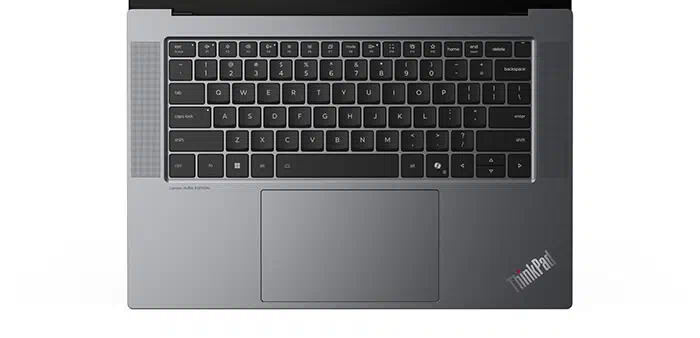
After using the keyboard for a long time, we found that the experience is much better than many traditional users would expect. While the key travel is shallower, the keys still retain the firm, highly tactile feedback typically found in traditional models. The typing experience was very crisp, responsive, and stable, rather than soft or extremely shallow as seen in many new business notebooks.
Lenovo has also redesigned the keycaps with slightly curved surfaces, which help fingers naturally adapt to the layout while typing and make long writing sessions surprisingly comfortable. The layout feels modern and well-suited for business notebook users.
The keyboard stretches almost edge-to-edge, making the keys feel spacious while also maintaining the slim profile. It also supports backlighting with minimal light spilling around the keys.
A few shortcomings we found on the keyboard include the arrow keys, which are smaller than what long-time ThinkPad users might be used to. The power button has an integrated fingerprint scanner. Keys like End and Insert have been combined. It takes a little time to get used to, especially if you are coming from an older ThinkPad.
Still, the overall typing experience feels very good and does a great job of blending a modern laptop-style layout with the comfortable and satisfying feel that ThinkPad keyboards are known for.
Below the keyboard is a touchpad with a glass surface covering an area of 135 x 85 mm. The touchpad features high-quality haptic feedback and delivers responsive, tactile precision compared to modern business laptops. It seems that Lenovo is moving away from its old design to compete more effectively with other modern-era brands.
Ports and Connectivity
In the business segment, we have usually seen that laptops compromise on the number of ports, but in the case of the Lenovo ThinkPad X9-15p, things are quite different. The laptop includes the following ports:
- 1x HDMI 2.1 Port (supports 4K@60Hz)
- 3x USB Type-C Thunderbolt 4 Ports (supports DisplayPort and Power Delivery)
- 1x USB Type-A Port
- 1x SD Card Reader
- 1x 3.5mm Audio Jack (Headphone/Microphone)
The laptop includes all the necessary basic ports, which makes it an excellent choice for users. The full-size SD card slot will benefit photographers by providing better storage access for their gear.
There are still some missed things we observed. Adding a USB Type-A port could further improve flexibility, and support for HDMI FRL could strengthen the laptop’s future-proofing. However, overall, Lenovo has avoided the ultra-minimalist port strategy that could frustrate many potential buyers.
The laptop is also equipped with Intel Wi-Fi 7 BE211, providing faster wireless speeds, lower latency, and improved stability for internet-intensive tasks such as cloud collaboration, streaming, and large file transfers. Additionally, this connectivity is future-ready with Bluetooth 5.4 support, and the hardware is also prepared for the upcoming Bluetooth 6.0 standard, offering better efficiency and long-term compatibility.
Battery and Charging
The laptop comes with an 88WHr Li-ion battery, which may not seem large to an average person, but in the business segment, this is the maximum you can get. In addition, it is also paired with Intel’s PTL Platform, which makes it more efficient.
For testing the battery, we used PCMark10, which showed the laptop provided around 10 hours of battery life on full charge at full brightness, which seems incredible for an OLED-equipped laptop running Intel’s H-series processor.
Along with the laptop, the company has provided a 100W GaN charger (weighing 235g), which can charge the battery to 80% in an hour, as advertised. The power adapter has two ports: the upper port supports 100W charging, and the lower one supports 80W. However, when both ports are connected, the first port’s power is reduced to 80W. We also tested which protocols this charger supports and found that it supports QC4 and DCP on the first port, and on the second, it only supports 15W (5V/3A).
RAM and SSD
The company has provided two options: 32GB LPDDR5x and 64GB LPDDR5x. The one we are reviewing is equipped with 32GB of LPDDR5x memory (clocked at 9600 MHz). It is worth noting that the RAM is soldered onto the motherboard, which results in higher memory speed but limits the ability to upgrade its capacity. On the storage side, the laptop has a 1TB Samsung PM9E1 SSD, a PCIe 5.0 storage device that uses a 5nm controller and Samsung’s own V8 NAND flash memory with independent cache to achieve excellent performance.
Benchmark:
For testing the RAM, we used the AIDA64 cache and memory benchmark, and we found the following results:
- Read Speed: 121.62GB/s
- Write Speed: 134.32GB/s
- Copy Speed: 132.26GB/s
- Latency: 83.1ns
In SSD’s benchmark, we got the following results in CrystalDiskMark:
- Sequential Read Speed: 14,225 MB/s
- Sequential Write Speed: 12,952 MB/s
- Random 4K Read Speed: 88.12 MB/s
- Random 4K Write Speed: 183.6 MB/s
The overall benchmark results show strong performance, indicating that the notebook won’t lag and is also future-proof.
Upgrading Memory and Storage
As we have seen in many modern business laptops, the upgradeability is very limited in this laptop as well. The RAM is soldered onto the motherboard and is very hard to upgrade later. Users can upgrade it, but the process is complex and time-consuming, and can only be performed by high-level technicians. On the other hand, the laptop has only one storage slot, which may be disappointing for a laptop aimed at creators and premium laptop users. However, you can upgrade to a maximum of 2TB by replacing the current SSD.
Audio and Webcam: Your First Choice for Video Conferencing
Usually, business laptops are compromised in speakers, but the ThinkPad X9 15p deserves serious recognition here. The six speakers of the laptop include:
- Four Woofers
- Two Tweeters
- Dolby Atmos Certification
As observed, the audio quality is truly among the best in its class, competing directly with Apple’s MacBook Pro lineup. Even many Windows laptops struggle with weak bass response and limited dynamic range. Here, it seems that Lenovo has heavily invested in both hardware and acoustic engineering.
On the other side, the company has also provided a high-resolution 10MP webcam paired with an IR camera and ToF sensor, delivering sharp video quality and reliable facial recognition for video calls and Windows Hello login, respectively. It also includes an electronic privacy shutter, temporal noise reduction, and a large sensor setup that helps improve image clarity and low-light performance.
CPU Benchmark
The Lenovo ThinkPad X9 15p Gen 1 Aura Edition comes in different CPU options, all of them from Intel’s H-series. The one we are reviewing is powered by the Intel Core Ultra X7 358H CPU. It is based on Intel’s newer PTL (Panther Lake) platform, which offers improved performance, better power efficiency, and significantly stronger integrated graphics compared to previous generations. The CPU’s specifications are mentioned below:
- 16 Cores and 16 Threads
- 4x P-Cores (5GHz Max and 2GHz Base Frequency)
- 8x E-Cores (3.8GHz Max and 1.6GHz Base Frequency)
- 4x LP E-Cores (3.6GHz Max and 1.6GHz Base Frequency)
- Integrated Arc B390 GPU
- 25W Base TDP
- NPU: Up to 50 TOPS
- 18MB Intel Smart Cache
We also performed CPU benchmark testing, as mentioned below:
- Cinebench R15: 3,151 on Multi-Thread
- Cinebench R20: 826cb on Single-Core and 8,032cb on Multi-Core
- Cinebench R23: 2,18`pts on Single-Core and 20,652pts on Multi-Core
Thanks to the new PTL platform, the ThinkPad X9 15p combines strong performance with surprisingly good power efficiency, allowing it to maintain competitive multicore output without requiring aggressive thermal behavior.
GPU
The CPU comes with Intel’s new Arc B390 integrated GPU. Built on Intel’s latest Xe2 graphics architecture, it delivers a significant performance leap over previous integrated graphics, making it capable of handling photo editing, light video editing, content creation, and even casual gaming. The benchmark results for the integrated GPU are mentioned below:
- 3DMark Time Spy: 7,231
- 3DMark Fire Strike: 18,568
- 3DMark Steel Nomad Light: 6,357
Benchmark results were quite impressive for integrated graphics. This is arguably one of the laptop’s strongest differentiators.
We also conducted a short gaming test with two AAA-tier games. The results are mentioned below along with their names:
Shadow of the Tomb Raider: At 2.8K resolution and maximum settings, we got 48 fps.
Cyberpunk 2077: At 2.8K resolution and medium settings, we got 61 fps.
Cooling System and Stress Testing:
The ThinkPad X9 15p comes with a redesigned cooling solution that features dual fans and a single D10 heat pipe. The unique ‘Engine Hub’ on the back allows the laptop to use larger fans than are usually found in slim laptops. In addition, dedicated cooling structures are also placed around the CPU power delivery components and onboard memory.
The air is drawn in through filtered intake vents and exhausted through multiple vents, which helps improve both cooling efficiency and acoustic performance.
In the single-CPU stress test, the CPU reached a peak power consumption of 65W and maintained about 62W for around 40 seconds before stabilizing at roughly 50W for the rest of the test. Regarding temperature, the CPU briefly spiked to 96°C at the start, and finally to 88°C at the end. The surface temperatures were also particularly impressive. After 20 minutes of testing, the recorded temperatures were:
- 33°C in the WASD area
- 41°C in the palmrest
For a portable premium ultrabook, this represents a strong sustained performance level and demonstrates the effectiveness of Lenovo’s cooling design.
Final Verdict
At this point, we can say that the ThinkPad X9 15p Gen 1 Aura Edition is one of Lenovo’s most fascinating laptops in years. It is not a traditional ThinkPad. Through many new features, it defies the traditional ThinkPad expectations. The trackpoint is gone, and the keyboard’s aesthetics are no longer the way they used to be. The target audience itself has shifted.
The engineering quality of the ThinkPad X9 15p is evident in everyday use. It provides excellent thermal management, impressive speakers, long battery life, a practical selection of ports, and a design that is easy to maintain. More importantly, Lenovo has focused on creating a laptop that feels great to use in real-world scenarios rather than just chasing impressive specifications on paper.
At the same time, Lenovo has successfully updated the ThinkPad experience for a new generation of users. The 15.3-inch OLED panel can comfortably compete with the best Windows laptops on the market and even rival Apple’s MacBook lineup in many areas.
Of course, it is not without compromises. The soldered memory cannot be upgraded, there is only a single SSD slot, and the AOFT touch layer may not appeal to everyone. Some long-time ThinkPad fans may also miss traditional features like the TrackPoint and classic keyboard layout. However, that seems to be Lenovo’s intention. The X9 15p is not designed to recreate older ThinkPads; it is designed to show what the future of the ThinkPad brand could look like.
Pros
- 8K OLED display with vibrant colors and anti-reflective coating.
- Intel Core Ultra processor with PTL platform and Arc B390 graphics.
- 88Wh larger battery.
- Premium build quality, effective cooling, and excellent speakers.
Cons
- Soldered RAM with no upgrade option.
- Only one SSD slot for storage expansion.
- No TrackPoint, which may disappoint traditional ThinkPad fans.
- The AOFT touch layer can show a subtle grid pattern on the display.
Great review! Thank you.
Great review, and great laptop. I’m going to get one of this.