
The gaming industry keeps changing, and with each new generation, we see more powerful and advanced machines hitting the market. Today, we’re reviewing a model from ASUS ROG, a well-known name in gaming. The star of today’s review is the ASUS ROG Strix SCAR 18 (2026).
The ASUS ROG Strix SCAR 18 G835 is a type of laptop not made for everyone, aimed only at high-end demanding users. The laptop is quite large in both size and price, designed for those who want maximum gaming performance in a laptop form factor. Since this is a top-tier gaming laptop, we also reviewed its highest-spec variant. This time, it seems ASUS has pushed this machine even closer to a desktop-class experience.
The laptop is powered by an Intel Core Ultra 9 290HX Plus CPU, paired with an RTX 5090 GPU, 128GB of DDR5 RAM, and an 8TB PCIe 5.0 SSD. On the display side, it has an 18-inch 4K MiniLED display with a 240Hz refresh rate. On paper, these specifications definitely look impressive, but we still need to examine their cooling system, display quality, and CPU and GPU performance. More importantly, we need to see whether the overall experience justifies its premium price tag.
Specifications
| Screen | 18” WQUXGA (3840 x 2400), Mini LED, 240Hz, 100% DCI-P3, G-Sync, MUX Switch + NVIDIA Advanced Optimus |
| Processor | Intel Core Ultra 9 Processor 290HX Plus, 2.7 GHz (36MB Cache, up to 5.5 GHz, 24 cores, 24 Threads); Intel AI Boost NPU up to 13TOPS |
| Wireless Connection | Wi-Fi 7(802.11be) (Triple band) 2*2+Bluetooth 5.4 |
| Graphics card | NVIDIA GeForce RTX 5080, 16GB GDDR7 |
| Memory | 128GB RAM (2 x 64GB), DDR5-6400MHz |
| Storage | 4TB + 4TB PCIe 5.0 NVMe M.2 SSD (RAID 0) |
| Ports | 1x 3.5mm Combo Audio Jack 1x HDMI 2.1 FRL 3x USB 3.2 Gen 2 Type-A (data speed up to 10Gbps) 2x Thunderbolt 5, support for DisplayPort / power delivery / G-SYNC (data speed up to 120Gbps) 1x 2.5G LAN port |
| Battery | 90WH, 4-cell Li-ion battery, 450W AC adapter |
| OS | Windows 11 Pro |
| Weight | 3.73 Kg (8.22 lbs) |
Design
At first glance, the ROG Strix SCAR 18 G835 2026 feels very large due to its big size and 18-inch display. It still maintains the bold gaming identity that ASUS ROG laptops are known for. The laptop doesn’t look simple from any angle, and it also seems that the company didn’t try to hide its character. Key features of this laptop’s design include a dark gray metal lid, an illuminated ROG logo, RGB lighting, and an AniMe Vision-style LED matrix, which play an important role in showcasing its e-sports-inspired appearance.
The laptop’s lid design gives a premium impression, and the RGB-illuminated ROG logo remains one of the laptop’s signature features, as seen in previous generations. The most notable addition is the new AniMe Vision lighting on the chassis, programmable lighting elements that can display custom patterns, text, and animations through ASUS’s dedicated software.
This may feel excessive for some users (who usually prefer simple and cleaner designs). It will likely appeal strongly to gaming enthusiasts who enjoy personalization, RGB effects, and a more expressive gaming setup. Another striking design element is the 360-degree RGB light bar surrounding the lower chassis. It enhances the laptop’s gaming-focused personality and gives the SCAR 18 a strong visual presence from almost every angle.
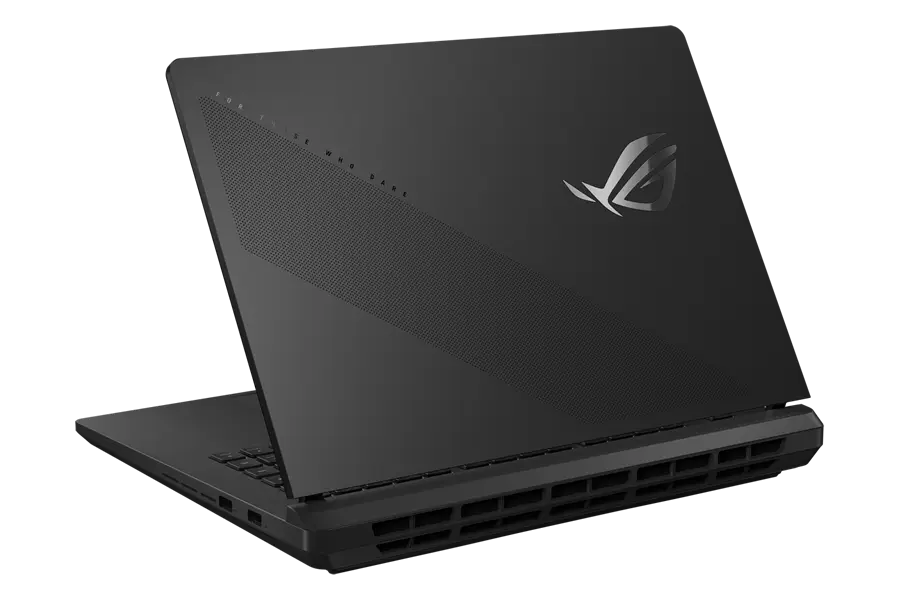
On the bottom, the company has used a tool-free quick-release back cover, making access to the internal components much easier for basic maintenance and upgrades. Traditional gaming notebooks used to be a headache in this regard. For a high-end laptop that buyers may want to keep for several years, this level of serviceability is a major advantage.
In terms of dimensions, the laptop measures 399 x 298 x 23.5-35 mm and weighs 3.73 kg (weight varies by variant).
With a huge 18-inch display, a weight of around 3.5kg, and a large 450W charger, the laptop clearly doesn’t fall into the category of decent portability.
This is a laptop you can move when you need to, but it’s not something most people would carry around every day. It is better understood as a partial, not complete, replacement for desktop gaming. It is quite close to a tower PC in terms of performance, but still technically portable.
Display
The laptop comes with an 18-inch MiniLED display; its complete specifications are mentioned below:
- 18-inch MiniLED HDR Display
- 4K Resolution (3840 x 2400) and 240Hz Refresh Rate
- 16:10 Aspect Ratio
- Anti-Glare and Low-Reflection (AGLR) Display
- 100% DCI-P3 Color Gamut
On paper, these specifications indicate an extremely high-quality panel, and in real-world use, we can say it is a display that can serve both high-end gaming and professional graphics tasks. The large display immediately enhances immersion, especially in open-world games, racing titles, creative applications, and media consumption. The combination of 4K resolution and 240Hz refresh rate provides users with both excellent image clarity and high-speed responsiveness. However, the default refresh rate is 120Hz in Standard, Eco, and Optimized GPU modes. To enable 240Hz, the GPU mode must be set to Ultimate in Armoury Crate.
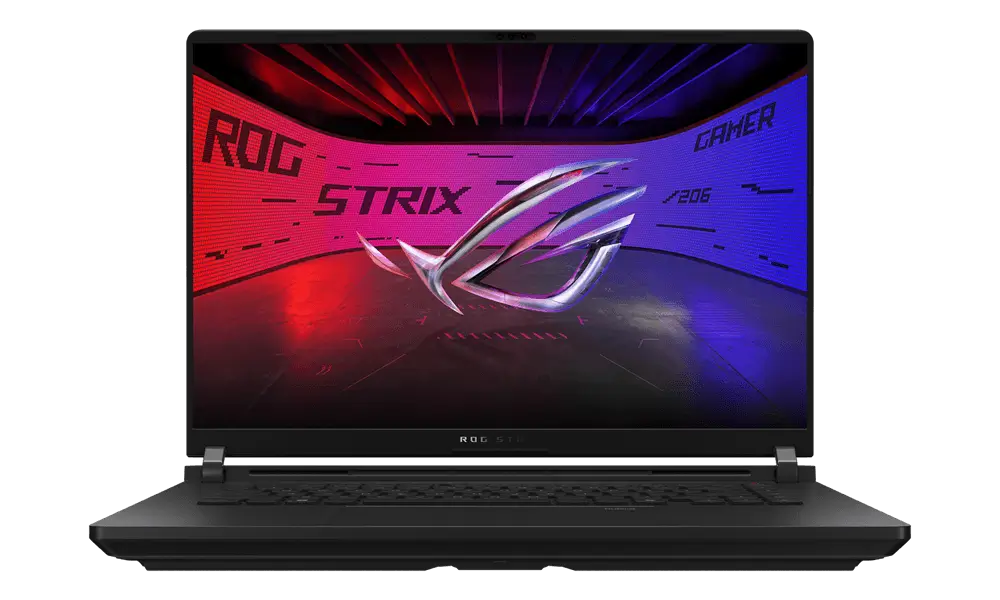
As mentioned, the display uses a MiniLED backlighting system. Compared to LCD panels, MiniLED enables much higher brightness, better contrast, and more effective local dimming. The screen supports around 2000 dimming zones, an ultra-high contrast ratio, high-frequency dimming, and DisplayHDR 1000 certification. As a result, HDR content looks more impactful, with brighter highlights, deeper shadows, and a stronger sense of depth.
The display also uses ASUS’s AGLR technology, which is anti-reflective and anti-glare, designed to reduce reflections without causing the washed-out look seen in traditional matte displays. This technology uses the principles of light interference and polarization, incorporating an ultra-low reflectivity coating and a phase gain compensation film to minimize ambient light reflection.
ASUS has also added its ROG ELMB Ultra Low Motion Blur technology, which further improves motion clarity by using the MiniLED backlight zones to reduce blur in fast-moving scenes. It divides the display into independent backlight-control zones and keeps brightness loss below 5% while delivering up to 16 times better dynamic clarity. This is especially useful in competitive games, where clearer motion helps players track enemies and move faster on-screen more easily.
We did different benchmarks to test how much the display could improve. In terms of color gamut, the display covered:
- 93% in sRGB mode
- 99.8% in Display-P3 mode
- 99.8% in DCI-P3 mode
While in the color accuracy test, the display got the following results in different modes:
- In sRGB mode, the average Delta E value was 0.81 (maximum was 2.22)
- In Display-P3 mode, the average Delta E value was 1.22 (maximum was 2.74)
- In DCI-P3 mode, the average Delta E value was 1.15 (maximum was 2.82)
In the brightness test, we got the following results:
- In SDR mode, the maximum full-screen brightness was 518 nits
- In HDR mode, when enabled in Windows with 100% screen brightness, it reached 1199 nits
- The maximum brightness in HDR mode was concentrated in the 5%-10% minimum window, with the peak soaring to 1792 nits, exceeding the officially advertised 1600 nits, which is quite impressive.
It is observed that the color performance was the strongest aspect in the display’s testing. The display provides wide color gamut support and multiple professional color modes, suitable for nearly every user, including gamers, professional graphic designers, videographers, or content creators.
Keyboard & Ports
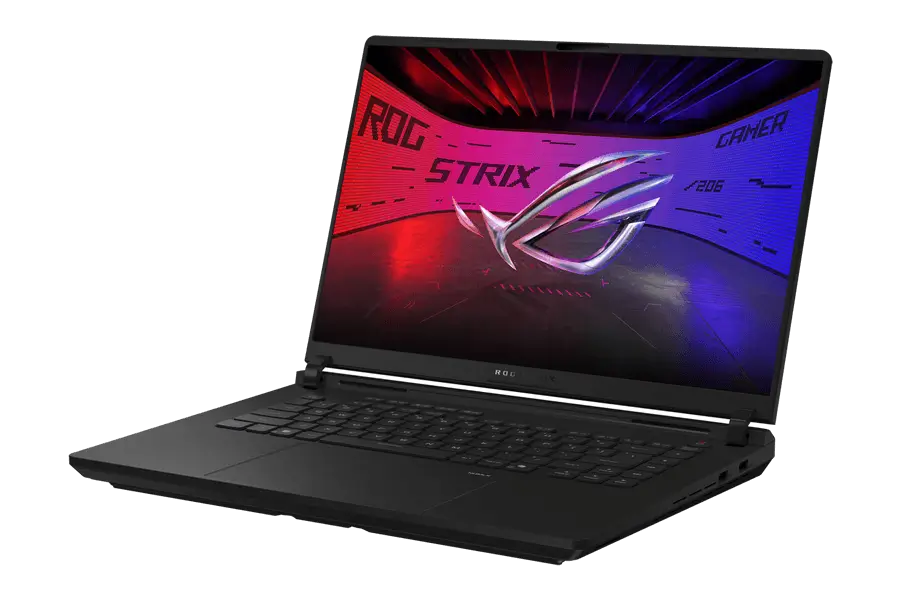
The ROG Strix SCAR 18 G835 2026 has a large Backlit Chiclet per-key RGB keyboard. The entire keyboard surface (including the touchpad area) has an anti-fingerprint coating that keeps fingerprints away even after prolonged use. The keyboard has 2mm key travel, a full numeric keypad, overshoot technology support and full N-key rollover. After a long typing session, the overall experience was quite good, the keys having a firm rebound and no hand fatigue. For gaming, typing, and productivity tasks, this is a strong setup.
ASUS has designed the keyboard so that it also serves as part of the airflow system. Cool air can be drawn from the area above the keyboard into the notebook, helping to improve internal cooling.
Under the keyboard, there is a large glass-covered touchpad, slightly shifted to the left. It feels solid and smooth when clicked. However, it still cannot replace an external mouse for gaming, though it is fine enough for normal use.
The port selection on the ROG Strix SCAR 18 G835 (2026) is excellent. It features a total of eight ports, almost covering every need. On the left side of the notebook, we have the following ports:
1x 2.5G LAN Port
1x HDMI 2.1 FRL
1x USB 3.2 Gen2 Type-A port
2x USB-C Thunderbolt 5 ports (supports DP and PD charging)
1x 3.5mm headphone jack
On the right side, we have:
2x USB 3.2 Gen2 Type-A ports
For a gaming laptop of this scale that may need to be connected to a monitor, an external mouse, external drives, and wired internet, this is exactly the kind of I/O selection users want.
The laptop is equipped with the latest Wi-Fi 7 (802.11be) with triple-band 2×2 support, offering faster speeds, lower latency, and stable performance while gaming. It also includes Bluetooth 5.4, enabling smooth connectivity with wireless devices such as headphones, controllers, and mice.
Battery and Charging
Inside the notebook, there is a large 90 WH Li-ion battery. With this larger battery, the laptop can offer decent standby time and reasonable endurance for basic tasks like web browsing, document editing, or office work. However, since this laptop is primarily designed for high-performance gaming, evaluating it primarily based on battery life would be unfair.
Along with the notebook, ASUS has provided a 450W AC adapter and a compact 100W PD charger. The PD charger is quite useful because it is lightweight and easy to carry, making it suitable for short commutes, travel, or emergency charging. While the 450W charger is required for maximum performance, the 100W PD charger adds a practical layer of portability to such a large gaming machine.
RAM and SSD
In terms of memory and storage, the ROG Strix SCAR 18 G835 (2026) is fully loaded. Regarding RAM, it comes with 128GB of DDR5 RAM. It is a dual-channel setup, meaning there are 2x 64GB RAM sticks clocked at 6400MHz, manufactured by SK Hynix. It is also worth noting that the RAM cannot be upgraded beyond 128GB.
On the storage side, ASUS has provided two PCIe 5.0 SSD slots. Each slot is fitted with a 4TB SSD, resulting in a total of 8TB of storage, which seems more than enough. The 4TB SSD is Samsung’s PM9E1. Furthermore, the manufacturer has also placed a dedicated thermal pad under the SSDs, and a full copper heat sink is attached on top.
Benchmarks:
First, we will run the memory benchmark using the AIDA64 Cache and Memory benchmark application. On completion, we got the following results:
- Read Speed: 98,132 MB/s
- Write Speed: 88,651 MB/s
- Copy Speed: 92,112 MB/s
- Latency Rate: 105.9ns
Next is the storage benchmark testing, which was carried out using the CrystalDiskMark application:
- Sequential Read Speed: 24,409.26 MB/s
- Sequential Write Speed: 25,045.35 MB/s
- Random 4K Read Speed: 87.86 MB/s
- Random 4K Write Speed: 219.02 MB/s
Overall, the benchmark showed an extreme flagship-level performance, positioning the laptop among the most powerful gaming notebooks in the industry.
Audio and Webcam
The laptop comes with a four-speaker system featuring Smart AMP, Hi-Res certification, and Dolby Atmos support. When gaming or streaming videos, the speakers deliver much better audio than the average laptop’s built-in speakers. When paired with the MiniLED display, the notebook becomes a very powerful entertainment machine even without external speakers.
On the other side, the laptop has a Full-HD IR Dual Webcam setup on the upper bezel of the display. The Full-HD webcam eliminates the need to buy a separate webcam for live streaming, which is another advantage for gamers. It also supports Windows Hello face recognition, allowing users to sign in to Windows quickly.
CPU and its Benchmark
The ROG Strix SCAR 18 G835 (2026) is powered by the Intel Core Ultra 9 290HX Plus, the highest option in the HX series, at the moment. The specifications of the CPU are mentioned below:
- Arrow Lake Platform
- Built on 3nm TSMC Process
- 24 Cores including
- 8 P-Cores (2.7GHz Base and 5.5GHz Max Frequency)
- 16 E-Cores (1.8GHz Base and 4.7GHz Max Frequency)
- 24 Threads
- 36MB Intel Smart L3 + 40MB L2 Cache
- 55W Base TDP
Based on the CPU specifications, we can expect strong performance. Let’s see how well it can perform in benchmark testing. The following are the benchmark results of the CPU:
CPU-Z: 908.2 points on Single-Core and 18,819.4 points on Multi-Core
Cinebench R23: 2,431 pts on Single-Core and 43,382 pts on Multi-Core
Cinebench 2024: 141 pts on Single-Core and 2,341 pts on Multi-Core
The benchmark results showed that the CPU delivers exactly the performance expected of a flagship HX-series CPU. The single-core scores ensure excellent responsiveness in daily use, gaming, and heavy workloads, while the multi-core results show that the CPU can also handle demanding tasks such as editing, rendering, compiling, and heavy multitasking with ease.
GPU and its Benchmark
On the GPU side, ASUS has once again used the top-of-the-line product, i.e., the GeForce RTX 5090 Mobile GPU. The specifications of the GPU are mentioned below:
- Based on Blackwell Architecture
- 24GB GDDR7 Video Memory
- 256-bit Memory Bus
- Max 175W TDP with 1650MHz Frequency
- NVIDIA DLSS 4.5 Support
It is worth noting that the GPU supports NVIDIA DLSS 4.5 Multi-Frame generation technology and Reflex 2.0 low-latency technology, enabling it to handle next-generation ray tracing in demanding PC games. The benchmark results of the GPU are as follows:
3DMark Time Spy: Total 23,728 Score, including 25,379 GPU Score
3DMark Time Spy Extreme: Total 12,512 Score, including 12,431 GPU Score
3DMark Port Royal: Total 16,551 Score and 76.89 FPS
3DMark Steel Nomad: Total 6,229 points and 61.98 FPS
In the benchmark results, the GPU delivered outstanding flagship-level performance. These scores clearly place the GPU among the most powerful laptop graphics solutions available.
Gaming Test
After benchmark testing is complete, it is time for the gaming test, the most important part of this review. In this test, we tried all the latest AAA games at 4K resolution with the 240Hz mode enabled.
Counter-Strike 2:
Starting the gaming test with one of the most popular games. It is worth noting that this game supports Intel’s APO (application optimization) technology, which is why we tested it with APO enabled and disabled.
At 4K resolution with higher graphics settings and APO disabled, we got an average of 267 FPS.
At 4K resolution with higher graphics settings and APO enabled, we got an average of 287 FPS, an improvement of 7.5%.
Delta Force Operation:
In battlefield mode with 4K resolution, higher graphics settings, and DLSS turned on, we got an average of 200 FPS.
Forza Horizon 6:
The new Forza Horizon 6 now also has an option for dedicated ray tracing graphics at launch, in addition to 6x multi-frame generation with DLSS 4.5.
At 4K resolution with high graphics settings and ray tracing turned on, we got an average of 65 FPS.
In this game, we enabled the 2x, 4x, and 6x frame generation options in sequence (it’s worth noting that the 6x multi-frame generation setting needs to be manually enabled in NVIDIA’s GeForce app).
With DLSS turned on and 2x frame generation, we got 109 FPS
With DLSS turned on and 4x frame generation, we got 185 FPS
With DLSS turned on and 6x frame generation, we got 242 FPS
The RTX 5090 Mobile GPU delivers outstanding flagship-level performance, with benchmark results that clearly place it among the most powerful laptop graphics available in the market.
Cooling System and Stress Testing
In this sector, ASUS has made some significant changes. Now, the cooling system uses a redesigned thermal module with three upgraded fans. The three cooling fans (visible when fully disassembled) are now upgraded, with the CPU and GPU fan thickness increased to 13.2mm, while the small fan thickness increased to 6.5mm. The heat dissipation plate is now 3mm thick, compared to 2.5mm in older models. Moreover, the notebook still retains its dual liquid-metal cooling system. Overall airflow has been greatly improved.
After discussing the cooling system, it’s time to check how much better it can perform under pressure.
CPU Stress Testing: This test was carried out using the AIDA64 Stress Test application. After 15 minutes of testing, the CPU power consumption was 200W, and its core temperature was 84°C. The frequency of the P-Cores was stable at 4.7 GHz, while the E-Cores’ frequency was 4.4 GHz.
GPU Stress Testing: This test was carried out using the Furmark application. After 10 minutes of testing, the GPU’s power consumption was stable at 175W, the temperature was 63.5°C, and the frequency was stable at 1860MHz.
Combined Stress Testing: In combined testing, the CPU’s power consumption was 95W, and the GPU’s power consumption was 175W (totaling 270W). The CPU temperature was 81°C, the GPU temperature was 68°C, and the noise level was kept at 50dB.
We conducted another phase of combined stress testing, during which we switched to manual mode. In this test, the CPU power consumption rose to 145W while the GPU’s rose to 175W. Surprisingly, this time the CPU’s temperature was 91°C, and the GPU’s temperature was 72°C. The noise level was controlled at 52dB.
The entire cooling system not only kept the temperature lower but also achieved full performance. This is one of the reasons why the notebook feels like a partial desktop replacement.
Summary
The ASUS ROG Strix SCAR 18 G835 (2026) is an extreme flagship-level gaming laptop designed for those who want desktop-class performance in a portable form factor. With its Intel Core Ultra 9 290HX Plus CPU, RTX 5090 GPU, 128GB DDR5 RAM, 8TB PCIe 5.0 SSD, and 18-inch 4K Mini LED 240Hz display, it delivers outstanding performance across gaming, productivity, and entertainment. Its cooling system also performs impressively, allowing the laptop to sustain high power levels under heavy load. However, its large size, heavy weight, premium price, and limited portability make it suitable mainly for serious gamers, creators, and enthusiasts rather than everyday users.
Pros
- Excellent 18-inch 4K Mini LED display
- Very strong CPU and GPU benchmark results, making it suitable for gaming, editing, rendering, multitasking, and heavy workloads.
- Impressive gaming performance at 4K resolution
- Advanced cooling system with a redesigned thermal module, upgraded fans, and dual liquid-metal cooling.
- Premium gaming design with RGB lighting, AniMe Vision lighting, and 360-degree RGB light bar.
- Tool-free quick-release back cover makes upgrades and maintenance easier.
Cons
- Very large and heavy, making it difficult to carry daily.
- Premium pricing makes it suitable mainly for enthusiasts and high-end users.
- The aggressive RGB-heavy design may not appeal to users who prefer a clean or professional look.
- Full performance requires the large 450W charger, reducing portability.