
We have seen that business laptops are usually lightweight and easy to carry, but they often sacrifice performance. On the other hand, gaming laptops are the opposite, offering powerful performance but with a larger and heavier body, sacrificing portability.
The laptop we are going to review in this article falls between these two categories. It provides strong performance while maintaining a slim, lightweight, and portable design. The laptop is ASUS’s ROG Zephyrus G14 GU405, a 14-inch slim-profile laptop with more powerful specifications.
While many 14-inch laptops focus either on mobility or raw power, the Zephyrus G14 has consistently aimed to deliver both in a single package. While continuing the same philosophy, the notebook also got some notable changes. The biggest change is the shift toward Intel’s latest Core Ultra platform, paired with a GeForce RTX 50-series laptop GPU. There are also a few small improvements, including an upgraded OLED display, a refined body design, a better cooling system, and several other minor optimizations.
Despite only weighing around 1.5kg, the Zephyrus G14 targets users who demand far more than a typical ultraportable machine can offer. Whether you are doing high-profile editing, rendering videos, developing software, or playing AAA-tier games, it promises desktop-class capabilities without sacrificing portability.
The ROG Zephyrus G14 2026 comes in different variants. The model we are reviewing is powered by an Intel Core Ultra 9 386H CPU paired with an NVIDIA RTX 5070 Ti GPU, and has a 14-inch 2.8K OLED display, 64GB LPDDR5X RAM, and a 1TB PCIe 4.0 SSD.
These specifications ensure that this laptop is one of the most powerful options available in a 14-inch size. However, specifications only tell half of the story. To evaluate the laptop’s real performance, we will review it across different sections.
Specifications
| Screen | 14-inch, 3K (2880 x 1800) OLED, 16:10 aspect ratio, Anti-reflection, 120Hz, G-Sync |
| Processor | Intel Core Ultra 9 Processor 386H 2.1 GHz (18MB Cache, up to 4.9 GHz, 16 cores, 16 Threads); Intel NPU up to 50TOPS |
| Wireless Connection | Wi-Fi 7(802.11be) (Triple band) 2*2 + Bluetooth 6.0 |
| Graphics card | NVIDIA GeForce RTX 5070 Ti, 12GB GDDR7, Turbo mode: 1812MHz at 115W, Manual mode: 1812MHz at 130W |
| Memory | 64GB LPDDR5X 8533 on board |
| Storage | 1TB PCIe 4.0 NVMe M.2 SSD |
| Ports | 1x 3.5mm Combo Audio Jack 1x HDMI 2.1 FRL 2x USB 3.2 Gen 2 Type-A (data speed up to 10Gbps) 1x USB 3.2 Gen 2 Type-C with support for DisplayPort / power delivery / G-SYNC (data speed up to 10Gbps) 1x Thunderbolt 4 with support for DisplayPort / power delivery (data speed up to 40Gbps) 1x SD card reader |
| Battery | 73WH, 4-cell, 250W AC adapter + 100W USB Type-C charger |
| OS | Windows 11 Home |
| Weight | 1.50 Kg (3.31 lbs) |
Design
The ASUS ROG Zephyrus G14 (2026) GU405 continues the philosophy of premium design, maintaining a slim profile and powerful hardware at the same time, which makes it highly recognizable in the compact performance laptop market. Instead of following the aggressive design typically seen in gaming notebooks, Asus has adopted a clean and modern look for this laptop, making it suitable for all sectors, including work, study, and gaming.
The entire body of the laptop is precision-machined from CNC aluminum, resulting in a rigid and exceptionally well-built machine. The lid and keyboard deck show very little flex, while the smooth matte finish gives the laptop a refined appearance and a premium feel in hand. All edges and corners are cleanly finished, reflecting the high manufacturing quality expected from a flagship device.
One of the most prominent features you will notice in this laptop is the Slash Lighting integrated into the display shell. In this year’s model, ASUS has further enhanced this lighting system by offering a wider variety of animation effects and smoother transitions than before. The lighting strip is now protected by an ultra-thin glass layer instead of acrylic (used in the previous generation), giving it a more premium look while also improving durability.
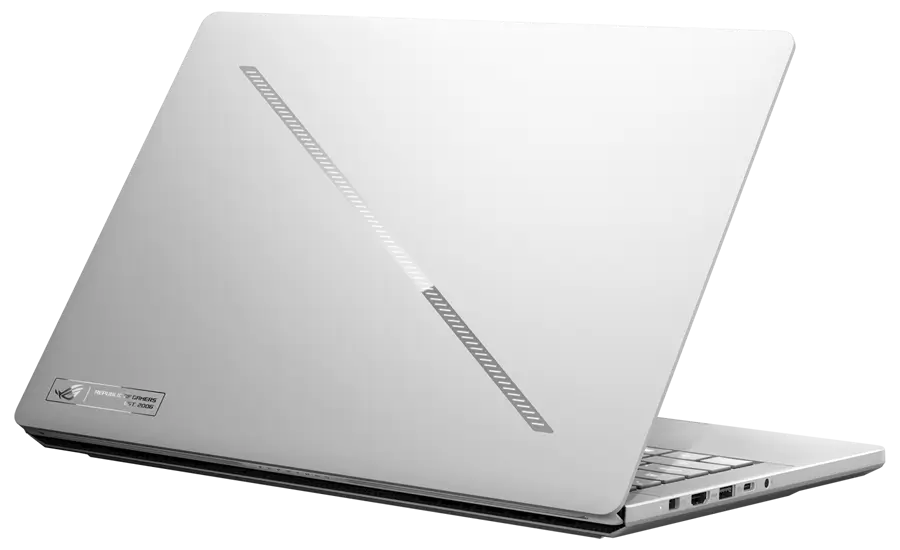
It is also worth mentioning that not only lighting effects, but it (Slash Lighting) also serves as a functional customization element. Users can personalize animations through Armoury Crate, while additional system information such as battery status can also be displayed directly on the lighting strip. ASUS has also applied an anti-fingerprint coating on the display’s side, helping the laptop maintain a cleaner look during everyday use.
Among all its specifications and key features, the laptop’s slim profile and portable design stand out as one of its biggest strengths. The laptop has the following dimensions: 311 x 220 x 15.9- 18.3 mm (open-closed state) and weighs approximately 1.56kg. The laptop is remarkably lightweight considering the high-performance hardware it contains. Its slim profile and compact 14-inch size make it easy to carry whether you are traveling between meetings, lectures, or a creative workspace.
When you open the notebook, the hinge feels sturdy and lets you open the lid easily with one hand. The simple ROG logo on the back gives it a clean look instead of the large, flashy branding found on many gaming laptops. As a result, the laptop looks modern and professional while still keeping its gaming identity.
Overall, the ROG Zephyrus G14 (2026) delivers outstanding build quality with a premium aluminum construction and excellent finish.
Display
When you open the laptop, you will be greeted with a 14-inch OLED screen. Here’s a simpler and more refined version: The display design is the same as the previous generation, featuring ultra-thin bezels on three sides. The bottom bezel is slightly thicker and has the ROG Zephyrus branding, making it a little more noticeable. The screen has the following specifications:
- 14-inch OLED Display
- 8K (2880 x 1800) Resolution
- 120Hz Refresh Rate
- 16:10 Aspect Ratio
- 1100nits Peak Brightness
- 100% DCI-P3 Color Gamut Coverage
Before discussing the display further, it is worth noting that the display uses Corning Gorilla Glass DXC anti-reflective coating. Compared to a standard glass-covered OLED panel, this coating can reduce reflections by up to 65%. Even when the screen was placed directly under a bright light source, reflections were greatly reduced, making the display easier to see in outdoor conditions.
The 14-inch OLED display features a 2.8K resolution and supports a 120Hz refresh rate, making it suitable for gaming, content creation, and daily productivity. The panel provides excellent sharpness, vibrant colors, and deep blacks typical of OLED technology.
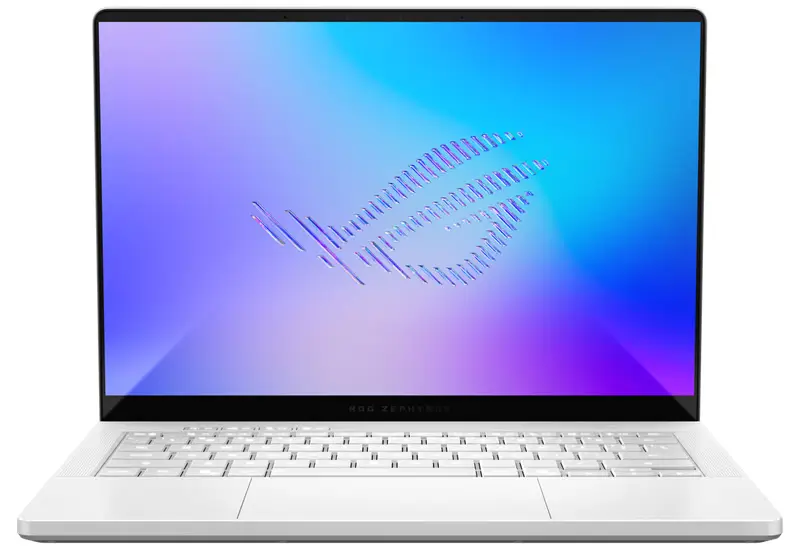
The display is Samsung’s E6 OLED panel, providing improvements in both brightness and power efficiency compared to previous generations. According to official sources, the display supports up to 1100 nits in HDR mode, covers 100% of the DCI-P3 color gamut, and comes with factory color calibration, enabling it to deliver highly accurate colors right out of the box.
ASUS has also included multiple color profiles (including sRGB, Display P3, and DCI-P3), which users can switch through the Armoury Crate software, depending on the user’s workflow. This flexibility makes the laptop equally suitable for professional photo editing, video editing, graphic design, and general multimedia consumption.
Motion handling is equally impressive thanks to the 120Hz refresh rate, which provides smoother animations throughout Windows and a noticeably more seamless gaming experience compared to a traditional 60Hz display. Combined with OLED’s near-instant pixel response times (i.e., 0.2ms), fast-moving scenes remain exceptionally sharp with minimal motion blur.
We also did a benchmark test for the display, mentioned below:
Brightness:
In SDR mode, we reached a peak brightness of 500 nits. In HDR mode, we achieved a peak brightness of 1100 nits, matching the company’s claim.
Color Gamut Coverage:
For this test, we used the SpyderX and got the following results:
- 100% sRGB coverage
- 95.2% AdobeRGB coverage
- 99.9% DCI-P3 coverage
Color Accuracy Test:
In DCI-P3 mode, we recorded a maximum Delta-E of 2.68 and an average of 0.82, indicating it is fully capable of handling nearly all daily office tasks and video streaming.
At the end, we can say that the display is also one of the strongest aspects of the ROG Zephyrus G14 (2026) GU405. It combines a 2.8K resolution OLED panel, excellent color accuracy, HDR support, a 120Hz refresh rate, and an effective anti-reflective coating into a package that caters equally well to gamers, creators, and professional-level users. In simple words, it is among the best displays available in the 14-inch laptop sector.
Keyboard
Under the display, we have a Chiclet keyboard with a 1-Zone RGB backlight, as named by ASUS. Despite being a 14-inch laptop, the keyboard features a clean layout with well-spaced keys that make extended typing sessions comfortable. The keycaps now come with a special UV coating that provides a smooth finish and helps resist fingerprints, allowing the keyboard to maintain its appearance after prolonged use.
The key travel is 1.7mm, providing a deeper and more tactile typing experience than many competitor models. Each keystroke feels firm and well-damped, offering satisfying feedback without becoming overly loud. Above the keyboard layout, there are four dedicated shortcut keys that provide quick access to commonly used functions such as volume control, microphone mute, and Armoury Crate. Their slightly separated placement helps avoid accidental presses.
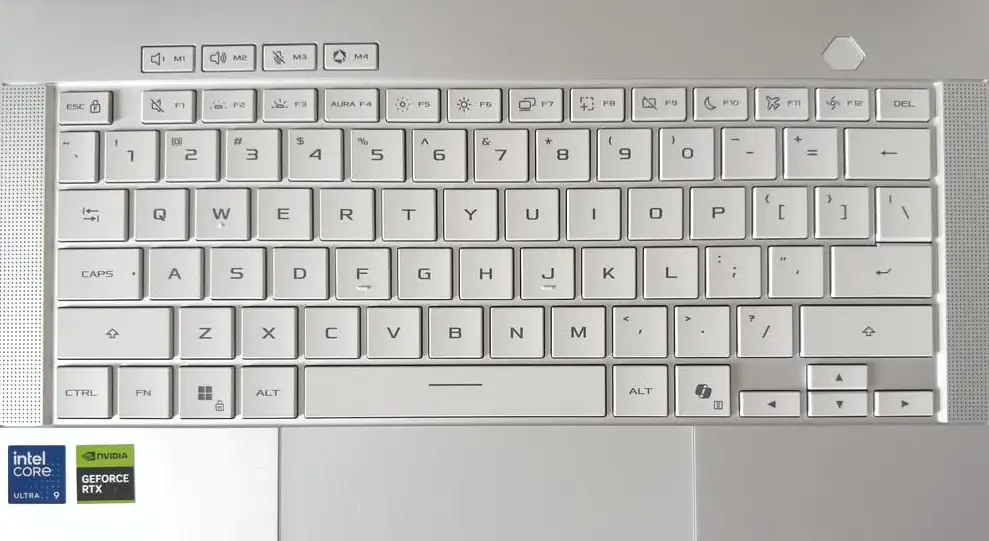
As mentioned before, the keyboard on the GU405 also comes with 1-zone RGB backlit, allowing users to customize the lighting as per their choice. The brightness level is also consistent across the keys, making them easy to identify in low light.
The only downside of this keyboard is that it lacks the fingerprint sensor that used to be integrated into the power button in previous generation models. The reason behind this change is unknown.
TouchPad:
Under the keyboard, we have a generously sized touchpad, covered with a smooth glass surface that provides excellent finger glide. Windows Precision drivers provide accurate tracking, responsive gestures, and reliable palm rejection. Multi-finger gestures also work seamlessly during everyday use.
The touchpad still uses the traditional mechanical click mechanism instead of a modern haptic design. The physical click may feel responsive and provide adequate feedback, but it lacks the uniform click experience offered by a haptic-feedback touchpad, which is found in some competitive models.
Ports and Connectivity
While maintaining a portable body, the notebook still offers a well-rounded selection of ports, catering to both everyday users and professional users (including designers, gamers, and office users). ASUS has managed to retain a practical I/O layout without requiring a dock or external adaptor.
The laptop has the following ports:
- 1x 3.5mm Headphone Jack
- 1x Charging Port
- 1x HDMI 2.1 FRL
- 2x USB 3.2 Gen2 Type-A (up to 10Gbps transfer speed)
- 1x USB 3.2 Gen2 Type-C (supports DisplayPort, Power Delivery and 10Gbps transfer)
- 1X Thunderbolt Type-C (supports DisplayPort, Power Delivery and 40Gbps transfer)
- 1x SD Card slot (UHS-II, 312MB/s)
The addition of an SD card slot is quite useful for photographers and content creators, eliminating the need for an external card reader when transferring files from a camera.
In the networking sector, ASUS has used updated hardware that supports Wi-Fi 7 (802.11be) and Bluetooth 6, ensuring fast wireless networking, lower latency, and reliable connectivity with modern peripherals and accessories.
Battery and Charging
ASUS has equipped the ROG Zephyrus G14 (2026) GU405 with a 73Wh lithium-ion battery, which may appear modest compared to some other performance laptops. However, due to its 14-inch size and Intel’s latest Core Ultra platform, we can expect noticeably improved power efficiency.
In light productivity tasks such as web browsing, office work, video streaming, and document editing, the laptop can last through a typical workday when using its power-saving mode. In standardized battery tests, the laptop provided 18 hours of battery life under light workloads at 120 nits brightness. Under heavy workloads, the same battery lasted 9 hours. During gaming or GPU-intensive tasks, battery life is significantly lower.
For charging, the company has shipped the laptop with two options. For maximum performance, users can use a 250W AC adapter, while for basic or office use, the company has provided a 100W USB Type-C charger, which is an easier option to carry. The 100W charger can charge almost 90% of the battery in just an hour. However, it is worth mentioning that the 100W charger cannot sustain the laptop’s full gaming performance; it provides enough power for office work, web browsing, and media consumption.
RAM and SSD
The ASUS ROG Zephyrus G14 GU405 is available in two options: 32GB and 64GB. The model we are reviewing comes with 64GB LPDDR5x (Dual-Channel). Before going further, it is important to note that the RAM is soldered to the motherboard, so there is no option to upgrade. Make sure to choose the RAM capacity that best suits your needs before purchasing.
The 64GB of RAM operates at 8533 MHz, providing ample bandwidth for both productivity applications and gaming. In everyday use, the system feels exceptionally responsive, even with multiple high memory consuming applications running in background.
RAM Benchmark:
This test was carried out using the AIDA64 Cache and Memory benchmark; we obtained the following results:
- 105 GB/s Read Speed
- 118 GB/s Write Speed
- 116 GB/s Copy Speed
- Latency Rate 91.2ns
On the storage side, we have a 1TB PCIe 4.0 SSD, i.e., Samsung’s PM9C1b SSD. It is one of the latest options in the SSD market and has lower power consumption than Samsung’s PM9C1a. It can deliver excellent performance for both everyday use and gaming.
It is worth mentioning that there is no other storage option. The notebook has only a single SSD slot that supports up to PCIe 5.0 SSDs. To upgrade the storage, the user would need to replace the current SSD. We also conducted a benchmark test for this SSD.
SSD Benchmark:
- Sequential Read Speed: 6985.48 MB/s
- Sequential Write Speed: 5829.38 MB/s
- Random 4K Read Speed: 58.98 MB/s
- Random 4K Write Speed: 119.36 MB/s
Overall, the memory and storage specs complement the Zephyrus G14’s premium positioning.
Audio and Webcam
ASUS has provided a six-speaker audio system in its ROG Zephyrus G14 (2026) GU405. This system consists of four woofers and two tweeters, providing a rich and well-balanced sound experience with clear vocals and noticeably stronger bass than most laptops in its size segment.
On the top bezel of the display, ASUS has integrated a Full-HD webcam along with an IR camera for Windows Hello facial recognition, allowing the user to unlock the laptop quickly without entering the password. The higher-resolution webcam sensor delivers sharper image quality than a traditional 720p camera. In the same bezel, the company has also integrated dual microphones, capturing voice clearly during video calls.
CPU and GPU
When it comes to the CPU, the company has provided only one option in the ASUS ROG Zephyrus G14 (2026), i.e., the Intel Core Ultra 9 386H. This CPU is one of the highest-ranked options available in Intel’s latest H-series CPUs. It is based on Intel’s latest Panther Lake architecture, which features a hybrid core design. The CPU has the following specifications:
- Intel 18A Manufacturing Process
- Total 16 Cores and 16 Threads
- 4x P-Cores (2.1GHz Base Frequency and 4.9GHz Max Frequency)
- 8x E-Cores (1.6GHz Base Frequency and 3.7GHz Max Frequency)
- 4x LP E-Cores (1.6GHz Base Frequency and 3.5GHz Max Frequency)
- Intel 18MB L3 Cache
- 25W Base and 80W Max TDP
The multi-core architecture helps deliver excellent responsiveness while maintaining power efficiency during lighter workloads. We also conducted a CPU benchmark test.
CPU Benchmarks
The following are the benchmarks of the CPU:
Cinebench R20: 791cb on Single-Core and 8,442cb on Multi-core
Cinebench R23: 2,121pts on Single-Core and 20,626pts on Multi-Core
Cinebench 2026: 4,901pts on Single-Core and 69,028 on Multi-Core
The benchmark results demonstrated strong performance, with enough power to comfortably handle demanding workloads such as content creation, software development, and multitasking.
On the GPU side, the company has provided various options. The variant we are reviewing is integrated with the NVIDIA GeForce RTX 5070Ti GPU, which has a maximum TGP of 130W, making it one of the most powerful GPUs available in a 14-inch laptop. Despite its compact body, the notebook can compete with many rivals that have larger 15- and 16-inch displays, making it suitable for both high-end gaming and professional tasks such as video rendering and photo editing.
The GPU has 12 GB of GDDR7 memory, built on NVIDIA’s latest Blackwell architecture, and supports all the latest technologies, including DLSS 4, advanced ray tracing, and AI-powered rendering features. These features not only help improve the gaming experience but also accelerate creative applications such as Adobe Premiere Pro and other GPU-intensive software.
GPU Benchmarks:
The following are the GPU benchmarks:
3DMark Time Spy: Total 16,085 Score including 16,086 GPU Score
3DMark Speed Way: Total 4,145 GPU Score
3DMark Fire Strike: Total 31,412 Score including 40,453 GPU Score
3DMark Steel Nomad Light: Total 16,828 GPU Score on DirectX 12
The GPU delivered excellent performance in benchmarks, proving it can handle modern AAA games and demanding GPU workloads with ease. GPU-accelerated rendering, AI-assisted image processing, video editing, and 3D content creation all benefit from the additional CUDA cores and dedicated AI hardware, allowing faster completion of heavy, graphics-demanding tasks.
Gaming Test
With this combo of high-profile CPU and GPU, gaming performance is one of the key areas to evaluate. The following are the games along with their performance analytics.
Counter-Strike 2: At full (2.8K) resolution and medium graphics settings, the notebook achieved an average frame rate of 332 FPS.
Shadow of the Tomb Raider: At full (2.8K) resolution and maximum graphics settings, we got an average of 169 FPS.
Cyberpunk 2077: In this game, the testing was divided into two phases. In the first phase, we used the following settings: Full 2.8K resolution, highest graphics settings, ray tracing disabled, and DLSS turned off. With these settings, we got an average of 66 FPS. In the second phase, with the same settings but DLSS turned on, we got an average of 99 FPS.
Overall, the gaming results show that the ROG Zephyrus G14 (2026) delivers excellent gaming performance for a 14-inch laptop, offering smooth gameplay across modern AAA games.
Cooling System and Stress Testing
As the laptop maintains a slim profile, you might think there could be compromises in the heat dissipation system. However, ASUS has proven all these assumptions wrong by providing a highly capable cooling solution, designed to sustain high-performance workloads.
It consists of dual fans and multiple heat pipes with an optimized internal airflow design that allows the laptop to easily handle high temperatures inside the notebook. Additionally, the company has integrated dust filters in the air intakes so that no dust or fibers can enter the laptop and cause heat buildup. To test how well this cooling system works, we also conducted stress testing.
CPU Stress Testing:
Starting with the CPU-only stress test, the CPU’s power consumption rose to 83W, and the temperature peaked at 95°C at the start. After some time, it stabilized at 70W with a temperature of 90°C, indicating that the cooling system is capable of maintaining consistent CPU performance without significant throttling.
GPU Stress Testing:
In GPU-only stress testing, the RTX 5070Ti operated at 115W in the default performance profile while maintaining a temperature of only 65°C. In manual mode, the GPU can reach its peak, i.e., 130W TGP.
Combined Testing:
During combined CPU and GPU stress testing, the keyboard surface remained surprisingly comfortable. The average measured temperature on this surface was 32°C, while the WASD area stayed particularly cool. The measured fan noise was 53 dB in default performance mode, while in manual mode, it rose to 55 dB with the fans running at maximum speed.
While the system becomes clearly audible under full load, the noise levels are reasonable considering the amount of performance being extracted from such a compact body.
Final Verdict
At the end of this review, we can say that ASUS has proven that a slim-profile laptop doesn’t have to compromise on performance. With its powerful specs (including CPU, GPU, and OLED display), it offers an excellent balance between portability and performance.
The soldered RAM and single SSD slot do limit future upgrades, but these are minor trade-offs considering everything else the laptop offers. Overall, if you are looking for a high-performance notebook with portability, the ROG Zephyrus G14 (2026) GU405 is one of the strongest choices currently available.
Pros:
- High-end specs in compact body
- 8K OLED with color calibration from factory and anti-reflective coating
- Sufficient numbers of port
- Two chargers: 250W charger for full performance and 100W Type-C charger for emergency charging (easier to carry)
Cons:
- Lacking a haptic touchpad
- Single SSD slot and limited expandability
- 73Whr battery is still a bit small at this stage