
Gaming laptops usually come with stronger hardware, but that often comes at the cost of increased weight and bulk. On the other hand, business laptops tend to prioritize portability and lightweight designs, but usually compromise on performance. Somewhere between these two categories lies a segment that aims to offer both portability and performance. Today’s targeted laptop also belongs to the same segment.
The laptop we are going to review is the all-new ASUS TUF Gaming A14 (2026) FA401EA. Its most notable feature is the new Ryzen AI Max series CPUs. This platform provides a significantly more powerful CPU architecture along with an integrated Radeon 8060S GPU. According to officials, this GPU can deliver performance comparable to a dedicated GPU while consuming less power.
This high-performance claim comes from new Variable Memory technology that lets the integrated GPU dynamically access system memory. The GPU can utilize significantly more memory for demanding workloads, making it capable of running larger models than dedicated graphics cards with 8GB or 12GB of VRAM.
Beyond its CPU and GPU, the laptop has a compact body. It comes with a 14-inch IPS display with a higher 2.5K resolution, along with the modern hardware and specs expected from a high-end laptop. However, the specs alone don’t tell the whole story. To see how far this new CPU-powered laptop can go, we have to review every section.
Design
Before discussing the laptop’s internals, let’s take a look at its exterior design. The TUF Gaming A14 (2026) FA401EA continues the same clean and understated design we saw in previous models. It looks much more subtle than many traditional gaming laptops. ASUS has provided two color options for this notebook: Eclipse Gray and Moonlight Silver. The one we are reviewing is in Eclipse Gray.
Overall, the body is made of aluminum with a sandblasted metal finish. On the display’s back, there is a simple TUF logo on the top right, while the rest of the area is plain. In short, the laptop offers a recognizable gaming identity without making the overall design look overly aggressive.
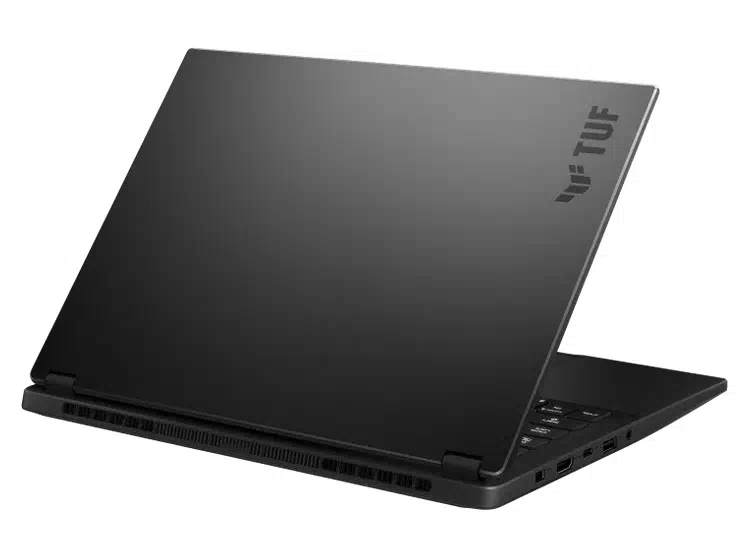
The laptop feels very compact. From the side, the notebook has a slim and streamlined profile, measuring just 16.9mm thick (when opened) and weighing around 1.5kg. The laptop measures 311 x 22.7 x 16.9–19.9mm (19.9mm when closed). From its structure, the TUF A14 is a highly portable machine, designed to handle demanding workloads and gaming.
The rest of the laptop follows the same old design approach. The hinge provides enough resistance to keep the display stable while still letting you open the lid with one hand. It also supports a 180° opening, allowing it to be used in different scenarios.
Overall, the TUF Gaming A14 (2026) delivers a premium user experience while maintaining a thin and lightweight body.
Display
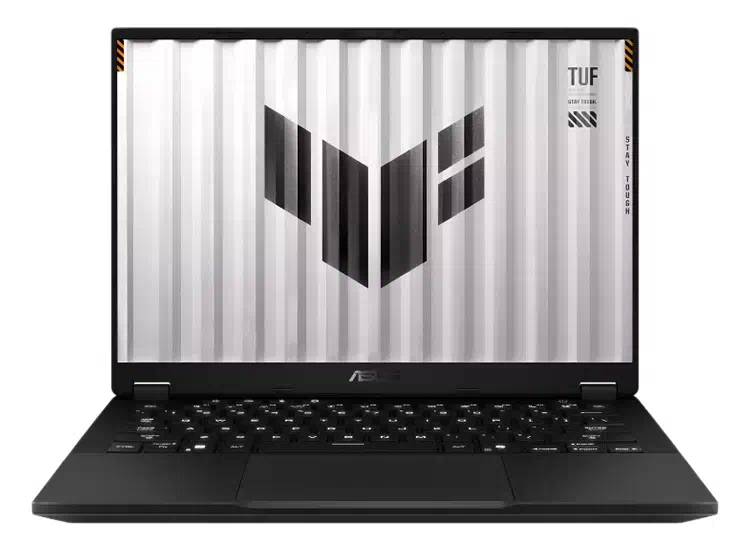
Despite its compact dimensions, which would typically accommodate a 13-inch display, the laptop fits a larger 14-inch IPS display thanks to its three-sided narrow-bezel design. The display also comes with a 16:10 aspect ratio, 2.5K resolution, and a 165Hz refresh rate. The complete specs of the display are mentioned below:
- 14-inch IPS LCD
- 5K Resolution (2560 x 1600, WQXGA)
- 165Hz refresh rate
- 16:10 Aspect Ratio
- Anti-Glare Display
- 100% sRGB color gamut coverage
- 88% screen-to-body ratio
- 3ms response time
The specs make this display well-suited for fast-paced gaming while also providing more vertical screen space for productivity. The display also has an Anti-Glare coating, which helps it perform well in both indoor and outdoor conditions. It also supports NVIDIA G-SYNC and DC dimming for a smoother, more comfortable viewing experience.
Benchmarks:
We also benchmarked the display and ran several tests.
Starting with brightness testing, we measured a maximum brightness of 458 nits with a 1020:1 contrast ratio, exceeding the official claim of 400 nits.
Now it’s time for color gamut testing. We used the SpyderX for this test and found that this display covers:
- 98% sRGB color gamut
- 75% AdobeRGB color gamut
- 76% DCI-P3 color gamut
In the color accuracy test, we got an average Delta E value of 1.61 (minimum 0.52 and maximum 5.81).
The testing showed that this display is excellent for gaming and also capable of editing. Its higher resolution, refresh rate, brightness, and decent accuracy provide a balanced experience. One feature that could have made the display even better is an OLED panel, which would offer superior contrast, deeper blacks, and more vibrant visuals. However, the IPS panel performs well enough in these areas, so the lack of OLED is not a major drawback.
Keyboard
Below the display is a compact keyboard that also lacks a numeric pad. It supports single white backlighting with three brightness levels, and each key has a 1.7 mm travel.
ASUS has also provided four dedicated shortcut buttons for controlling volume, microphone on/off, and system utilities, which are positioned above the keyboard, quite helpful during gaming and video conferencing. On the top right, a hexagonal-shaped power button is also integrated.
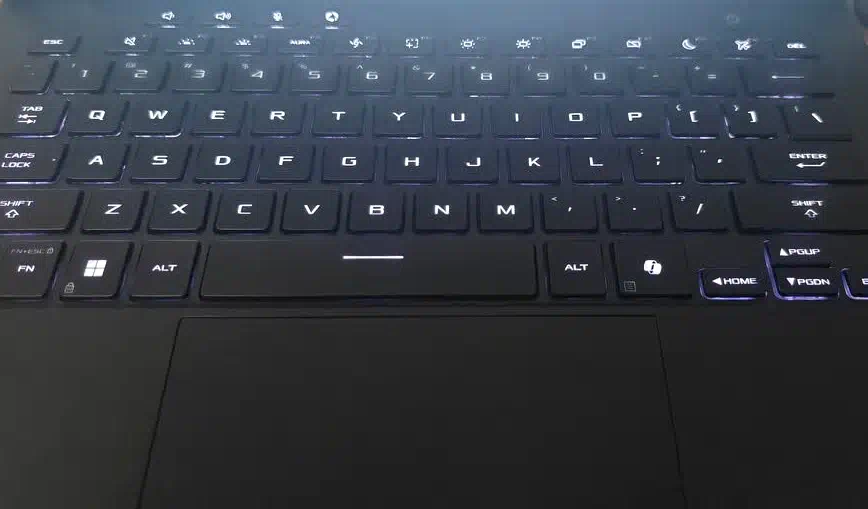
When using the keyboard, the keys felt well-spaced, reducing the chance of accidental key presses. The key actuation force is also relatively high, which results in very noticeable and rapid rebound feedback, providing a responsive and engaging experience. Overall, it offers a comfortable experience for both gaming and office work.
Under the keyboard, ASUS has managed to fit a generously sized glass touchpad, which is particularly impressive given the notebook’s compact dimensions. It has a smooth surface and a 240Hz sampling rate that helps in precise tracking and responsive navigation, making it comfortable enough for everyday office use. However, for gaming, an external mouse is a must.
Ports and Connectivity
Despite its slim profile, ASUS has still managed to add a good number of ports. Starting from the left side, we have:
- 1x Charging port
- 1x HDMI 2.1 port (supports 8K@60Hz and 4K@120Hz)
- 1x USB 4 Type-C port (supports DisplayPort and Power Delivery)
- 1x USB 3.2 Gen2 Type-A port
- 1x 3.5mm Headphone jack
On the right side, we have:
- 1x USB 3.2 Gen2 Type-A port
- 1x USB 3.2 Gen2 Type-C port
- 1x UHS-II microSD card reader
ASUS has done a great job packing this laptop with ports despite its slim body. Moreover, the Type-C port supports power delivery charging up to 100W (20V/5A). We are confident an office user won’t need to connect an external dock.
The two USB-A ports help provide high data transfer, HDMI ports allow connectivity to external monitors and projectors, while the USB 4 Type-C ports provide both. The TUF Gaming A14 (2026) offers excellent expandability.
The laptop comes with Wi-Fi 6E (802.11ax) with a triple-band 2×2 configuration. It also features Bluetooth 5.3 for connecting wireless peripherals and accessories. Overall, the networking setup is modern and more than sufficient for gaming, streaming, and everyday use.
Battery and Charging
Inside the TUF Gaming A14 FA401EA, ASUS provides a 73WH 4-cell Li-ion battery and a 200W charger for fast charging. The 73WH may sound a bit low on paper, but for this 14-inch size, it feels quite sufficient. Furthermore, with the new platform lacking a dedicated GPU, we expect better battery life. We also conducted a battery test, which is detailed below:
For this test, we used UL Procyon software with the following settings: 50% brightness, 30% volume, power-saving mode, and both Wi-Fi and Bluetooth enabled. The laptop consumed about 12% of the battery during one hour of office work and 14% during one hour of video playback.
As mentioned before, the company provided a 200W (20V/5A) charger that can charge 50% of the battery in just 30 minutes according to the official claim. Additionally, the laptop also supports 100W charging through the USB 4.0 Type-C port. If you are traveling, you can buy a small 100W charger, which is lightweight and much easier to carry than a 200W charger.
RAM and SSD
The laptop has many RAM options. The variant we are reviewing comes with 32GB (8000MHz) LPDDR5x memory, which means it is not upgradeable. So before purchasing, make sure you know how much memory you need, since you can’t change it later. It is worth mentioning that it is quad-channel memory, which means faster memory speed and signal integrity.
For RAM benchmarking, we used AIDA64 Cache and Memory benchmark software.
- Read Speed: 120.55 GB/s
- Write Speed: 211.06 GB/s
- Copy Speed: 151.29 GB/s
- Latency Rate: 145.2ns
On the storage side, the laptop has a 1TB PCIe 4.0 SSD. It has two SSD slots, so you can upgrade storage. The laptop supports up to 4TB of storage. We also conducted SSD benchmark testing, mentioned below:
For this test, we used the CrystalDiskMark application, on which we got the following results:
- 5,011.6 MB/s Sequential Read Speed
- 3,442.46 MB/s Sequential Write Speed
- 53.28 MB/s 4K Random Read Speed
- 125.68 MB/s 4K Random Write Speed
Overall, the laptop has performed well in both benchmark tests.
Audio and Webcam
In live streaming and video conferencing, both audio devices and the webcam play an important role. The ASUS TUF Gaming A14 FA401EA includes a Full-HD IR webcam that also supports Windows Hello facial recognition, letting users sign in quickly. Moreover, thanks to the CPU’s integrated NPU, the webcam also supports AI features such as background blur, gesture recognition, and real-time noise reduction during video calls.
Additionally, the laptop has two speakers powered by Dolby Atmos, while Hi-Res audio support enhances the experience when using compatible headphones. ASUS has also included two-way AI noise cancellation to reduce background noise in both incoming and outgoing audio, which is useful for gaming and video conferencing.
CPU and GPU
The laptop is powered by an AMD Ryzen AI Max+ 392 CPU. The following are the CPU’s specifications:
- Based on TSMC’s 4nm process
- 12 P-Cores (3.2GHz Base and 5.0GHz Max Frequency) and 24 Threads
- 76MB (L2+L3) Total Cache Memory
- 55W Base TDP and 120W Max TDP
- Integrated Radeon 8060S GPU
It is worth mentioning that all 12 cores are performance cores with a maximum frequency of 5.0GHz. The most notable feature is the integrated Radeon 8060S GPU. Despite being built into the CPU, its graphics performance can reach the level of a dedicated GPU. It uses unified memory, allowing part of the system RAM to be allocated as graphics memory through AMD’s built-in software.
CPU Benchmarks:
Here are the CPU benchmark results:
- Cinebench R23: 1,958 pts in Single-Core and 27,669 pts in Multi-Cores
- Cinebench 2024: 110 pts in Single-Core and 1,371 pts in Multi-Cores
- Maxon Cinebench 2026: 616 pts on Single-Core and 5,768 pts on Multi-Core
GPU Benchmarks:
After CPU, it is time for GPU:
- 3DMark Fire Strike: 28,541 GPU Score (with a total 25,116 Score)
- 3DMark Time Spy: 11,119 GPU Score (with a total 10,963 Score)
- 3DMark Steel Nomad Light: 10,821 GPU Score
Both CPU and GPU scores are highly impressive, with the Radeon 8060S reaching performance levels normally associated with dedicated laptop graphics. The scores suggest it should handle modern games smoothly at reasonable settings while also handling demanding GPU-accelerated workloads.
Gaming Test
After the benchmark testing, it’s time for the gaming test. We ran this test on six mainstream games with different settings. Below are the games and their benchmark performance.
Shadow of the Tomb Raider: We set the resolution to 2560 x 1600 with the highest graphics settings, achieving an average of 118 fps.
Forza Horizon 6: With the same settings as in the previous game, we got an average of 98 fps.
Red Dead Redemption 2: At 2560 x 1600 resolution and default (medium) graphics settings, we got an average of 88 fps.
Counter-Strike 2: At 2560 x 1600 resolution and low graphics settings, we got an average of 335 fps.
Cyberpunk 2077: With the same resolution and graphics settings, plus multi-frame generation enabled, we got an average of 258 fps.
Overall, these gaming results are exceptionally strong for an integrated GPU, especially at the native 2.5K resolution. The Radeon 8060S can comfortably handle competitive titles at very high frame rates and even demanding AAA games with the right graphics settings and frame-generation support.
Cooling System and Stress Testing
As officials claim, the laptop uses a dual-fan cooling system with 97-blade fans, 0.1mm-thick blades, and fluid bearings to improve airflow while keeping noise under control. Air is directed across key components such as the processor and memory, while two heatsinks with dense 0.1mm copper fins help dissipate heat more efficiently. ASUS also added dust filters inside the notebook, along with a redesigned keyboard deck that allows additional air intake, helping maintain sustained performance during longer gaming or rendering workloads.
CPU Stress Test
For this test, we used the AIDA64 CPU stress benchmark application. After a short test, power consumption reached 84.6W, with a core temperature of 96°C. Despite its slim body, the laptop’s power consumption is not compromised, achieving a powerful level.
Final Verdict
The ASUS TUF Gaming A14 (2026) FA401EA is an impressive compact gaming laptop, thanks to its new CPU with a powerful integrated GPU. It delivers performance surprisingly close to dedicated-GPU laptops while keeping a slim 14-inch form factor.
Our gaming tests also showed that it can run almost every modern game. Additionally, beyond its higher specifications, its portable design makes it suitable for office work, editing, and other demanding tasks.
The TUF Gaming A14 (2026) is one of the more balanced choices for users who want strong gaming performance without the bulk of a traditional gaming laptop.
Pros:
- Strong CPU and GPU Performance
- No need for a dedicated GPU
- Lightweight and Compact body
- Excellent selection of ports
- Effective cooling system despite such a slim body
Cons:
- Missing OLED Display
- Integrated GPU may not help users relying on specific NVIDIA/CUDA workloads
- RAM cannot be upgraded (but can be ignored because of unified memory)