
In almost every segment of the laptop industry, we have seen that manufacturers usually try to push the boundaries of innovation. But the latest tech isn’t always what we focus on. Today, we’re looking at a Dell Precision notebook, a mobile workstation series for buyers who want high performance and a sleek, classic design in one package.
The laptop we are going to review is the Dell Pro Precision 5 16 PW516261, which maintains the same slim design as its predecessor but with updated specifications. It comes in a price range of $3000 (depending on the variant chosen by the buyer) and is a workstation-tier laptop.
The laptop is powered by the 3rd-generation Intel Core Ultra series, featuring integrated AI acceleration and support for Intel vPro technology. Dell also offers an option for discrete graphics, but the variant we received lacks it, so that won’t be our focus. Other specs include the all-new LPCAMM2 LPDDR5x RAM, a PCIe 4.0 SSD, a 1080p display, and more.
Let’s take a closer look at each aspect of the laptop to better understand its features, capabilities, and overall performance.
Appearance
At first glance, the laptop feels very clean and professional. It avoids the bulky appearance we usually see in traditional mobile workstations. The aluminum body pairs perfectly with its dark grey matte finish, giving it a premium yet understated look.
The display lid features a centered Dell logo, while the minimalist styling makes it equally suitable for corporate environments and everyday professional use. The entire body is made of aluminum with a matching dark gray matte finish.
The side edges are clean, and the overall laptop feels sturdy. The matte surface helps reduce visible fingerprints and smudges during daily office use.
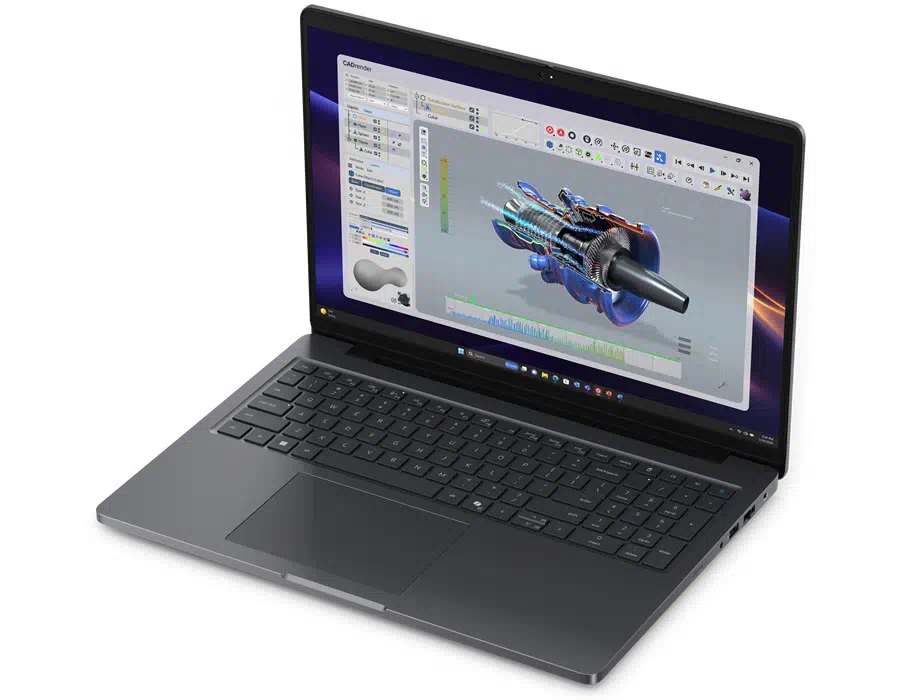
Despite being a workstation, Dell has kept a slim profile without sacrificing practicality or specifications. The laptop measures 358 x 256 mm, is 13.78-18.36 mm thick (front to rear), and weighs 2.16 kg.
Another key feature is the 180-degree hinge, which lets the display open up to 180 degrees. This is especially useful during meetings, presentations, or collaborative work sessions where the screen needs to be viewed from different angles.
Overall, the Dell Pro Precision 5 16 PW516261 combines the professional and powerful identity of Dell’s Precision lineup with a more modern and refined appearance.
Display
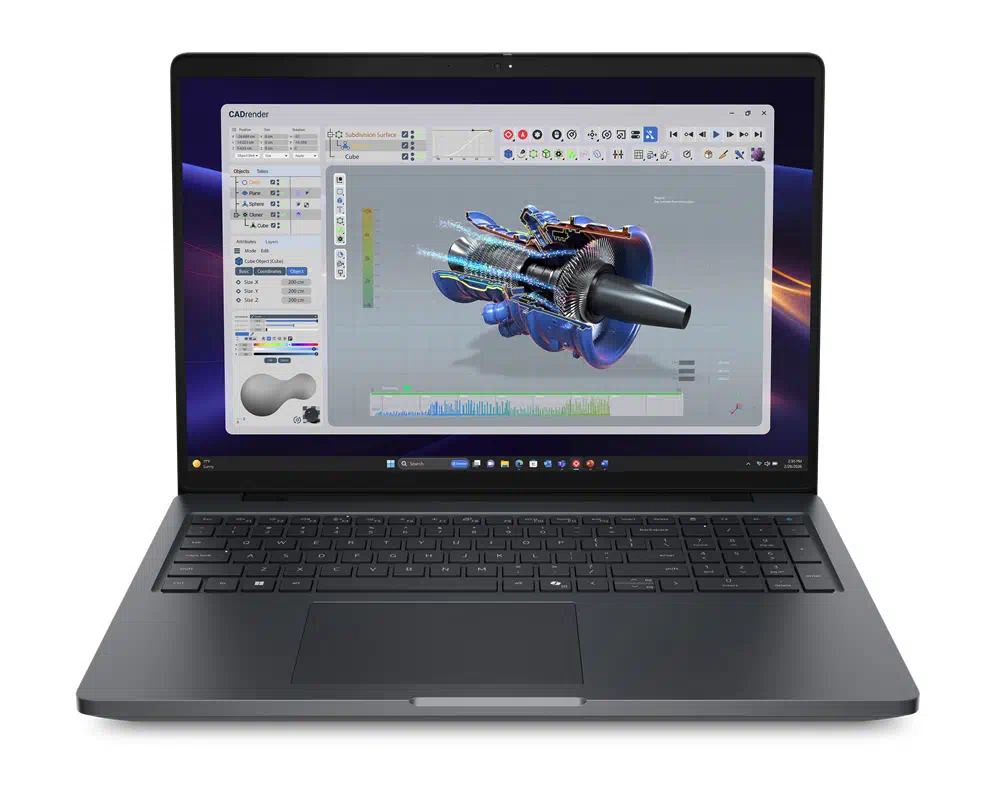
From the laptop’s name, it is easy to guess it has a 16-inch display. The variant we got has very basic specs: a WUXGA 1080p display with a 60Hz refresh rate, no touch support, and a maximum brightness of 400 nits. One good thing is the 16:10 aspect ratio, which is useful for office work because it provides extra vertical screen space and lets users view more content with less scrolling (helpful in spreadsheets and programming environments).
Display Benchmarks:
We also conducted benchmark testing for the display, in which various aspects were tested using the Spyder X colorimeter. The results are as follows:
Brightness Test:
In this test, we measured a peak brightness of 455 nits (55 nits higher than the official claim) and a contrast ratio of 1250:1. This ensures that even in a bright office environment, the screen’s content remains clearly visible without large areas of glare making things difficult to see.
Color Gamut Test:
In this test, using the Spyder X colorimeter, we found that the display covers:
- 68% sRGB Color Gamut
- 50% AdobeRGB Color Gamut
- 50% DCI-P3 Color Gamut
- 48% NTSC Color Gamut
This is sufficient for routine office work, such as web browsing and presentations. However, it falls short of the requirements of professionals who depend on a wider color gamut for accurate photo editing and color grading.
Color Accuracy:
The screen has an average Delta E value of 1.5, with a maximum value of 9.68 and a minimum value of 0.04, sufficient for regular office use (for basic text and graphics layout and PPT creation).
This is not the only display option Dell offers for this model. It offers multiple display configurations, ranging from FHD to Quad-HD resolution, with a touchscreen option. The display on our review variant is sufficient for basic office work, but it is not designed for high-end tasks. However, higher-resolution display options offer additional flexibility for users with more demanding needs.
Keyboard and Touchpad
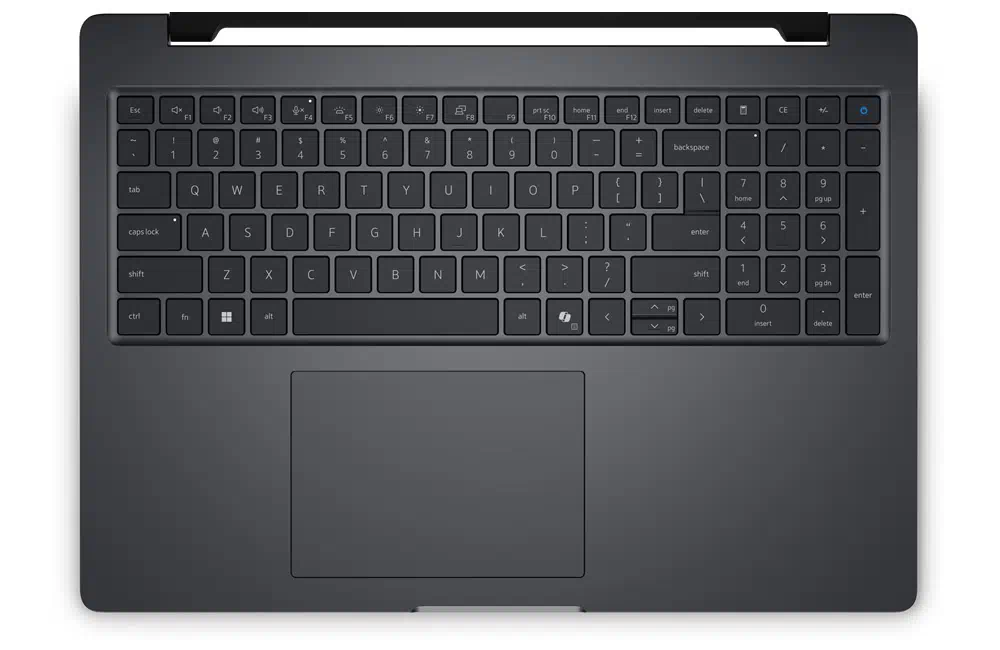
The laptop has a full-sized keyboard with a dedicated numeric keypad. It is available in both backlit and non-backlit configurations; buyers can choose according to their preferences. The variant we received lacks it. Another optional feature Dell offers is a fingerprint scanner integrated into the power button, allowing users to sign in to Windows quickly without entering their password every time.
Given its dimensions, the numeric keypad is a practical necessity. The keypad provides convenience for professionals who frequently work with numerical data, spreadsheets, and financial applications. Overall, the keyboard layout is spacious and comfortable for everyday typing.
TouchPad
Under the keyboard, we have a large touchpad that lets users navigate Windows easily. After using it for a while, we found that it offers precise tracking, while the spacious palm rest provides adequate support for the hands during extended typing sessions.
Overall, the keyboard and touchpad layout emphasizes practicality and productivity, making the laptop well-suited for extended office work and professional applications.
Ports and Network
Connectivity has never been an issue with Dell’s Precision series, and this model keeps up that tradition. Even with its slim design, Dell packs a range of modern and classic ports, so you won’t need extra adapters.
Starting from the left side, we have:
- 1x HDMI 2.1 port
- 1x USB-A 3.2 Gen1 port
- 2x USB-C Thunderbolt 4 ports
- 1x MicroSD card slot
On the right side, we have:
- 1x Kensington lock slot
- 1x LAN (RJ45 Ethernet) port
- 1x USB-A 3.2 Gen1 port
- 1x 3.5mm Headphone Jack
- 1x Nano SIM card slot (supports 5G connectivity)
The SIM card slot and smart card reader are optional. The variant we received includes a SIM card slot but lacks a smart card reader. This port selection covers all office scenarios, including wired internet, external peripherals, storage devices, video expansion, and mobile networking, making it very user-friendly.
Network
The laptop includes an Intel Wi-Fi 7 BE211 wireless module that supports Wi-Fi 7 and Bluetooth 6.0. It also supports mobile broadband connectivity through a SIM card slot, as mentioned before.
Overall, the Dell Pro Precision 5 16 PW516261 offers a strong selection of connectivity options.
RAM and SSD
Our review variant includes the basic specifications of this model: 16GB of RAM and 256GB of storage. Starting with the RAM, the 16GB memory is dual-channel LP-CAMM2 LPDDR5x RAM running at 8533MHz. Thanks to the all-new LP-CAMM2, which maintains the same high frequency as traditional onboard memory while also allowing easier RAM replacement and expansion, it meets the needs of users who want higher memory capacity.
RAM Benchmarks:
For this test, we used the AIDA64 Cache and Memory benchmark application, on which we obtained the following results:
- Read Speed: 106.36GB/s
- Write Speed: 116.28GB/s
- Copy Speed: 112.49GB/s
- Latency: 89.2ns
The results showed that the all-new LPCAMM2 RAM offers faster speeds and lower latency at the same frequency than traditional memory technologies.
The laptop has a 256GB NVMe PCIe 4.0 SSD from Kioxia (BG7 series). When the laptop is disassembled, two M.2 slots can be seen, one for a WWAN card and the other for an SSD. The laptop also supports PCIe 5.0 SSDs. However, to upgrade storage, users must replace the current SSD.
Storage Benchmarks:
For this test, we used the CrystalDiskMark application and got the following results:
- Sequential Read Speed: 6,370.91MB/s
- Sequential Write Speed: 4183.27MB/s
- Random 4K Read Speed: 61.65MB/s
- Random 4K Write Speed: 156.38MB/s
Overall, the SSD benchmark was also impressive, ensuring fast data transfers, quick application loading, and smooth performance during everyday tasks.
Battery and Charging
For workstations, battery life expectations are modest because of powerful, power-hungry hardware. However, this laptop is different. Dell has provided two battery options for this laptop: 64WH and 96WH. The variant we received comes with a 4-cell 64WH battery.
Battery Benchmarks:
For battery testing, we used the PCMark 10 Modern Office battery life test with the following settings: 50% brightness, Wi-Fi and Bluetooth enabled, and the power profile set to optimal power efficiency mode. With all this, we achieved an impressive battery runtime of 16 hours and 27 minutes.
Despite being a workstation, the results are particularly encouraging. This also means the laptop can handle typical office tasks on a single charge. However, the battery life may vary depending on workload intensity and the selected hardware configuration.
Charging:
For charging, the company has shipped a 100W USB-C charger along with the laptop. However, if you think that is not enough, the company also offers a faster 130W charger that you can select at purchase.
Overall, the Dell Pro Precision 5 offers impressive battery life, making it a practical choice for professionals who value both performance and portability. If you still think 64WH isn’t enough, you can opt for the 96WH battery option.
Audio and Webcam
For audio, the Dell Pro Precision 5 16 PW516261 has a dual-speaker system with a total output of 4W (2W x 2). The audio setup may seem modest for a 16-inch notebook, but it is sufficient for office use (video conferencing, online meetings, and presentations). For voice recording, the laptop also includes dual-array digital microphones.
For webcams, Dell offers multiple options. The variant we received comes with a Full-HD RGB camera (records 1080p video at 30fps), accompanied by Temporal Noise Reduction technology to help minimize visual noise during video calls.
There is another webcam option: an 8MP RGB HDR camera sensor (records 1440p video at 30fps) that also supports Windows Hello facial recognition. Above the camera, there is a physical privacy shutter that manually covers the webcam when it is not in use.
CPU Benchmarks
Dell has once again offered multiple options (all in the Series 3 Intel Core Ultra lineup). Our review variant is powered by the Intel Core Ultra 5 336H, the entry-level CPU of this series. The specifications of the CPU are as follows:
- Manufactured using Intel 18A Process
- Total 12 Cores
- 4-Performance Cores (1.9GHz Base and 4.6GHz Peak Frequency)
- 4-Efficient Cores (1.5GHz Base and 3.4GHz Peak Frequency)
- 4-LP Efficient Cores (1.5GHz Base and 3.2GHz Peak Frequency)
- Total 12 Threads
- 25W Base and 65W Max TDP
- 18MB Intel Smart Cache
- Integrated Intel GPU based on Xe3 architecture
Based on the specifications, we can expect a decent performance output. Let’s move on to the benchmark section for testing.
CPU Benchmarks:
- CPU-Z: 734.5 points on Single-Core and 7,012.5 points on Multi-Core
- Cinebench 2026: 486 points on Single-Core and 3,828 points on Multi-Core
- 3DMark CPU: 1,112 points on Single Thread and 8,214 points on Multi Thread
Integrated Graphics
On the graphics side, we have Intel’s integrated Graphics, a quad-core GPU based on the Xe3 architecture that also supports Ray Tracing. However, if you still want discrete graphics, you can choose the NVIDIA RTX Pro Blackwell series GPU at purchase. We also benchmarked the integrated GPU.
GPU Benchmarks:
- 3DMark Time Spy: 3,179 GPU Score
- 3DMark Fire Strike: 6,164 GPU Score
Based on these benchmarks, the CPU delivers impressive single-core and multi-core performance and easily meets everyday office needs. The integrated GPU also meets basic graphics needs. If you still want stronger performance, you can opt for higher specifications.
Stress Testing:
Inside the notebook, it is equipped with a dual fan system and heat pipes for heat dissipation. For conducting the stress test, we used the AIDA64 FPU stress testing application. After 15 minutes, the CPU power consumption rose to 55W while the core temperature reached 93°C, demonstrating an excellent heat management system, despite the slim and lightweight design.
Final Verdict
Overall, the Dell Pro Precision 5 16 PW516261 is a well-balanced mobile workstation that combines strong performance with a slim profile. Despite its modern and sleek design, the notebook provides strong build quality, extensive connectivity options, impressive processing capabilities, and excellent battery endurance.
There are a few areas where the notebook could have been better. The basic display specifications offer limited color gamut coverage, making it less suitable for professional color-sensitive work. Similarly, the absence of a dedicated GPU limits its suitability for graphics-intensive applications. However, Dell offers higher-end display, CPU, and GPU options (at a higher price), which is why we can overlook these drawbacks.
In conclusion, the Dell Pro Precision 5 is a good choice for those seeking a reliable workstation with excellent portability and productivity features. However, its high price may not be attractive to everyone.
Pros and Cons:
| Pros | Cons |
| Premium Aluminum Body | No GPU in the base model despite high pricing |
| All-new LPCAMM2 RAM, allows upgrading of RAM | Limited color gamut on the base display |
| Excellent Battery Life |