
Gaming laptops have become significantly more powerful, but their designs haven’t changed much. Most performance-focused models still rely on dark-colored schemes, aggressive styling, and RGB lighting on every side to provide a true gaming identity.
However, we didn’t compromise performance. Newer CPUs and NVIDIA’s latest RTX 50-series mobile GPUs let manufacturers deliver higher gaming performance, along with improved AI capabilities and productivity. We believe that there is still room for gaming notebooks that can differentiate themselves not only through specifications but also through design. Today’s targeted notebook will fill that space.
Today, we’re reviewing the MSI Crosshair A16 HX MLG Edition E8WFK. Instead of a black or dark-gray color scheme, the laptop uses a distinctive white color (officially named Stellar White) and features a simple design rather than a flashy one.
It features an AMD Ryzen 9 8940HX CPU and an RTX 50 series GPU (depending on the model; the variant we received comes with an RTX 5060). It also features a 16-inch IPS LCD display, an 80WH battery, 16GB DDR5 RAM, a PCIe 5.0 SSD, and an improved Cooler Boost thermal system.
The specifications and related features may sound impressive, but we still need to see how well it performs. Moreover, let’s also take a closer look at its design.
Design and Appearance
At first glance, any enthusiast can say this laptop has a different design. Its entirely white exterior sets it apart from the usual crowd of gaming notebooks. The clean and simple design feels more distinctive without making the notebook overly flashy. Above all, the lid is one of the most interesting parts of the design. The company has used a subtle pearlescent finish emblem that shows gray and violet under different reflected light conditions. There is also Crosshair branding on the display shell, but MSI has kept it relatively understated. We also noticed the slightly glossy, color-shifting nature of the white coating when viewed from certain angles.
Despite having a 16-inch display and higher specs, the notebook still maintains reasonable dimensions. The laptop measures 363 x 269.7 mm with a thickness ranging from 21.95 to 23.85mm. It also weighs 2.3kg. Overall, the weight and dimensions are quite reasonable, given the laptop has an HX series CPU and a high-power dedicated GPU. However, once the 240W charger is added, it is clearly better suited for moving between desks than being carried around all day. The opening hinge has a fairly firm yet balanced action. It can be opened with one hand and reaches roughly 135 degrees, enough for normal desk, lap, and stand use.
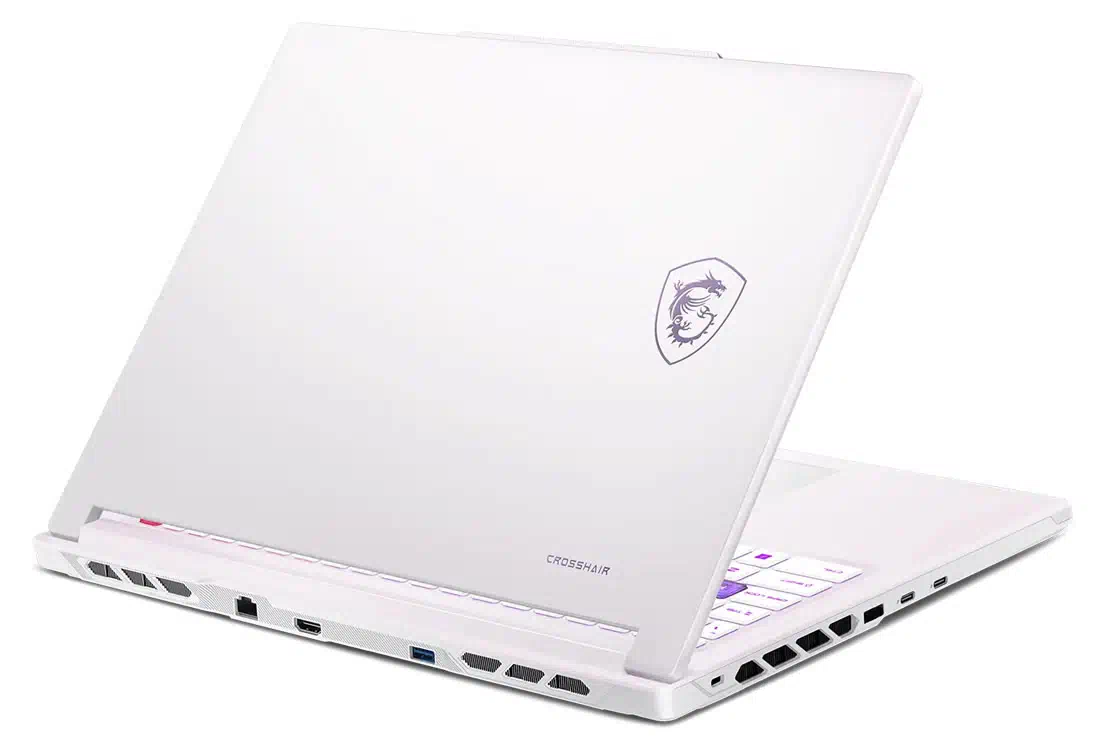
On the bottom, the laptop keeps the same white color scheme, but the design is much more aggressive. It features large ventilation openings (including dual cooling fans), while a contrasting red structural accent adds some character to the otherwise light-colored base. Overall, the Crosshair A16 HX MLG edition looks different without becoming impractical.
Display
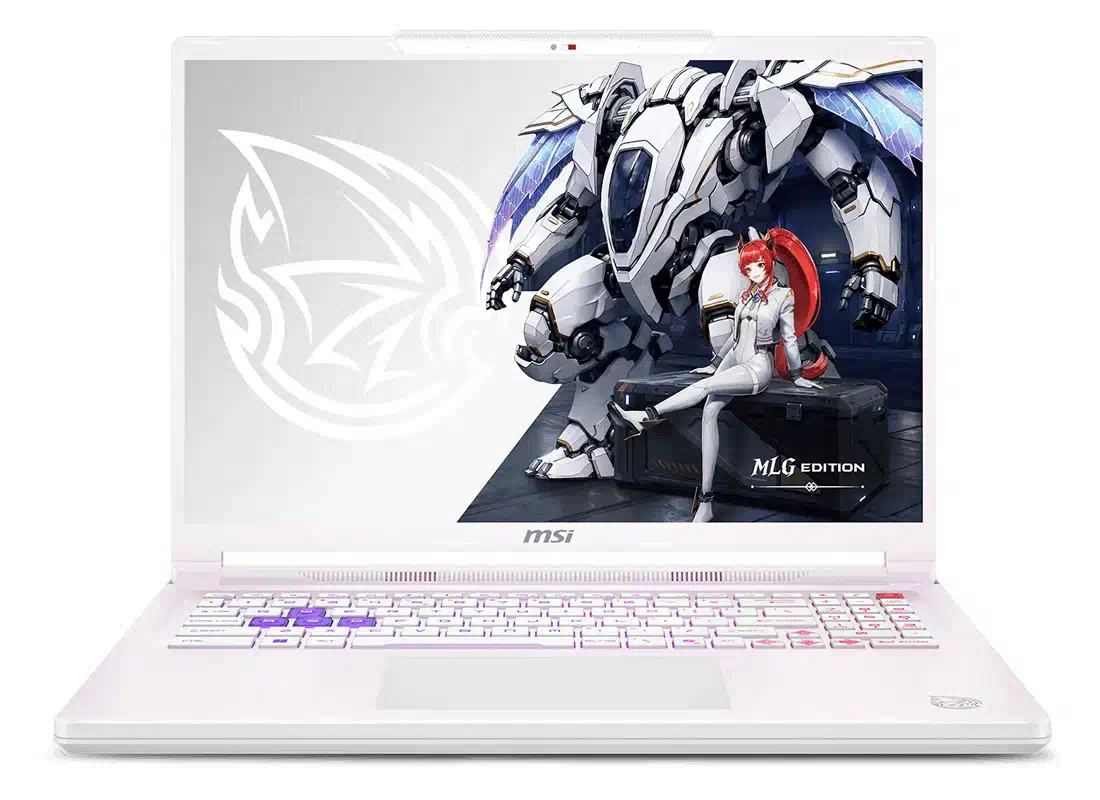
When you open the lid, you’ll see a 16-inch IPS LCD display with thinner bezels, featuring the following specifications:
- Quad HD+ (2560 x 1600) resolution
- 240Hz refresh rate
- IPS-Level Panel
- 16:10 aspect ratio
- 100% DCI-P3 color gamut coverage
In every variant, MSI has provided the same 16-inch IPS display with 2.5K resolution and a 240Hz refresh rate. The panel has a 16:10 aspect ratio, offering a slightly taller workspace than older 16:9 displays, useful in almost every scenario, including gaming, web browsing, editing, and productivity tasks. The company has also advertised that this display covers 100% of the DCI-P3 color gamut, making it suitable for both gaming and content creation.
Display Benchmarks:
In this benchmark test, we will check how far this display can go in brightness, color accuracy, and color gamut. Before starting the test, we downloaded MSI’s official color management tool (MSI True Color) and set it to Display-P3 mode for testing.
Brightness Testing:
For this test, we used the Spyder colorimeter. The screen reached a peak brightness of 477.4 nits with a contrast ratio of 1050:1, considerably brighter than many mainstream gaming laptops, and it also works well in brightly lit indoor environments. However, black levels cannot match those of an OLED or Mini-LED display.
Color Gamut Testing:
In terms of color gamut, the display covers (in Display P3 mode):
- 100% sRGB color gamut
- 96% DCI-P3 color gamut
- 85% AdobeRGB color gamut
The measured DCI-P3 result is slightly lower than the official advertisement, but it is still wide enough for photo and video editing and other color-sensitive tasks.
Color Accuracy:
In this test, we got an average Delta-E value of 0.94 (2.15 highest and 0.22 lowest), indicating very accurate color reproduction out of the box when using the appropriate color profile.
Overall, the display is one of the most prominent aspects of the MSI Crosshair A16 HX MLG edition. The combination of higher resolution and higher refresh rate, wide color gamut, and good brightness makes it equally suitable for fast-paced gaming, media consumption, and creative workloads.
Keyboard and Touchpad
Below the display is a full-size 4-zone RGB gaming keyboard with a dedicated numeric keypad, which is useful for both gaming and office work. As mentioned before, it is a keyboard with a 4-zone RGB backlight, meaning the lighting is divided into four configurable zones that can be customized through MSI Center. MSI could also use per-key RGB lighting, which is usually found in more expensive gaming laptops.
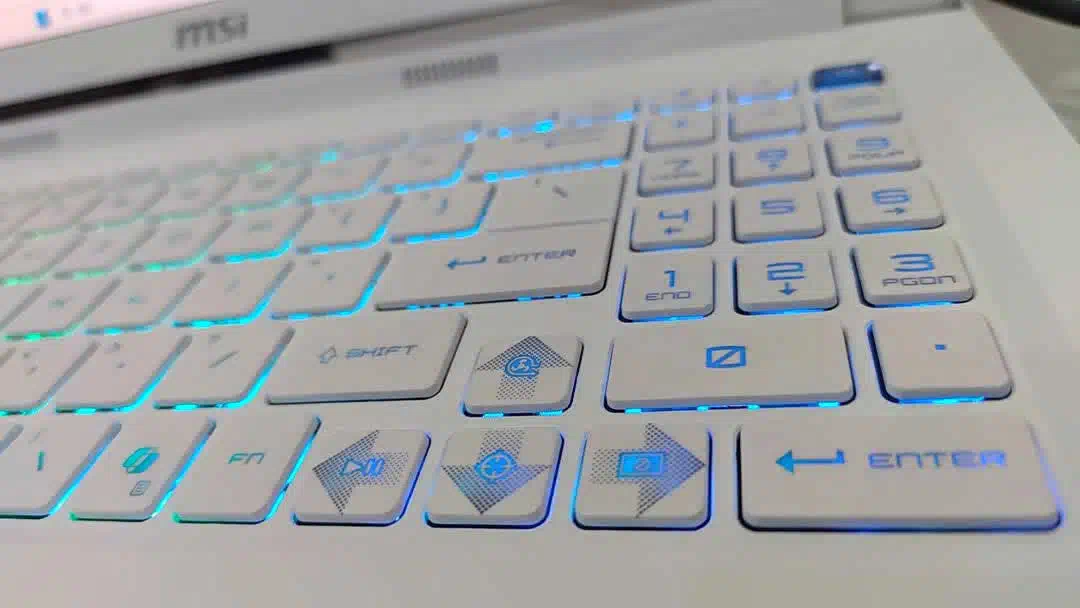
The keyboard comes with 1.7mm of key travel and provides a relatively deep and comfortable keystroke. Moreover, the keys offer enough movement for long typing sessions while still feeling responsive during gaming sessions. On the left side, we have unique WASD keys that come with semi-transparent keycaps, making them easier to identify when RGB lighting is enabled. On the right, the arrow keys feature a distinctive pixel-style pattern, and when pressed with the Fn key, they access different functions. For example:
- Fn + Up Arrow activates Cooler Boost
- Fn + Down Arrow enables the on-screen gaming crosshair
- Fn + Left/Right Arrow can be used for media playback and controlling the display backlight.
A dedicated Copilot key is also included, reflecting Microsoft’s increasing integration of AI features into Windows laptops. The power button is integrated at the top right.
TouchPad
Beneath the keyboard, there is a large touchpad that maintains the same white color scheme as the palm rest. Additionally, its surface is slightly recessed, making it easy to locate by touch without disrupting typing. The ample area provides plenty of space for cursor movement and ensures comfort during regular use. Since this laptop is primarily for gaming, most users will likely prefer an external mouse during gaming sessions.
Overall, the keyboard offers a good balance between gaming and everyday use, while the touchpad makes the laptop equally practical for regular work.
Ports and Network
The MSI Crosshair A16 HX MLG edition offers a fairly complete range of ports on all three sides (left, right, and back). This is especially useful in a gaming laptop scenario because larger cables such as HDMI, Ethernet, and power cables can be kept away from the sides of the laptop, leaving more space for an external mouse and other peripherals.
Starting from the left side, we have:
- 1x Kensington lock slot
- 1x Charging port
- 2x USB Type-C 3.2 Gen2 (supports 10Gbps transfer, 100W PD charging and DP 1.4 output)
On the right side, we have:
- 1x 3.5mm headphone jack
- 2x USB Type-A 3.2 Gen1 (supports 5Gbps transfer rate)
And finally, on the back side, we have:
- 1x RJ45 LAN port
- 1x HDMI 2.1 (supports 8K@60Hz and 4K@120Hz)
- 1x USB Type-A 3.2 Gen1 (supports 5Gbps transfer rate)
The Type-C port supports 100W power delivery, making it easier to travel with since you can use smaller USB-C chargers for lighter tasks, though you’ll still need the company-provided 240W charger for full gaming performance. The HDMI and Ethernet ports on the back are great for a gaming setup because their thicker cables can go straight behind the laptop instead of taking up space next to the keyboard.
Overall, this wide variety of ports suits both gaming and everyday office use, and users won’t need to connect a docking station. One thing that may feel lacking for content creators is the absence of an SD card slot.
Network
The laptop supports Wi-Fi 6E, providing access to the latest 6GHz band alongside the traditional 2.4GHz and 5GHz bands for a faster wireless connection. It also includes Bluetooth 5.4 for seamless connections with wireless headsets, controllers, mice, and other peripherals.
RAM and SSD
The MSI Crosshair A16 HX has two DDR5 SO-DIMM RAM slots that support up to 96GB of RAM (with a frequency of 5200MHz). The unit we received comes with 16GB of DDR5 RAM. Upon dismantling, we found that there is a single RAM module installed while the other slot is empty. Since it is single-channel memory, the benchmark results won’t be as good as with dual-channel memory. Moreover, this single RAM module also displays the manufacturer’s name, SK Hynix.
RAM Benchmarks
For the RAM benchmarking test, we used the AIDA64 cache and memory application and got the following results:
- Read Speed: 37,865 MB/s
- Write Speed: 31,528 MB/s
- Copy Speed: 30,122 MB/s
- Latency rate: 81.5ns
On the storage side, we have two M.2 SSD slots: the first supports PCIe 4.0 SSDs, and the second supports up to PCIe 5.0 SSDs. This allows users to add a faster or larger storage drive later without replacing the SSD. Our review unit includes a single 512GB Samsung PM9C1b SSD.
SSD Benchmarks:
For this test, we used the traditional CrystalDiskMark application. This test was carried out in two phases. First, the 1GiB test mode was used, and we got the following results:
- Sequential Read Speed: 6,652MB/s
- Sequential Write Speed: 5,912MB/s
- Random 4K Write Speed: 58MB/s
- Random 4K Read Speed: 162MB/s
In the second phase, we used the 64GiB test mode and got better sequential read and write speeds.
- Sequential Read Speed: 7,051MB/s
- Sequential Write Speed: 5,811 MB/s
- Random 4K Read Speed: 49MB/s
- Random 4K Write Speed: 155MB/s
Overall, the benchmark results of both RAM and SSD indicate good performance for fast game loading, large file transfers, and everyday productivity tasks.
Battery and Charging
Inside the Crosshair A16 HX, MSI has equipped it with a 4-cell 80 WH battery, which appears reasonable, although we have observed that manufacturers typically provide a 99 WH battery for this size. Additionally, the company includes a 240W power adapter, which is essential when the laptop runs at full performance and the CPU and GPU are allowed to reach their maximum combined power limits.
Moreover, the laptop also supports up to 100W charging through the USB-C port, thanks to USB Power Delivery 3.0 technology, making it possible to use a smaller charger for lighter workloads or travel. However, system performance can drop when running on USB-C power, so the 240W adapter remains the better choice for gaming.
Battery Test:
To test how long this battery can last, we ran a battery test using PCMark 10 Modern Office. Before starting, we switched the laptop to integrated GPU mode, enabled airplane mode, set the brightness to 50%, and chose the most power-efficient profile. Over 5 hours and 21 minutes, the battery dropped from 100% to 3%, which is a respectable result for a gaming laptop with a high power-consuming CPU and discrete RTX GPU, although actual battery life will vary significantly depending on display brightness, GPU usage, and workload.
Audio and Webcam
The laptop has a dual-speaker setup with two 2W speakers. It also has Hi-Res audio certification and the Nahimic 3 audio enhancer, delivering 3D surround sound that helps improve spatial awareness in games. It also has a 3.5mm headphone jack so gamers can plug in their gaming headphones.
The laptop has a basic 720p webcam (at 30fps) built into the top bezel of the screen, with a physical shutter so you can cover the camera when you’re not using it. MSI has also added 3DNR (3D Noise Reduction) to the webcam, which makes the image clearer in low-light situations.
CPU Benchmark
The version we got comes with an AMD Ryzen 9 8940HX, a top-tier CPU built on AMD’s Zen 4 architecture. Here are the specs of the CPU:
- Based on TSMC 5nm FinFET
- Total 16 cores (2.4GHz base frequency and 5.3GHz base frequency)
- Total 32 threads
- 55W Base TDP and 75W Max TDP (Configurable)
- Total 80MB Cache (16MB L2 Cache and 64MB L3 Cache)
- Integrated Radeon 610M (Mobile Graphics)
The specifications indicate that the CPU can handle not only gaming but also heavily threaded workloads such as video rendering, 3D work, software compilation, and content creation. We also performed benchmark testing for this laptop, which is mentioned below:
Before doing all these tests, we switched the laptop to integrated graphics mode to check the CPU’s real benchmarks through MSI Center, while keeping the game and high-performance profiles enabled. This stopped the RTX 5060 from using extra power during the CPU-only tests. Here are the benchmark results:
- CPU-Z:6 points in Single-Thread and 13,261.2 points in Multi-Thread
- Cinebench R20: 732cb on Single-Core and 12,321cb on Multi-Core
- Cinebench R23: 1,859pts on Single-Core and 31,295pts on Multi-Core
- Cinebench 2024: 112pts on Single-Core and 1,426pts on Multi-Core
- Cinebench 2026: 451pts on Single-Core and 5,642pts on Multi-Core
- 3DMark CPU: 1,038 points on Single-Core and 13,355 on Maximum (16) Cores
Overall, the AMD Ryzen 9 8940HX demonstrated strong CPU performance, particularly in heavily threaded applications. Its 16-core architecture strongly supports demanding productivity workloads.
GPU Benchmarks
Under the hood, the laptop has an RTX 5060 GPU. Before we go further, it is worth noting that the company also offers stronger GPU options in higher variants. The GPU has 8GB of GDDR7 memory with a maximum frequency of 2497 MHz and a maximum TGP of 115W. The GPU has the following specifications:
- Based on a 5nm 4N FinFET process
- 128-bit Memory Bus
- Max 115W TGP (as per MSI) at 2497MHz Frequency
- Supports DLSS 4 Multi Frame Generation
We also did a benchmark test, mentioned below.
Before running the benchmark, we switched the laptop to discrete graphics mode through MSI Center, enabled the high-performance profile, and enabled Game Mode. The following are the benchmark results:
- 3DMark Time Spy: Total score: 12,188, including 12,285 GPU score
- 3DMark Time Spy Extreme: Total score: 6,041, including 5,698 GPU score
- 3DMark Fire Strike Total score: 30,722, including 32,841 GPU score
- 3DMark Fire Strike Extreme: Total score: 15,252, including 15,520 GPU score
- 3DMark Fire Strike Ultra: Total score: 7,528, including 7,289 GPU score
- 3DMark Steel Nomad: Total 2693 GPU score
- 3DMark NVIDIA DLSS 4: 91 FPS with DLSS off and 116.58 FPS with DLSS 4x mode (640% difference)
Gaming Test
Gaming tests are necessary for this laptop. We also tested some modern AAA games, which are mentioned below along with their performances:
Black Myth: Wukong
We set the graphics level to Cinematic, DLSS sampling quality to 50, and enabled DLSS 4x frame generation. At 2.5K resolution, we reached a maximum of 115 FPS.
Cyberpunk 2077
In this game, we enabled the Super Preset, set texture quality to the highest, and set the resolution to 2.5K. We got 68 FPS with DLSS off, and when enabled with a 6x multiplier, the frame rate rose to 215 FPS.
Horizon: Zero Dawn
In this game, we set the graphics to Ultimate quality and got an average rate of 85 FPS.
Delta Force
In Delta Force, we set the graphics to the highest. We got an average of 131 FPS.
Overall, the GPU is a strong match for the Crosshair A16’s Quad-HD display. However, demanding AAA games (at the highest resolution) may still require DLSS support.
Cooling System and Stress Testing
The laptop uses MSI’s Cooler Boost 5 thermal solution (as named by officials), which features a dual-fan design, five heat pipes, and four air vents to efficiently manage heat generated by both the CPU and GPU. The cooling system also includes a phase-change thermal compound (an advanced thermal interface material that changes its consistency with heat) to improve heat transfer during heavy workloads. The system also features dedicated copper heat pipes that cover the CPU and GPU.
To test how efficiently the cooling system manages laptop temperature under heavy workload, we also ran stress tests on both the CPU and GPU in separate and combined scenarios.
CPU Stress Testing: For this test, we used AIDA64. After testing for a while, the CPU remained stable at 102W with a controlled temperature around 91°C, and the fan noise was relatively low.
GPU Stress Testing: In this test, we used FurMark. After running the test for 10 minutes, the GPU’s power remained stable at 115W with a maintained frequency of 2110MHz, while the temperature was around 80°C.
Combined Stress Testing: When we stress-tested both the CPU and GPU at the same time, the GPU used 115W and the CPU used 72W, for a total of 190W, showing both were performing steadily.
Conclusion
At the end, we can say that the MSI Crosshair A16 HX MLG Edition E8WGK successfully combines a unique design with strong hardware. Its CPU, GPU, Quad-HD display, and capable cooling system make it a good choice for both gaming and content creation. For some users, the single-channel RAM may feel like a drawback, but as it is upgradeable, we can ignore this factor. Overall, the notebook is an excellent package that offers upgradeability, impressive performance, and a unique design approach compared to traditional gaming laptops.
Pros:
- Unique White Color and Premium Appearance
- Quad-HD+ display
- Capable Cooling System
- Large number and different types of Ports
- Excellent Upgradability in storage and memory
Cons:
- 80WHr battery
- Potential risk of showing dirt and fingerprints on the white body
- 240W power adapter adds extra weight