
In the past few months, we have seen a major development in the compact laptop segment. Manufacturers are now putting increasingly powerful hardware into smaller bodies, with some models even equipped with dedicated GPUs. And even when a dedicated GPU isn’t included, the latest integrated GPUs have become powerful enough that they can provide moderate competition to entry-level and mid-range dedicated GPUs.
The laptop we are going to review is a compact laptop with powerful enough hardware to compete with some mid-range dedicated GPUs. Today, we are focusing on the HP EliteBook X Flip G2i 14-inch, one of the latest additions to HP’s premium EliteBook lineup.
As expected from an EliteBook, the laptop is highly priced, but its build quality, functionality, and hardware justify the price tag to some extent. The variant we are reviewing is powered by the Intel Core Ultra 7 358H CPU and comes with an integrated Intel Arc B390 GPU. It also features a 14-inch 2.8K OLED display, 64GB of LPDDR5x memory, and a 1TB PCIe 5.0 SSD.
As a flip variant, it also supports a 360-degree hinge, allowing it to be used in different modes. This can be particularly useful in offices for sharing the screen with colleagues, during meetings, presentations, and similar scenarios.
Specifications
| Processor | Intel Core Ultra X7 358H, up to 4.8 GHz Max Turbo frequency, 18 MB Smart Cache, 16 cores, and 16 threads, Intel AI Boost (50 NPU TOPS) |
| Graphics card | Intel Arc Graphics |
| Screen | 14.0″, 3K (2880 x 1800), OLED, 120 Hz (VRR), UWVA, Touch Screen, antiglare, Low Blue Light, 500 nits, DCI-P3 100% |
| Memory | 64 GB LPDDR5X-9600 MT/s (onboard) |
| Storage | 1 TB PCIe Gen 5.0 NVMe SSD |
| Wireless Connection | Intel BE211 Wi-Fi 7 and Bluetooth 6.0 wireless card, non-vPro |
| Ports | Left side: 2x Thunderbolt 4 with USB Type-C ports; 40 Gbps signaling rate (USB Power Delivery and DisplayPort 2.1) 1x Headphone/microphone combo jack 1x HDMI v2.1 Right side: 1x USB 3.2 Gen 2.0 Type-C port; 10 Gbps signaling rate (USB Power Delivery, DisplayPort 1.4) 1x USB 3.2 Gen 1.0 Type-A port; 5 Gbps signaling rate (powered) 1x Nano SIM card slot (integrated; optional) 1x Security lock slot |
| Battery | 68 Wh Li-ion polymer battery, 6-cell, 65W USB Type-C charger |
| OS | Windows 11 Home |
| Weight | 1.299 kg (2.864 lb) |
Design
At first glance, the EliteBook X Flip G2i follows a clean and minimalistic approach. There are no unnecessary decorative elements on the display shell, just HP’s recognizable logo in the middle, giving the laptop a professional appearance and also ensuring that this laptop belongs to a premium lineup, like the EliteBook series. The entire body is made of metal and features a finely finished surface that adds to its premium feel. The polished edges further enhance the overall appearance without making the design look overly flashy.
HP has provided two color schemes for its EliteBook X Flip G2i 14-inch: Glacier Silver and Misty Blue. We got the Misty Blue one. Color really comes down to what you like, but we think the silver looks better on this laptop, making it feel more classic and professional for business users.
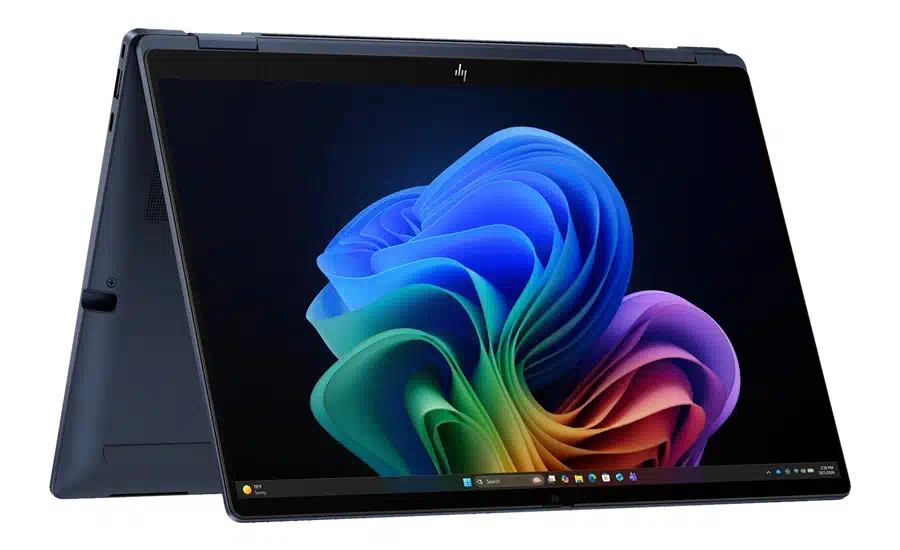
Portability is also a major positive factor of this laptop. Despite its premium metal body, it weighs only 1.3kg, making it easy to carry all day. The hinge also feels smooth and supports a full 360° rotation, letting you use the laptop in different office scenarios.
When it comes to durability and build quality, the laptop has also passed 19 MIL-STD-810H military-standard tests along with approximately 120,000 hours of HP’s internal testing, highlighting its ability to withstand harsh conditions that business users may encounter in everyday use. For an average office user, this level of durability is valuable, helping to reduce the risk of damage or unexpected work interruptions.
Overall, the combination of a lightweight metal body, durable construction, and flexible hinge makes the EliteBook X G2i Flip 14-inch especially suitable for professionals who often work while on the move.
Display
For the display, the EliteBook X G2i Flip 14 comes in different variants, including both OLED and IPS displays. The one we are reviewing comes with a 14-inch OLED screen which has the following specifications:
- 2880 x 1800 resolution
- 120Hz refresh rate (with Variable Refresh Rate)
- 16:10 aspect ratio
- Touch Supported
- Anti-Glare Display
- 100% DCI-P3 color gamut
The laptop offers higher specifications, including a 2.8K resolution and a 120Hz refresh rate. It also supports Variable Refresh Rate, which automatically reduces the refresh rate based on usage to save battery life. Moreover, it also has features such as 500 nits of brightness, anti-glare coating, and HDR support, indicating that the display’s performance would be excellent.
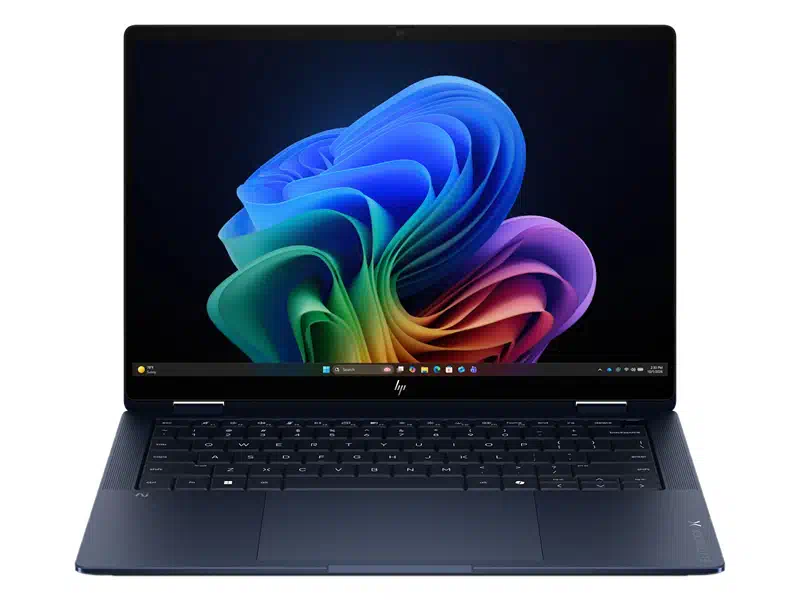
In addition, the display also supports multi-touch. Combined with 360° rotation, the laptop can also be used as a large tablet, which is useful in office scenarios. To check how much better this display is, we also conducted a benchmark test.
Brightness Test:
In this test, we measured a peak brightness of 511 nits in SDR mode (8 nits higher than the official claim), and 942 nits in HDR mode.
Color Gamut Test:
For this test, we used the SpyderX and got the following results:
- 100% sRGB coverage
- 97.6% AdobeRGB coverage
- 99.9% DCI-P3 coverage
The benchmark results indicate this display can fully meet the needs of high-end office work.
Keyboard
Below the display is a compact keyboard. The keyboard feels comfortable and responsive during long-term use. It features a 1.5mm key travel, which may feel a little shallow for users accustomed to deeper keyboards, such as ThinkPad users. However, the keys remain consistent, responsive, and comfortable enough for long typing sessions without noticeable fatigue.
The keycaps have a slightly concave surface that fits the fingertips well and enhances the overall typing experience. The keyboard also features two levels of backlighting, making it easier to work in both dim and very dark environments. The power button (located at the top-left) includes an integrated fingerprint reader, allowing the user to quickly and securely log in to Windows. Additionally, the F7 key works as a dedicated screenshot button, and the F11 key is a customizable key that can be set to quickly open a preferred file, application, or website.
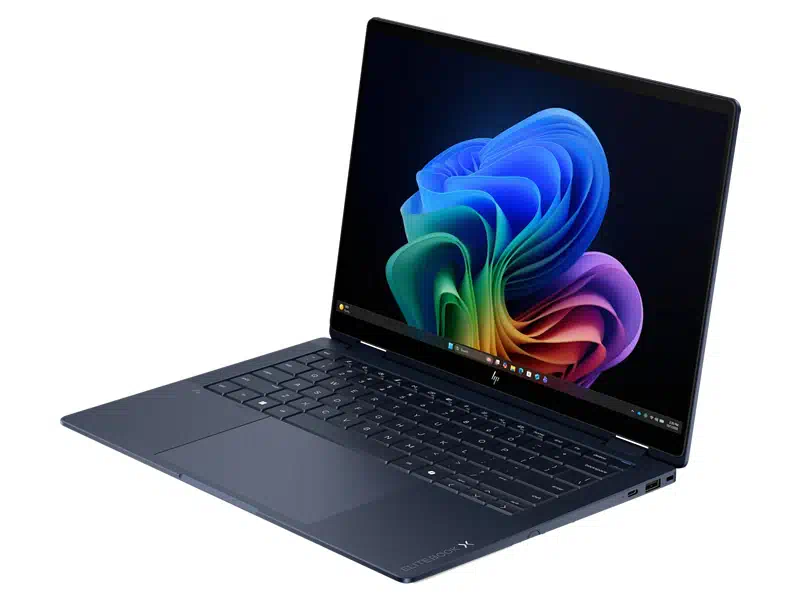
The company has made the keyboard easy to maintain. It comes with a quick-release mechanism, so you can remove it easily whenever needed. Plus, the keyboard is spill-resistant, offering some extra protection if you accidentally spill something.
Below the keyboard, there is a generously sized touchpad with a smooth surface. Finger movements feel effortless and precise, giving the touchpad a refined and premium feel in everyday use.
Ports and Network
For connectivity, the EliteBook X Flip G2i 14 has seven ports. Starting with the left side, it has the following ports:
- 1x HDMI 2.1
- 2x USB Type-C with Thunderbolt 4 support (supports transfer up to 40Gbps, PD and DP)
- 1x 3.5mm headphone jack
On the right side, we have:
- 1x Kensington lock slot
- 1x USB Type-A port (with up to 5Gbps transfer rate)
- 1x USB Type-C port (with up to 10Gbps transfer rate, supports PD and DP)
Before discussing it further, it is worth noting that HP also provides a SIM card slot (5G SIM cards are supported) in some variants; the one we are reviewing doesn’t have it. All Type-C ports support Power Delivery and DisplayPort, so you can use them for video output and charging. With this many ports, we can be confident an average user won’t need to buy an additional dock or extender.
For wireless connectivity, the laptop comes with an Intel Wi-Fi 7 BE211 (2×2) and Bluetooth 6 wireless card (non-vPro). During our testing with a Wi-Fi 7 access point, the connection stayed fast and stable across two rooms, with no noticeable drop. Overall, the laptop provides strong and reliable wireless connectivity for both office and everyday use.
Battery and Charging
Inside the laptop, the company has used a 6-cell 68WH Li-ion polymer battery. The battery capacity may seem small, but given the laptop’s size, it fits well. To test the battery’s performance, we also conducted a benchmark using PCMark 10 Modern Office.
At 150 nits of brightness and in energy-saving mode, we got 20 hours and 22 minutes of battery life, which is pretty impressive. This makes it a strong choice for frequent travelers and professionals who often work away from a power outlet.
For charging, HP includes a 65W USB Type-C charger that can charge 50% of the battery in just 30 minutes. If your battery is running low, a quick charge during your lunch break should be enough to get you through the rest of the day.
RAM and SSD
The variant we received comes with 64GB of LPDDR5x 9600MT/s (9600MHz) RAM. This RAM is soldered to the motherboard and cannot be upgraded, so make sure to choose the right capacity (24GB, 32GB, or 64GB) when purchasing. While the lack of upgradeability is a drawback, soldered memory generally offers faster performance than conventional replaceable RAM modules.
On the storage side, the laptop comes with a 1TB PCIe 5.0 SSD. For upgradability, the laptop has only one SSD slot. To upgrade the storage capacity, you need to replace the current SSD. The maximum storage supported is 2TB of PCIe 5.0 storage. To avoid hassle later, it’s best to choose your storage carefully from the start.
Webcam and Audio
At the top bezel of the display, the company integrated a 5MP AI MIPI webcam with IR support, delivering clear, detailed video quality and making it well-suited for Teams, Zoom, and other business meeting apps. It also supports features such as AI Presence Detection, auto framing, background blur, voice leveling, and other enhancements through Poly Camera Pro. The company has also included a physical webcam shutter beside the 5MP sensor that can completely block the camera when not in use.
HP continued its collaboration with Poly Studio. The setup includes a quad-speaker system with dedicated amplifiers to deliver clear and surprisingly rich sound compared to other business-segment laptops. The laptop also features AI-based noise reduction for both speakers and microphones, helping reduce distracting background noise during calls. Combined with the dual-array microphones, the overall setup provides clear voice pickup and a reliable conferencing experience.
CPU and GPU
For the CPU, HP offers several options in the EliteBook X Flip G2i 14-inch. The review unit we received is powered by the Intel Core Ultra X7 358H CPU, based on the Panther Lake architecture. It has the following specifications:
- Based on TSMC’s 3nm manufacturing process
- 16 Cores and 16 Threads
- 4 P-Cores (1.9GHz Base Frequency and 4.8GHz Max Frequency)
- 8 E-Cores (1.5GHz Base Frequency and 3.5GHz Max Frequency)
- 4 LP E-Cores (1.5GHz Base Frequency and 3.3GHz Max Frequency)
- 25W Base TDP and 80W Max TDP
- 18MB Intel Smart L3 Cache
- Integrated Intel Arc B390 GPU
The CPU’s hybrid architecture includes all three types of cores: performance cores, energy-efficient cores, and low-power energy-efficient cores, allowing the CPU to balance performance and power efficiency depending on the workload. With a maximum 80W TDP, it can handle all demanding productivity, multitasking, and content creation workloads when needed. At the same time, the low-power cores help improve efficiency during lighter everyday tasks, which is particularly important for a thin and portable business laptop.
GPU:
The CPU also comes with the integrated Intel Arc B390 GPU, featuring 12 Xe cores with a maximum clock speed of 2.5GHz and peak AI performance of up to 122 TOPS. It also includes a dedicated NPU capable of delivering up to 50 TOPS of AI computing performance.
CPU Benchmarks:
The following are some of the CPU benchmark results we obtained:
- Cinebench R23: 2,032 pts on Single-Core and 18,752 pts on Multi-Core
- Cinebench 2024: 119 pts on Single-Core and 1,004 pts on Multi-Core
- Cinebench 2026: 498 pts on Single-Core and 3821 pts on Multi-Core
- 3DMark Time Spy: Total 3,591 score, including 5,431 CPU score and 3,378 GPU Score
Overall, these results show that the EliteBook X Flip G2i 14 delivers strong CPU performance along with surprisingly capable integrated graphics for a compact business notebook.
Cooling System and Stress Test
The HP EliteBook X Flip G2i 14 uses a simple cooling setup with two fans and a single heat pipe. Considering the laptop’s dimensions, this cooling system seems quite reasonable.
Stress Testing:
When the laptop was left idle in Balanced mode, the CPU temperature was 42.5°C, while the power consumption ranged from 4W to 8W. The fans were almost silent, staying below 30dB, and the keyboard’s surface temperature was around 31.2°C (at the center).
To stress the CPU, we used the Blender benchmark software in High Performance mode. After a short while, the CPU temperature reached 97°C with a maximum power consumption of 52W. The peak measured frequency was 4.5GHz on the P-Cores and 3.1GHz on the E-Cores. Noise-wise, the fan reached 55dB, although the keyboard’s central surface temperature remained fairly controlled at around 31°C.
Overall, the cooling system in the EliteBook X Flip G2i 14 keeps it reasonably cool. However, the CPU runs very close to its thermal limit under sustained heavy workloads, and the fan noise also becomes clearly noticeable.
Conclusion
The HP EliteBook X Flip G2i 14 is a premium all-rounder laptop that combines performance, solid build quality, flexibility, and long battery life in a compact body. Its 360-degree hinge, strong hardware, reliable connectivity, and collaboration-focused features make it suitable for professionals who frequently move between office work, meetings, and travel.
The price may seem expensive, but the overall package is supported by business-grade durability and strong hardware. For professionals looking for a premium convertible laptop that can handle demanding workloads while remaining portable and versatile, the HP EliteBook X Flip G2i 14 presents a strong case for itself.
Pros:
- Premium metal construction with military-grade durability
- Strong specifications such as a 2.8K OLED display and Core Ultra X7 358H CPU
- Excellent Battery Life
- 360-degree convertible design
Cons:
- Expensive when compared with mainstream business laptops
- Soldered RAM, cannot be upgraded later
- Loud Fan noise during sustained workloads