
Because of the memory chip shortage, we have seen huge price increases across almost every electronic device that uses them. Especially for laptops, prices have risen significantly, which has also reduced buyers’ purchasing power.
Our targeted laptop for review is the HP HyperX Omen 16 am-2000. The laptop belongs to the HP HyperX Omen series, which is a familiar name in the gaming laptop segment, offering a complete package of powerful hardware, modern design, and gaming-focused features.
The HyperX Omen 16 features updated hardware, a refined design, and several features designed to deliver a better gaming experience. In terms of specifications, the laptop is powered by an Intel Core Ultra HX series CPU combined with NVIDIA’s latest RTX 50 series GPUs. It also includes essential components like a 2.5K display, 16GB DDR5 RAM, and a 1TB PCIe 4.0 SSD.
The variant we received for review is currently priced at $1,799. However, in the upcoming 11.11 sales, a discount of $200-300 is expected from HP. In many regions (including China), HP has already announced the discount for this model. Let’s take a closer look at the notebook’s key features and capabilities to help you make a well-informed purchasing decision.
Design and Appearance
At first glance, the HyperX Omen 16 am-2000 follows a minimalist design approach, avoiding the aggressive design that is commonly found in most gaming laptops. The laptop feels quite clean and sophisticated, making it suitable for both gaming and office use.
Starting with the display lid, HP has chosen a fully metallic matte finish, complemented by a glossy HyperX logo in the center. The metal construction offers a premium feel, while the clean surface also helps maintain the laptop’s overall aesthetic.
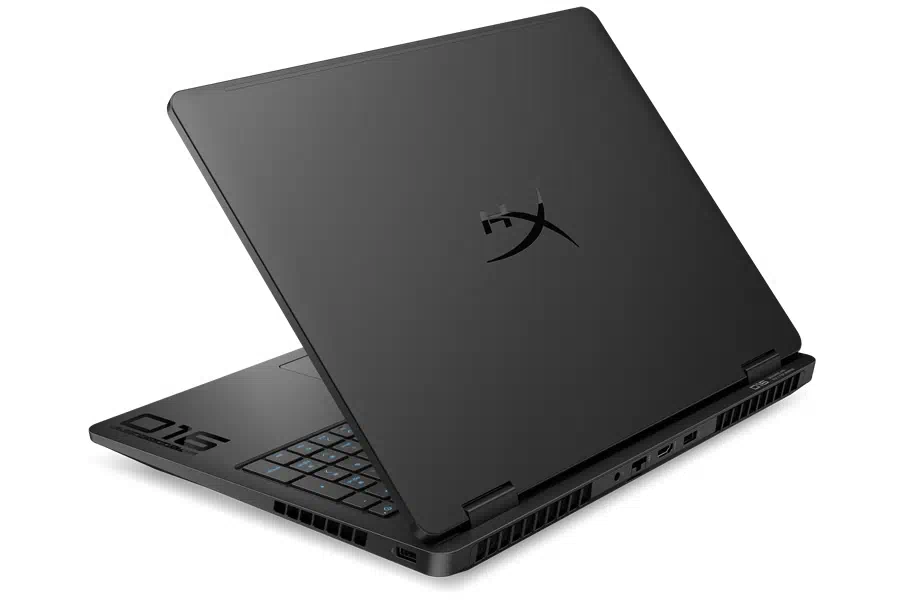
The keyboard surface and bottom panels are not made of metal, but their finish closely matches the lid, giving the laptop a consistent and refined appearance. Another positive design feature is the vertically positioned hinge mechanism. Unlike the previously used recessed hinges, this design prevents the rear ventilation outlets from being blocked when the laptop is opened.
The laptop measures 357.5 x 269 x 25.9 mm and weighs about 2.48 kg. The laptop may not seem lightweight, but considering its powerful hardware, the weight is reasonable.
Overall, HP has provided an attractive combination of simple design and practical construction.
Specifications
| Processor | Intel Core Ultra 7 255HX (up to 5.2 GHz with Intel Turbo Boost Technology, 30 MB L3 cache, 20 cores, 20 threads), Intel AI Boost (13 NPU TOPS) |
| Graphics card | NVIDIA GeForce RTX 5070 Laptop GPU (8 GB GDDR7 dedicated) |
| Screen | 16.0-inch, 2.5K (2560 x 1600), 240 Hz, 3 ms response time, IPS, micro-edge, antiglare, Low Blue Light, 500 nits, 100% sRGB |
| Memory | 16 GB DDR5-5600 MT/s (1 x 16 GB), two slots |
| Storage | 1 TB PCIe Gen 4.0 x4 NVMe M.2 SSD |
| Wireless Connection | Intel Wi-Fi 7 BE211 (2×2) and Bluetooth 6.0 |
| Ports | 1x USB 3.2 Gen 2.0 Type-C port; 10 Gbps signaling rate (USB Power Delivery 3.0, DisplayPort 1.4, HP Sleep and Charge) 1x USB 3.2 Gen 2.0 Type-A port; 10 Gbps signaling rate 2x USB 3.2 Gen 1.0 Type-A ports; 5 Gbps signaling rate 1x RJ-45 Ethernet port 1x Headphone/microphone combo port 1x HDMI 2.1 port 1x AC smart pin |
| Battery | 6-cell Li-ion Polymer battery, 83 Wh, supports fast battery charging (50% charged in 30 minutes) |
| OS | Windows 11 Home |
| Weight | 2.48 kg |
Display
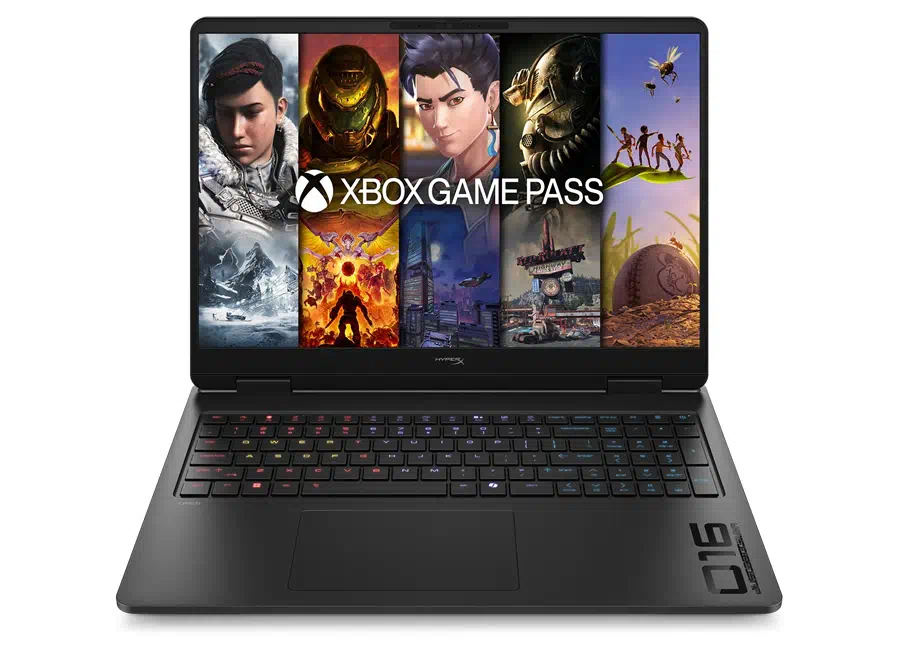
From the laptop name (HP HyperX Omen 16), it’s clear it has a 16-inch display. HP has provided four display options globally. The variant we received comes with a 2.5K IPS display, which has the following specifications:
- 2.5K (2560 x 1600) resolution
- 240Hz refresh rate
- 16:10 aspect ratio
- Supports Variable Refresh Rate (VRR) and DC Dimming
- 3ms response time
- 100% sRGB color gamut coverage
The left and right bezels are quite narrow. The upper bezel features a webcam along with a privacy shutter. The high-end specifications deliver a smooth and detailed visual experience with fast response times, making it ideal for gaming.
Display Benchmarks
We also conducted a benchmark test of the display in three phases (sRGB mode), which are mentioned below:
Brightness Test
This test was conducted using the SpyderX Colorimeter, which measured a peak brightness of 620 nits with a contrast ratio of 1320:1. The result is 120 nits higher than the official claim (i.e., 500 nits), also indicating that the display would perform well in brightly lit indoor environments.
Color Gamut Testing:
In color gamut testing, we found that the display covers:
- 99.9% sRGB color gamut and 110.8% sRGB volume
- 73.5% AdobeRGB color gamut and 76.4% AdobeRGB volume
- 78.6% DCI-P3 color gamut and 78.6% DCI-P3 volume
Color Accuracy Test:
In terms of color accuracy, we achieved an average Delta E of 1.22 (max 2.78), indicating excellent color reproduction.
Although HP has not officially specified the display’s color accuracy, the test results were remarkably impressive.
Keyboard and Touchpad
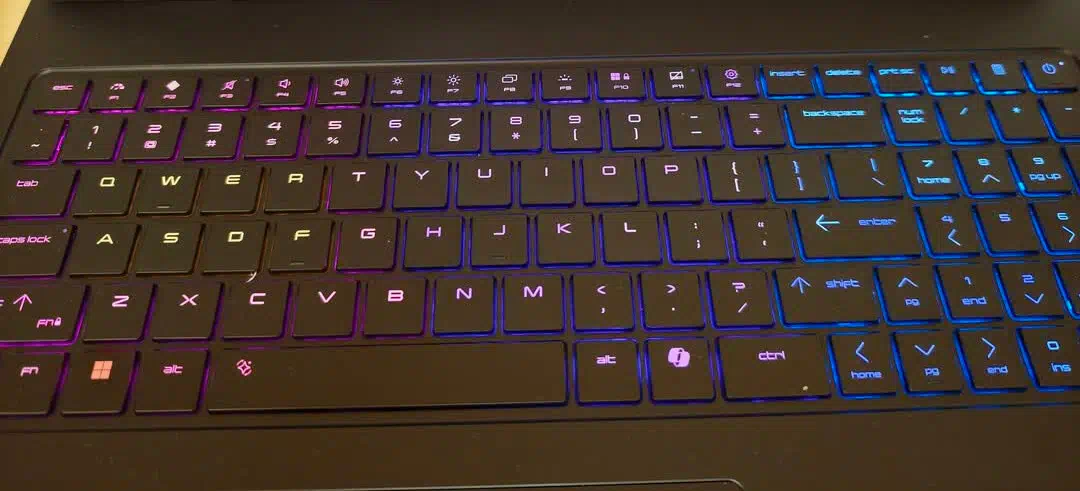
Under the hood, we have a full-sized keyboard that isn’t ordinary and includes a numeric pad. HP has equipped it with an 8kHz high-speed keyboard, offering a polling rate of up to 8,000Hz and a theoretical response latency as low as 0.125ms. Compared to previous gaming laptop keyboards, the higher polling rate enables faster input, which can be particularly beneficial in fast-paced competitive gaming.
The keyboard features full-sized arrow keys, making it easier for gamers who use directional controls often. Another benefit is the power button’s placement in the upper-right corner, which reduces the chance of accidental presses during gaming.
It also has 4-zone RGB backlighting, which is an essential feature in a gaming-focused notebook. One of these lighting zones is dedicated to frequently used keys, including the QWER and ASDF keys. All of this color customization can be done through the OMEN Gaming Hub software.
TouchPad:
Under the keyboard, there is a fairly large touchpad that matches the laptop’s minimalist design. Its smooth surface is designed to allow comfortable finger movement, and support for multi-touch gestures makes everyday navigation easier. Although most gamers prefer using an external mouse, the touchpad remains a practical option for regular productivity tasks.
Overall, the HP HyperX Omen 16 am-2000 offers a feature-rich keyboard designed with competitive gamers in mind.
Ports and Connectivity
For wired connectivity, the HP HyperX Omen 16 am-2000 offers a variety of ports for daily office needs and eliminates the need for additional USB docks. HP has added ports on all three sides. Starting from the left side, it has:
- 1x USB-A (5Gbps transfer rate)
- 1x USB-C (10Gbps transfer rate, DisplayPort 1.4 and HP Sleep Charging port)
- 1x 3.5mm Headphone jack
On the right side, we have:
- 1x USB-A (5Gbps transfer rate)
On the back side, we have:
- 1x USB-A (10Gbps transfer rate)
- 1x HDMI 2.1 port
- 1x RJ45 LAN port
- 1x Charging port
HP has thoughtfully arranged the ports, placing those typically connected to longer cables at the rear of the notebook. This helps minimize cable clutter and keeps the workspace neat and organized.
Network:
For wireless connectivity, HP has provided different Wi-Fi card options. The variant we received comes with an Intel Wi-Fi 7 BE211 (2×2) network card, which provides faster and more stable connections with lower latency. It also supports Bluetooth 6.0 for seamless connectivity with compatible wireless peripherals.
RAM and SSD
The variant we received comes with 16GB DDR5 memory and 1TB of PCIe 4.0 storage. The 16GB DDR5 memory is single-channel at 5600MHz. The laptop has two RAM slots and can be expanded up to 32GB.
The laptop comes with a 1TB PCIe 4.0 SSD. Like the RAM, HP provides two SSD slots, with the primary slot also supporting PCIe 5.0 SSDs. The two SSD slots eliminate the need to replace the current SSD to upgrade storage. We also performed a benchmark test of the SSD using the CrystalDiskMark application, and we got the following results:
- Sequential Read Speed: 7,139.89 MB/s
- Sequential Write Speed: 6,585.59 MB/s
- 4K Random Read Speed: 93.57 MB/s
- 4K Random Write Speed: 267.11 MB/s
The SSD delivered impressive benchmark results. Overall, these results demonstrate excellent storage performance, placing it among the high-performing PCIe 4.0 SSDs.
Battery and Charging
HP offers two battery options in the HP HyperX Omen 16: a 4-cell 70WH battery and a 6-cell 83WH battery. The variant we received has the 6-cell option and uses a lithium-ion polymer battery. The battery capacity may seem reasonable for a 16-inch laptop, but this is not our main concern since it is a gaming notebook. For optimal gaming performance, it is recommended to keep the notebook plugged into its charger to ensure maximum power output.
Charging:
On the charging side, HP has provided different chargers in different regions (the charger is sold separately in certain regions). The charger we received is a 280W charger and can charge 50% of the battery in just 30 minutes. The notebook also supports charging through the Type-C port, but a minimum of a 100W charger is required.
CPU Benchmark:
The HP HyperX Omen 16 am-2000 comes with various options, including Intel and AMD CPUs. Our review unit is powered by the Intel Core Ultra 7 255HX CPU, the second-generation Intel Ultra HX series chipset. The CPU specifications are as follows:
- Based on Arrow Lake architecture
- Total 20 Cores
- 8-Performance Cores (2.4GHz Base Frequency and 5.2GHz Peak Frequency)
- 12-Efficient Cores (1.8GHz Base Frequency and 4.5GHz Peak Frequency)
- Total 20 Threads
- 55W Base TDP and 160W Max TDP
- 30MB Intel Smart L3 Cache and 36MB L2 Cache
- Integrated Intel GPU with four Xe Cores
The specifications show strong hardware. Let’s move on to the benchmark section to see how well this CPU would perform.
CPU Benchmarks:
The following are the benchmark results of the CPU:
- Cinebench R23: 2,089 score on single-core and 32,042 score on multi-core
- Cinebench 2024: 126 points on Single-Core and 1,565 points on Multi-Core
- Maxon Cinebench 2026: 511 pts on Single-Core and 6,215 pts on Multi-Core
Both single-core and multi-core scores are quite decent. We can place it in the mid-to-high tier of current mobile CPU platforms.
GPU Benchmarks:
As with the CPU, we have multiple GPU options, including RTX 5060, RTX 5070, and so on. The variant we received is equipped with an RTX 5070 GPU that comes with 8GB of GDDR7 video memory. The specifications of the GPU are as follows:
- Based on TSMC 4N FinFET architecture
- 128-bit Memory Bus
- 4608 CUDA cores
- 1837MHz Base and 2175MHz Peak Frequency with Max 115W TGP
- Supports DLSS 4.5 Multi-Frame Generation
We entered the laptop into Master Mode through Omen Gaming Hub, and the base clock (i.e., 1500MHz) increased to 1837MHz. To check the GPU’s performance output, we also conducted a GPU benchmark test.
GPU Benchmarks:
The following are the GPU benchmarks:
- 3DMark Steel Nomad Light: 14,725 points with 110 FPS of GPU Performance
- 3DMark Time Spy: 14,398 points with 14,412 GPU score
- 3DMark Fire Strike Extreme: 18,436 points with 18,679 GPU Score
The benchmark results above show strong performance, and we can rank it the same as a mid-to-high-tier CPU. With support for up to 6x higher frame rates in compatible games, it can run most modern games smoothly.
Gaming Test
It’s time for the most anticipated part: the gaming benchmark test of this laptop. The following are some modern AAA games along with their benchmark results:
Black Myth: Wukong
Starting with this game, we set the resolution to 2560 x1600 and DLSS Frame Generation to 4x. When ray tracing was disabled, we got an average of 200 FPS with high presets, and even with ultra-high presets, we got an average of 150 FPS.
When ray tracing was enabled, the frame rates dropped slightly, but the frame rates on medium presets were quite good, averaging around 168 FPS, which is relatively smooth. On high and ultra-high settings, frame rates fluctuated around 100 FPS.
Cyberpunk 2077:
Cyberpunk 2077 supports up to 6x DLSS frame generation, which is why we tested it in both 4x and 6x modes. At 2.5K resolution with DLSS frame generation set to 4x, we achieved an average of 150.36 FPS with ray tracing enabled and 194 FPS with ray tracing disabled.
While using the same resolution and 6x DLSS frame generation, we achieved an average of 180.26 FPS on the medium preset with ray tracing enabled. On the Ultra preset with ray tracing enabled, the frame rates dropped sharply, most likely due to 8GB graphics memory strain or game compatibility issues.
Shadow of the Tomb Raider:
At the same 2.5K resolution, with NVIDIA RTX DLSS Quality enabled and the highest image preset, we achieved an average of 157 FPS. Multi-frame generation isn’t needed, as the smoothness is already good.
CS: GO
The gaming test phase would end with this game. At 2.5K with the highest image preset, the average frame rate was 185 FPS. Meanwhile, at Full HD resolution, the average frame rate reached an impressive 526 FPS.
Overall, it has been observed that the HP HyperX Omen 16 can deliver exceptional gaming performance on medium to high graphics settings.
Cooling System and Stress Testing
As a gaming notebook, the HP HyperX Omen 16 am-2000 should have a strong heat dissipation system for an excellent peak gaming experience without interruptions due to heat. Inside the notebook, there is a large cooling system that includes dual cooling fans, six heat pipes, and four exhaust vents arranged in a six-channel airflow design. To further enhance performance, both the CPU and GPU use a phase-change thermal compound with a thermal conductivity of 8.5 W/m·K (Watts per meter-Kelvin). In addition, the laptop features a reverse-fan dust-removal mechanism that helps minimize dust accumulation and maintain cooling efficiency over time.
To test how good this cooling system is, we conducted stress testing in three phases, which are discussed below:
CPU Stress Test:
For this test, we used the AIDA64 CPU stress application. After running the test for a while, the CPU’s power consumption remained stable at around 111W while the CPU’s package temperature was around 78°C.
GPU Stress Test:
For the GPU, we used the FurMark benchmark application. After running the test for a while, the GPU’s power consumption stabilized at 115W (peak consumption) while the core temperature was 60°C, demonstrating excellent temperature control.
Combined Test:
Finally, it’s time to stress both the CPU and GPU at the same time. After a while of testing, the CPU’s power consumption stabilized at 87W with a core temperature of 85°C, while the GPU’s power consumption was 115W with a core temperature of 71°C.
Overall, temperature control was excellent in every phase of testing, eliminating the risk of overheating during gaming.
Final Conclusion
After reviewing each area, we can say that the HP HyperX Omen 16 am-2000 stands out as a powerful and well-equipped gaming laptop, offering an impressive package of performance, sleek design, and gaming-focused features. The all-new 8kHz fast-click keyboard, combined CPU and GPU power output exceeding 200W, and intelligent OMEN AI optimization provide a competitive edge over many conventional gaming notebooks. Its updated design, high-resolution IPS display, and excellent cooling system further enhance its appeal.
The benchmark results show strong performance across the board while maintaining efficient thermal management. Its high-resolution display and fast, responsive keyboard make it particularly attractive to competitive esports players. In short, this laptop is a solid choice for gamers and enthusiasts seeking a capable, feature-rich gaming notebook that balances performance, cooling efficiency, and everyday usability.
Pros:
- Premium and Sleek Design with Solid Build Quality
- 2.5K Resolution Display with 240Hz Refresh Rate
- Excellent CPU and GPU Performance for demanding AAA games
- All-new Ultra-responsive 8kHz keyboard
Cons:
- Relatively Heavy and Bulky for carrying
- VRAM could be higher