
The highly anticipated launch of GTA 6 is just around the corner, and the gaming community now has another reason to consider upgrading their hardware. It is worth noting that the game will not initially be available on Windows. However, investing in a powerful and future-ready machine can help buyers ensure a smooth gaming experience when the game becomes available for PC.
The notebook we received for today’s review is a future-ready machine named MSI Crosshair 18 HX AI A2XW, the latest addition from MSI, featuring the updated Intel Core Ultra 200HX series CPU. It has an 18-inch display, which is becoming increasingly common in the mainstream gaming segment.
It is worth noting that a couple of years ago, 18-inch gaming laptops were primarily limited to expensive, flagship-tier models. The larger displays provided a more immersive visual experience, while the bigger dimensions allowed manufacturers to include more capable cooling solutions. However, with this laptop, buyers can get all the advantages without necessarily moving into the ultra-premium category.
The MSI Crosshair 18 HX AI A2XW comes with a powerful combination of Intel Core Ultra 9 275HX and an RTX 5070 mobile GPU (with 12GB of GDDR7 VRAM). With its gaming-oriented design and excellent cooling capabilities, the laptop aims to deliver a compelling mix of performance and immersion. Let’s take a closer look at every aspect of the laptop.
Specifications
| Processor | Intel Core Ultra 7 275HX (up to 5.4 GHz with Intel Turbo Boost Technology, 24 cores, 24 threads), Intel AI Boost (13 NPU TOPS) |
| Graphics card | NVIDIA GeForce RTX 5070 Laptop GPU (12GB GDDR7), 115W |
| Screen | 18″ QHD+(2560×1600), 240Hz, 100% DCI-P3 |
| Memory | 16GB (8GB x 2), DDR5 5600MHz |
| Storage | 1 TB PCIe Gen 4.0 NVMe M.2 SSD |
| Wireless Connection | Intel Wi-Fi 6E AX211(2*2 ax) |
| Ports | 1x RJ45 1x Thunderbolt™ 4 (DisplayPort/ Power Delivery 3.0) 3x Type-A USB3.2 Gen1 1x HDMI™ 2.1 (8K @ 60Hz / 4K @ 120Hz) |
| Battery | 4-cell Li-ion Polymer battery, 90 Wh, 240W adapter |
| OS | Windows 11 Home |
| Weight | 6.83lb |
Appearance
At first glance, it is evident that the laptop has a bold, gaming-focused design that combines futuristic aesthetics with a relatively restrained appearance. The laptop is available only in a single color, Matte Black, giving it a sleek yet aggressive appearance.
On the backside of the laptop, we have MSI branding along with a large dragon shield logo that adds character to the otherwise understated exterior. The angular detailing and sharp lines around the laptop further demonstrate its gaming identity, while the contrasting ventilation grilles give it a more mechanical and almost mecha-inspired appearance.
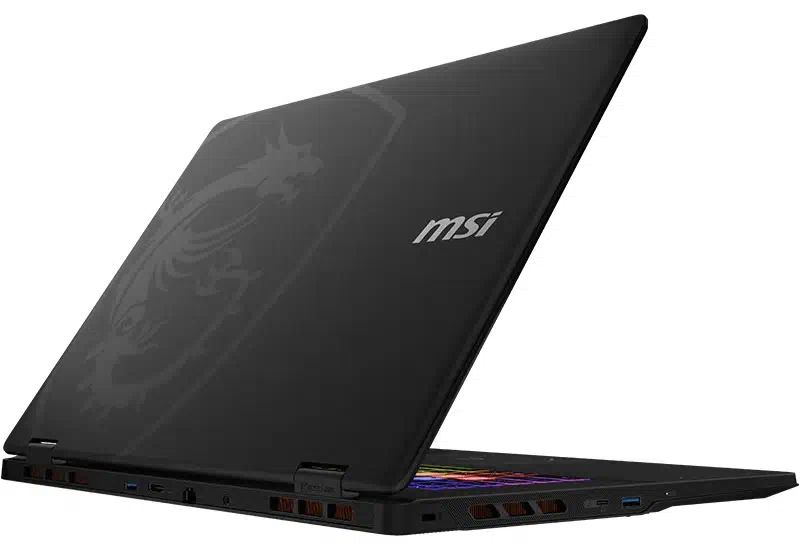
The laptop has dimensions of 404 x 280 x 25.6 – 29.9 mm and weighs 3.1kg. The laptop is quite large and heavy, suggesting this gaming laptop isn’t meant for frequent travel but for users who want a larger display and robust hardware. Furthermore, its bigger size also provides additional room for a larger and more efficient cooling system.
Overall, this laptop strikes a balance between an aggressive gaming look and a more refined appearance.
Display
On opening the laptop lid, you will be greeted with an 18-inch Quad-HD IPS panel which has the following specifications:
- Quad-HD+ (2560 x 1600) Resolution
- 240Hz Refresh Rate
- 16:10 Aspect Ratio
- 100% DCI-P3 color gamut coverage
- 500 nits Peak Brightness
After using the display for a while, the image clarity and smoothness felt very good, and the colors were quite rich, resulting in excellent visual effects during gaming. Compared with a 16-inch display, the 18-inch display is only 2 inches larger, but the impact on the viewing experience is much more noticeable in practice. At a typical viewing distance, the larger display occupies a greater portion of the user’s field of view, creating a more engaging and immersive gaming experience.
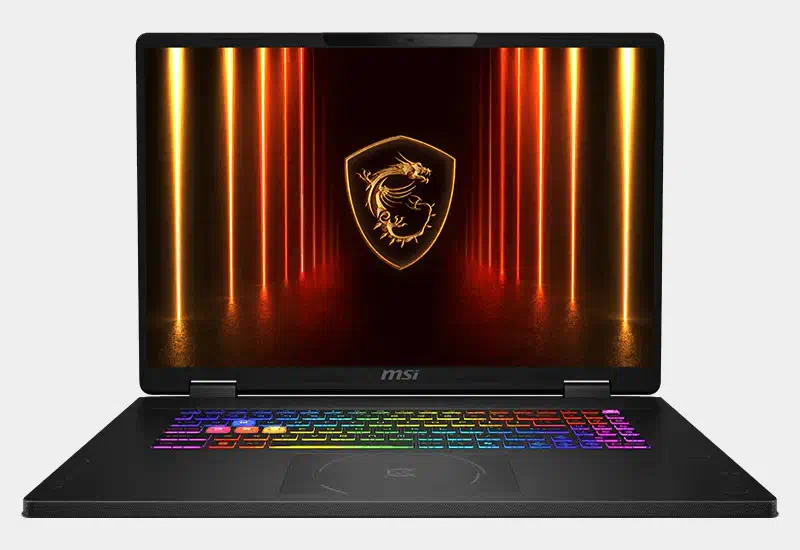
Display Benchmarks:
We also conducted a benchmark test of the display, which is as follows:
Peak Brightness Test:
Using SpyderX, we found that the display has a peak brightness of 559 nits, 59 nits higher than the official claim.
Color Gamut Test:
Using SpyderX, we found that the display covers:
- 99.8% sRGB color gamut and 151.5% color gamut volume
- 86.5% AdobeRGB color gamut and 105.5% color gamut volume
- 99.4% DCI-P3 color gamut and 105.8% color gamut volume
Overall, the display delivered an excellent experience in terms of both brightness and colors with an impressive color accuracy, making it a great choice for both gamers and content creators.
Keyboard and Touchpad
Under the display, the MSI Crosshair 18 HX AI A2XW has a full-size gaming keyboard with 24-zone RGB backlighting, allowing users to assign different colors and lighting effects to specific sections.
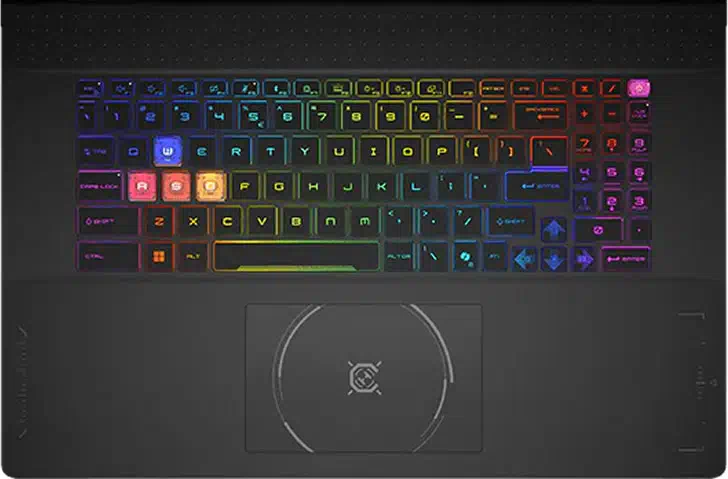
In the keyboard layout, the WASD keys and the power button with a semi-transparent design are visible, making them stand out from the other keys. The keyboard also includes a dedicated numeric keypad and full-sized arrow keys, which is a good attempt by MSI to replace the need for an external keyboard.
After using the keyboard for a while, we found that the keys are relatively large and offer moderate key travel with responsive feedback and a good rebound experience, providing a comfortable typing experience, especially during longer gaming sessions.
TouchPad
Below the keyboard, we have a moderately sized touchpad that features mecha-style paintwork. After using it for a while, it became clear that its surface offers smooth movement and decent responsiveness for everyday navigation. However, a typical gamer would naturally prefer an external mouse for better precision and control during gameplay.
Overall, the Crosshair 18 HX AI offers a comfortable and adaptive keyboard with customizable RGB lighting, which further enhances its gaming appeal. On the other hand, the touchpad also provides a decent experience for daily office use.
Connectivity
The MSI Crosshair 18 HX AI A2XW is fully equipped with ports. It comes with all the ports that are essential for gaming. MSI has placed them on all three sides: right, left, and back. Starting from the left side, we have:
- 1x Kensington Lock
- 1x USB-C Thunderbolt 4 (supports DisplayPort and Power Delivery 3.0, 100W Charging)
- 1x USB-A 3.2 Gen1 port
On the right side, we have:
- 1x USB-A 3.2 Gen1 port
- 1x 3.5mm Headphone Jack
On the back side, we have:
- 1x USB-A 3.2 Gen1 port
- 1x HDMI 2.1 (supports 8K@60Hz/4K@120Hz)
- 1x RJ45 LAN port
- 1x DC-in (charging port)
One thing we observed is that MSI has placed the USB-A ports on all three sides, providing greater flexibility when connecting peripherals. Another point is the placement of ports for cables that are more likely to remain connected, such as power, HDMI, and Ethernet, at the back of the laptop. This helps minimize cable clutter around the workspace, resulting in a cleaner and more organized setup.
Wireless Connectivity:
The MSI Crosshair 18 HX AI A2XW features a Wi-Fi 6E AX211 WLAN card with Bluetooth 5.4 support. The Wi-Fi 6E band provides fast and stable connections with reduced latency, especially on compatible 6GHz networks. Additionally, Bluetooth 5.4 enables seamless connectivity with wireless peripherals such as headphones, mice, and controllers.
RAM and SSD
In terms of memory and storage, the variant we received comes with 16GB of DDR5 RAM and a 1TB PCIe 4.0 SSD. The DDR5 RAM runs at 5600 MT/s and is dual-channel memory (2x 8GB RAM sticks). Inside the notebook, there are two SO-DIMM RAM slots, and the official site mentions a maximum RAM upgrade of up to 96GB.
We already mentioned that the laptop comes with a 1TB PCIe 4.0 SSD. However, it is worth noting that the laptop has two SSD slots, one of which also supports a PCIe 5.0 SSD. In the end, we conducted a benchmark test of the SSD, which is mentioned below.
SSD Benchmarks:
The benchmark results of the SSD are as follows:
- Sequential Read Speed: 6,992.79 MB/s
- Sequential Write Speed: 6,093.21 MB/s
- Random 4K Read Speed: 87.6 MB/s
- Random 4K Write Speed: 345.21 MB/s
The benchmark results of the SSD demonstrate excellent performance and also show that the SSD belongs to the high-end category.
Battery and Charging
Next, head toward the battery section. We won’t go into much detail on the battery, since it is a gaming notebook where performance matters more than battery life. The MSI Crosshair 18 HX AI comes with a 4-cell, 90 Wh battery that provides decent battery life for office use or light work.
On the charging side, the manufacturer has provided a 240W charger to meet the power demands of the notebook’s high-performance hardware. In addition, the MSI Crosshair 18 HX AI also supports 100W charging via the USB-C Thunderbolt 4 port. There is no doubt that this is a convenient option for everyday use and travel, but the 240W adapter still remains the preferred option for gaming and other intensive workloads.
Webcam and Audio
For audio output, the notebook comes with 2x 2W speakers. Moreover, it also supports Hi-Res audio (as claimed by the officials), providing high-quality audio reproduction when paired with compatible audio equipment. In addition, MSI has included Nahimic Audio enhancement technology, which delivers immersive 3D surround sound to enhance spatial awareness during gaming, making it easier to distinguish directional audio cues such as footsteps and environmental effects.
In the webcam area, we have an HD camera sensor (records 720p video at 30 fps) that delivers decent video quality during video conferences. The addition of 3D Noise Reduction (3DNR) technology also helps minimize image noise and improve video clarity. Alongside the webcam sensor, MSI has also included a physical privacy switch that can manually block the camera view for enhanced security.
CPU
The variant we got is powered by the Intel Core Ultra 9 275HX CPU, the highest available option in this model. The CPU belongs to Intel’s 2nd Generation Core Ultra HX series, which is famous for its high-end mobile CPUs. The specifications of the CPU are as follows:
- Based on Arrow Lake architecture (TSMC N3B)
- Total 24 Cores
- Including 8 P-Cores (2.7GHz Base Frequency and 5.4GHz Peak Frequency)
- Including 16 E-Cores (2.1GHz Base Frequency and 4.6GHz Peak Frequency)
- Total 24 Threads
- 55W Base TDP and 160W Max TDP
- 36MB Intel Smart L3 Cache and 40MB L2 Cache
- Integrated Intel GPU including
- 4 Xe Cores (300MHz Base and 1.9GHz Peak Frequency)
To evaluate how much better the CPU is in practice, we conducted a series of benchmark tests to assess its single-core and multi-core performance under different workloads.
CPU Benchmarks:
The following are the benchmark results of the CPU:
- Cinebench R23: 2,253 pts on Single-Core and 33,537 pts on Multi-Core
- Cinebench 2024: 132 pts on Single-Core and 1,723 pts on Multi-Core
- Cinebench 2026: 528 pts on Single-Core and 6,771 pts on Multi-Core
Benchmark results show that the CPU performed very well in both single-core and multi-core tests.
GPU
After the CPU, let’s take a look at the GPU. The MSI Crosshair 18 HX AI A2XW offers three GPU options. The version we received comes with an RTX 5070 Mobile GPU with 12GB of GDDR7 memory, the highest option among all variants. The other versions come with lower GPU models or with 8GB of VRAM, but in our case, the 12GB of VRAM will allow us to experience the GPU’s maximum performance. The GPU specifications are as follows:
- Based on TSMC 4N FinFET architecture
- 128-bit memory bus
- 4608 CUDA cores
- 907MHz Base Frequency and 1425MHz Peak Frequency
- Supports DLSS 5 Multi-Frame generation
Let’s move forward to benchmark testing to check how good the performance of 12GB VRAM can be.
GPU Benchmarks:
The following are the benchmarks for the GPU:
- 3DMark Steel Nomad Light: 14,215 pts with 104.9FPS graphics performance (2K resolution and DirectX 12 latest)
- 3DMark Time Spy: 13,660 pts GPU score (2K resolution and DirectX 12 old)
- 3DMark Fire Strike Extreme: 17,523 GPU score (2K resolution and DirectX 11)
The results showed that the 12GB and 8GB VRAM variants of the RTX 5070 are nearly identical in terms of performance, differing only in VRAM capacity. The advantage of the 12GB version is that it supports higher resolutions and graphics settings in games, with a lower risk of VRAM shortages.
Gaming Test
As this is a gaming laptop, our review won’t be complete without a gaming test. In this section, we tried some modern-era AAA games, which are mentioned below along with their benchmarks:
Cyberpunk 2077:
This game supports up to 6x frame generation in the NVIDIA app, which is why we tested it in both 4x and 6x frame generation modes. At 4x frame generation, we achieved around 150.08 FPS. It is worth noting that ray tracing was enabled, and the graphics settings were set to high, ensuring smooth gameplay. At 6x frame generation, the frame rate rose to 280 FPS and around 200 FPS when ray tracing was enabled with the highest graphics settings.
Shadow of the Tomb Raider:
This game was tested using NVIDIA RTX DLSS at two different graphics settings. At high settings, we got 163 FPS, while at the highest settings, we got an average of 150 FPS, indicating excellent smoothness.
Counter-Strike 2:
In this game, we got 251 FPS at the highest settings (2.5K resolution). We also tested the game at Full HD resolution (1920x1200p) and recorded an average of 531 FPS.
The results showed an excellent gaming experience and also indicate that the MSI Crosshair 18 HX AI is a future-proof gaming laptop.
Cooling System and Stress Testing
When taking apart the MSI Crosshair 18 HX AI A2XW, its cooling system can be observed. The cooling system consists of 2 fans, 6 heat pipes, and 4 exhaust vents; each vent has pure copper heatsink fins, and the core thermal interface material uses a phase-change thermal paste, which has stronger thermal conductivity, a longer lifespan, and is easier to replace than common thermal paste. To see how well the cooling system works, we ran a stress test in three stages.
CPU Stress Testing:
After 20 minutes of stress testing, the core power stabilized at around 100W, while the peak power consumption reached 130W. The frequencies of both P-Cores and E-Cores stabilized at 3.6-3.8GHz, and the CPU package temperature was 90°C.
GPU Stress Testing:
After 20 minutes of stress testing, the GPU’s power consumption stabilized at 115W (reaching its maximum) while the core frequency was 2640 MHz and the temperature was around 71°C.
Combined Stress Testing:
Finally, we stress-tested both at the same time. Again, with a duration of 20 minutes, the CPU and GPU power consumption were around 76W and 115W, respectively, totaling 190 W, which also matches the official claim. In terms of temperature, the CPU was around 82°C, while the GPU was around 73°C.
In all three phases of testing, the notebook demonstrates very strong cooling performance, ensuring smooth gaming without heat issues.
Final Conclusion
At the end, we can say that the MSI Crosshair 18 HX AI A2XW is a very powerful laptop in terms of performance. Its HX series CPU and RTX 5070 mobile GPU show excellent performance in every aspect, including gaming and benchmarking. Its large 18-inch Quad-HD display also provides an immersive viewing experience during use, while the efficient cooling system ensures proper heat dissipation throughout testing.
The customizable 24-zone RGB lighting keyboard, extensive connectivity, and upgradeable memory and storage further enhance its appeal. However, its bulky design also limits its portability, but being a gaming notebook, this can be overlooked. The MSI Crosshair 18 HX AI is an excellent choice for gamers and content creators looking for a laptop with powerful performance, a large screen, and most importantly, future-proof hardware.
Pros:
- Powerful Hardware
- Larger display with a Quad-HD panel and a 240Hz refresh rate
- Excellent Gaming Experience
- 24-zone customizable RGB keyboard.
- Efficient Cooling System
Cons:
- Bulky Design (reducing portability to a very low level)
- 16GB RAM may need to be upgraded, as it is insufficient for demanding workloads.