
Whether it’s a smartphone or a laptop, ASUS’s ROG series is dedicated to gaming. One appealing aspect of the ROG gaming laptop lineup is that it gives much attention to weight. ROG’s laptops are lightweight, which makes them unique in the market. As a result, ROG laptops can handle gaming and other creative work. In addition to a series of notebooks released this year, the company also launched the ASUS ROG Zephyrus M16 GU603. This laptop focuses on large screens, long battery life, and versatile performance. The main specifications of this laptop are as follows.
Specifications
| Screen | 16-inch WQXGA (2560 x 1600) 16:10 anti-glare display; DCI-P3:100%; Refresh Rate:165Hz; Response Time:3ms, BOE NE160QDM-NY3 |
| Processor | Intel Core i7-11800H Processor 2.3 GHz (24M Cache, up to 4.6 GHz, 8 Cores) |
| Wireless Connection | Wi-Fi 6 (802.11ax) + Bluetooth 5.2 (Dual-band) |
| Graphics card | NVIDIA GeForce RTX 3060 (6GB GDDR6), with ROG Boost up to 1525MHz at 80W (95W with Dynamic Boost) |
| Memory | 16GB DDR4-3200 MHz |
| Storage | 512GB M.2 NVMe™ PCIe® 4.0 SSD |
| Camera | 720P HD camera |
| Ports | 1x 3.5mm Combo Audio Jack 1x HDMI 2.0b 1x USB 3.2 Gen 2 Type-A 1x USB 3.2 Gen 1 Type-A 1x USB 3.2 Gen 2 Type-C support DisplayPort / power delivery 1x RJ45 LAN port 1x card reader (microSD) 1x Thunderbolt™ 4 support DisplayPort™ / power delivery |
| Battery | 90W/Hrs, 4S1P, 4-cell Li-ion |
| OS | Windows 10 Home |
| Weight | 1.90 kg |
Before we go into the detailed review of this laptop, it is important to note that the Asus ROG Zephyrus M16 currently sells for about $1,550
Appearance
Generally, gaming laptops have a rugged and durable design. However, since the ROG Zephyrus series is also designed for office work, it’s not as wild as ROG’s other products. The design style is understated and premium, and if office users choose to use this laptop, it will not look like a tough guy.
The device measures approximately 355 x 244 x 19.9 mm and weighs 1.9 kg. Considering that this is an oversized 16-inch gaming laptop, the weight is still relatively light.
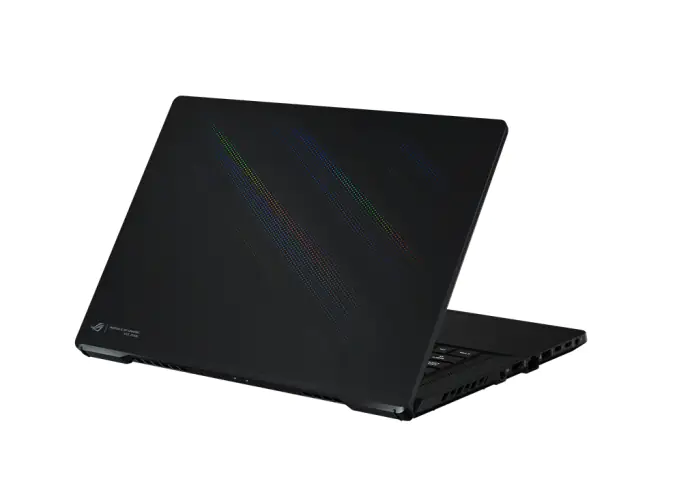
The LCD cover on this laptop is unique in every way. The design is understated, and the usually prominent ROG logo now appears on a small nameplate in the lower left corner. However, a large area (more than half) of LCD covers uses a unique color coating that creates a phantom-prism effect when the light is reflected. This makes the laptop look like a luxury device while still having a gaming appearance.
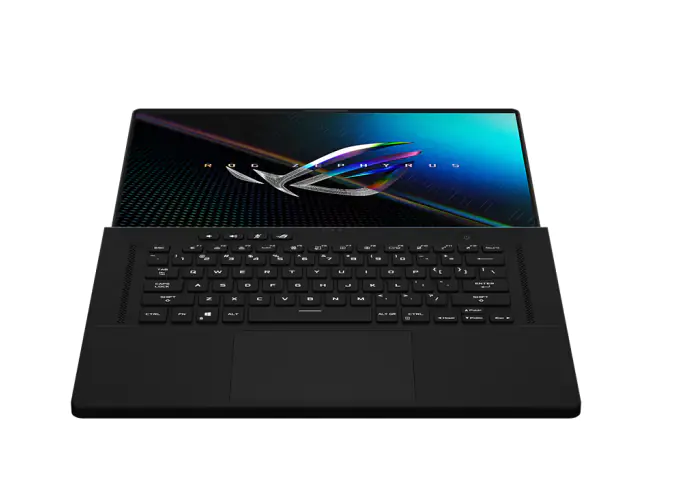
The display can be opened with one hand without any obstruction. The maximum opening angle is up to 180°.
The palm rest is coated with a skin-like coating, which makes the overall feeling very comfortable. The power button supports fingerprint recognition. The keyboard has a very comfortable feel and supports customizable white backlighting, allowing you to set lighting effects in the software.
Unfortunately, the device doesn’t have a numeric keypad, and the arrow keys are relatively small. However, because of this, a pair of stereo speakers is plugged into the palm rest, and the sound cavities in the rest of the body form a two-tweeter and four-woofer combination. The hardware specifications of the sound chamber, combined with the built-in Dolby Atmos sound effects, make the device one of the best sound outputs on the market.
Below is a large glass touchpad that feels smooth and comfortable in your hand. However, if you’re used to matte touchpads, it may take some time to adjust.
The foot pads on the bottom of the case are very high and provide some air intake when the case is opened and closed at a small angle. There are also two speaker openings at the bottom.
Display
The display is one of the highlights of the Asus ROG Zephyrus M16 GU603. This device comes with a large 16-inch 16:10 screen. However, you will be interested to know that it still retains the normal 15.6-inch body. To achieve a 16-inch display, the screen-to-body ratio has been increased to 94%. Such a high screen-to-body ratio requires ultra-thin four-sided bezels, which give the electronic device a premium appearance.
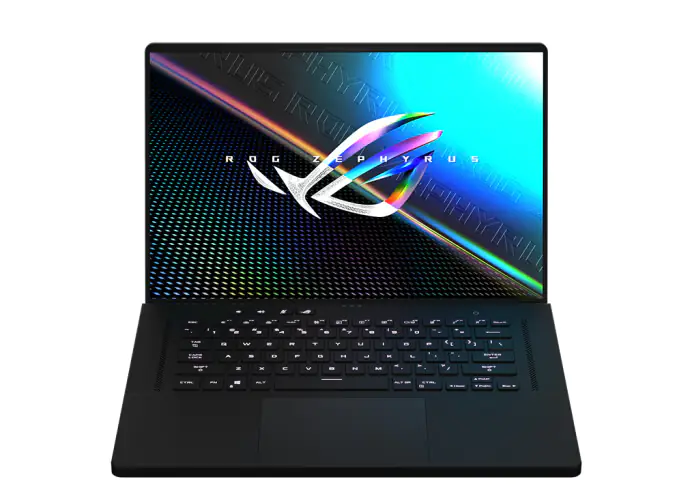
In addition to the reduced bezels, this laptop features a unique hinge design to hide the chin. The chin is almost invisible when used at a normal angle.
Additionally, this hinge cushions the body when opening and closing at large angles, significantly improving cooling efficiency.
The ASUS ROG Zephyrus M16 is positioned as a design all-rounder, so the hardware specifications of this screen are also taken into account. The screen is manufactured by BOE and has model number NE160QDM-NY3. It supports a 2560 x 1600 resolution, a 165Hz refresh rate, and a fast 3ms response time. The color gamut coverage is 100% DCI-P3, and it is also PANTONE certified and Dolby Vision certified.
Whether you’re a gamer, creative worker, or audio-visual enthusiast, this device has you covered. The display also supports multiple color presets that can be switched depending on the scene.
Using a color calibration instrument, we found that the screen covers 99.9% of the sRGB color gamut, 84.7% of the ARGB color gamut, and 99.2% of the DCI-P3 color gamut. The maximum brightness is 535 nits, and the DeltaE is 0.87. The overall display performance is very good for editing images.
Ports
There are plenty of ports on the side to meet the needs of creative workers. However, it may be a bit crowded for many users. On the left side are the DC power port (240W), HDMI port, Gigabit Ethernet port, USB-A port, Thunderbolt 4 port, full-featured Type-C port (supports 100W PD charging), and 3.5mm headphone jack. On the right side are the TF card reader and USB-A port.
Hardware
ROG has consistently maintained a high level of internal design. The Asus ROG Zephyrus M16 GU603 in our hands comes with an i7-11800H processor and an RTX 3060 graphics card (95W). How about its heat dissipation performance? Let’s take a look at it now.
The bottom cover is tightly secured with six screws. Three of them are exposed, and the other three are hidden. Unscrew all the screws and pry open the bottom cover. At first glance, I was shocked by its cooling system.
Its cooling system consists of multiple heat pipes that also use liquid thermal-conductive sheets. This sheet covers the Intel Core i7-11800H processor and NVIDIA GeForce RTX 3060 graphics card. Additionally, a large area of metal thermal conductive foil is applied to the bottom plate.
Below the fan is the onboard and slot memory. It comes with 8GB of onboard memory and 8GB of in-slot memory, forming a dual-channel memory configuration. Unfortunately, you can’t replace the onboard memory. However, you can replace the memory in the slots.
On the left of the memory is the MediaTek MT7921 wireless card, which supports the Wi-Fi 6 protocol. With the gradual absence of Intel network cards, MediaTek network cards have now occupied a significant market share.
On the left side of the memory is the MediaTek MT7921 Wi-Fi 6 wireless network card. As Intel network cards gradually withdraw from the market, MediaTek network cards now occupy a significant market share.
Below is the M.2 slot. The ASUS ROG Zephyrus M16 has two M.2 SSD slots that can be upgraded and expanded. The internal hard drive is a 1TB Samsung PM9A1.
At the bottom is a 90Wh battery. Because this laptop can manually block discrete graphics cards and switch performance modes, the battery life is excellent. According to Asus, the device has a maximum battery life of around 16.6 hours. With a 100W PD charger, you can share it with your phone when you go out, significantly reducing the weight of travel.
Hardware Performance
The ASUS ROG Zephyrus M16 GU603 seems to have a powerful cooling system and excellent cooling performance. But can it consistently deliver high performance? Let’s find out.
We first use AIDA64. In the beginning, the power can reach a terrifying 105W. The instantaneous performance is very good. After 15 minutes, the CPU temperature stabilizes at 88°C. At this time, the power consumption reaches 80W, and the frequency stabilizes at 3.8 GHz. We can see that the power consumption of the 11th-generation Core Duo is still relatively high. However, the Asus ROG Zephyrus M16 GU603 controls the temperature very well.
Then, we used FurMark for GPU testing. With Dynamic Boost 2.0 technology, the RTX 3060 in this laptop is stabilized at 95W. Furthermore, the temperature stabilizes at 71°C, and the frequency stabilizes at approximately 1230 MHz. This is not the best performance for the RTX 3060, but it is still excellent.
Next, we run both software programs at the same time to simulate the maximum pressure and conduct the double-core test for 15 minutes. After 15 minutes, the CPU stabilized at 45W and 79°C while the GPU stabilized at 82W and 75°C. Both the CPU and GPU can run above the baseline power consumption, and the cooling performance is excellent.
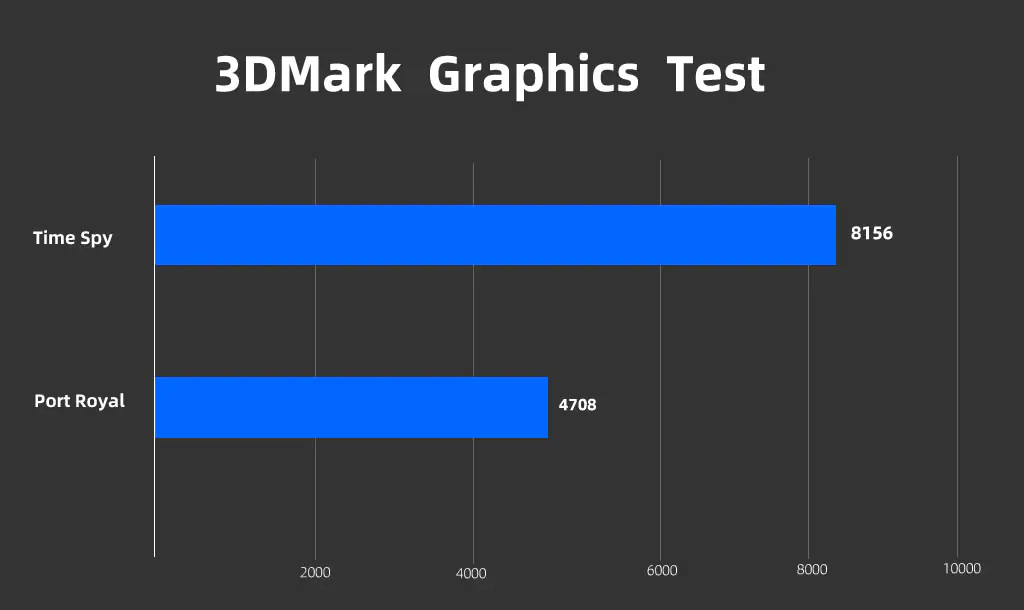
The GPU running score in 3DMark Time Spy reached 8156 points. We also ran the 3DMark light-tracking test. The Port Royal score was 4708 points. It can run most light-tracking 3A masterpieces smoothly at 60 fps.
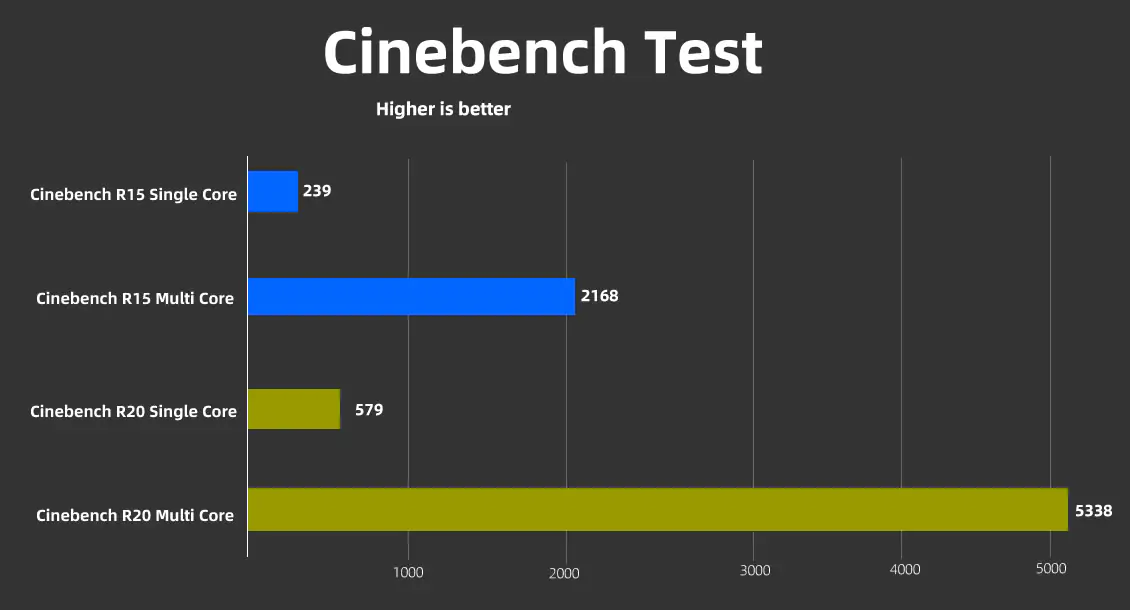
In Cinebench R15, it scored 239 points for single-thread and 2168 points for multi-thread. In Cinebench R20, it scored 579 points for single-thread and 5338 points for multi-thread.
Game testing
In terms of theoretical performance, the i7-11800H + RTX 3060 laptop is quite good. This generation of Core Duo has increased the three-level cache, which should also improve game performance. Then let’s run some games to test it and see if it can run the 2K 165Hz screen.
| Game | 2560 x 1600 |
| League of Legends | Most scenes run above 200 fps |
| Rainbow Six: Siege | 127 fps avg |
| APEX Legend | 120 fps avg |
| PlayerUnknown’s Battlegrounds | 110 fps avg |
| Death Stranding | 70 fps avg |
From the tests above, it can be seen that most esports games and AAA games that do not support ray tracing can still run smoothly at over 60 fps at 2K resolution on the highest settings, providing an excellent gaming experience.
Can it handle ray-tracing games? We used Call of Duty: Black Ops Cold War and Cyberpunk 2077 to test this.
Call of Duty: Black Ops Cold War is a 3A masterpiece that supports both ray tracing and DLSS. In 2K quality, it can run up to around 70 fps for a smooth experience.
For Cyberpunk 2077, the game isn’t very well optimized. At the highest resolution of 1920 x 1200, the frame rate is basically stable without the lights on. At 60 fps, the gaming experience is acceptable.
Since the ASUS ROG Zephyrus M16 doesn’t support discrete graphics cards at high frame rates, there will be a slight loss of image quality. Overall, laptops with the RTX 3060 can run ray-traced 3A masterpieces smoothly at 2K, as well as all esports games at high frame rates. It will outperform the mainstream for a long time to come.
Perfect for creative work
If you want to think of this laptop strictly as a gaming laptop, you might underestimate its aesthetic appeal. Because it’s a positioning all-rounder, the ROG Zephyrus M16 GU603 is also very good for creative work. The device uses AI and a 3D microphone matrix to deliver two-way AI-intelligent noise cancellation. Whether you’re in a business meeting or a gaming voice environment, the surrounding noise will affect you.
Adobe Premiere and Photoshop, which are commonly used by creatives, are also top-notch. In Premiere, thanks to the excellent single-core and multi-core performance of the i7-11800H processor, even the real-time playback of 4K original movies does not require proxies, and the editing is very smooth. When exporting, it’s faster thanks to the RTX 3060’s CUDA acceleration.
In Photoshop, there is no lag when directly modifying 4K RAW files. With this brightly colored screen, modifying pictures is simple and comfortable.
Summary
I can describe this laptop in three words, and they will be stylish, fast, and ultra-thin. In short, I have an excellent impression of this laptop. The ASUS ROG Zephyrus M16 GU603 is attractive because it is located at a transition between the campus and the workplace. An all-rounder who can both work and play is clearly suitable.
If your work requires a premium screen and high performance, while also requiring some portability, the ASUS ROG Zephyrus M16 is the ideal choice.