
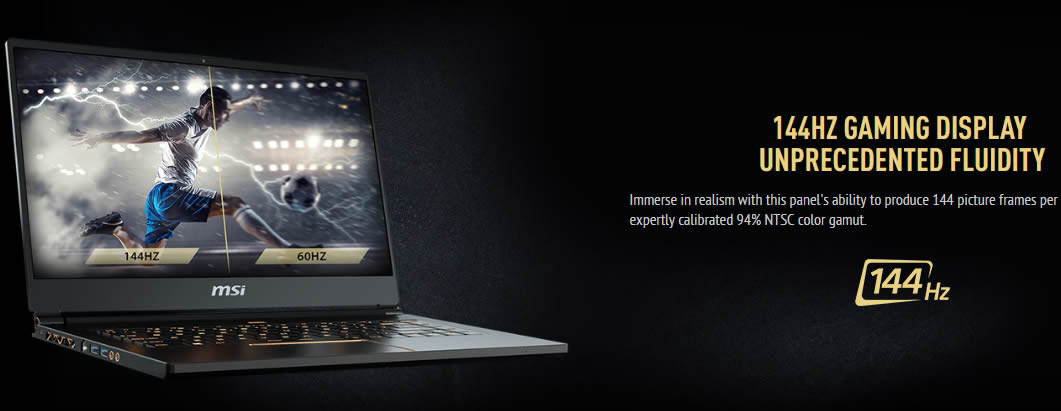
For many years, many enthusiastic gamers have longed to break free from the constraints of 60Hz LCD panels. Although such panels have now become the mainstream standard, providing exquisite visuals for various personal entertainment experiences, they have shown signs of decline in the gaming realm. For games with fast frame-to-frame transitions, a screen that refreshes only 60 times per second may not offer an ideal experience for players. Game developers once offered a solution to break these limitations through vertical sync technology, but it also has many flaws that hinder the player experience.
Currently, there are not many 144Hz screens on the market. In our table, the LCD screen model used in the laptop is also listed. You can click the screen model to purchase this screen.
The list of 15.6 – 17.3-inch gaming laptops
After clarifying the key factors to consider before purchasing a laptop, we can now delve into a complete list of laptops with 144Hz screens.
| Model | Screen | Screen Model | Hardware | Price(start from) |
| HP Omen 16 (Review) | 16.1″QHD, 165Hz, 3 ms, IPS, matte, 300 nits, 100% sRGB4 | Up to i7-11800H / RTX 3070 | $1150 | |
| Lenovo Legion 5 Pro(Review) | 16″ QHD(2560 x 1600), 165Hz, IPS, 16:10, 500 nits, 3ms, 100% sRGB, G-SYNC | CSOT MNG007DA1-1 | Up to Ryzen 7 5800H / RTX 3070 | $1699 |
| Asus ROG Zephyrus M16 GU603 (Review) | 16″ WQXGA(2560 x 1600),IPS, 16:10, 165Hz,matte, DCI-P3:100%, 3ms, | BOE NE160QDM-NY3 | Up to i9-11900H / RTX 3070 | |
| Asus TUF Gaming A15 FA506QR (Disassembly) | 15.6″, FHD 1920 x 1080, 240Hz, IPS, 16:9, matte, 3ms, 100% sRGB, AdaptiveSync | Sharp LQ156M1JW26 | Up to Ryzen 7 5800H / RTX 3070 | |
| Asus ROG Zephyrus M15 GU502 (Disassembly) | 15.6″, FHD 1920 x 1080, 144Hz, IPS, 16:9, matte, 3ms, 62.5% sRGB | Up to i7-10750H / RTX 2060 | ||
| MSI GF75 Thin (Disassembly) | 17.3″ FHD (1920 x 1080), 144Hz, IPS-Level | Up to i7-10750H / RTX 2060 | ||
| MSI GE66 Raider (Disassembly) | 15.6″ QHD (2560 x 1600), 165Hz(240Hz,300Hz), IPS-Level | Up to i9-11900H / RTX 3080 | ||
| MSI GS66 Stealth (Disassembly) | 15.6″ QHD (2560 x 1600), 165Hz(240Hz,300Hz), IPS-Level | Up to i9-11900H / RTX 3070 |
Fortunately, the list will grow every day. Although a high refresh rate screen doesn’t solve the prevalent lag between frame rate output and screen refresh rate, it happens. The high refresh rate screen has no tearing, stuttering, or lag. Ideally, a 144Hz laptop should also come with 144 fps for the most comfortable gaming experience.
Although there is no prospect yet, gamers want to be closer to bridging the gap using technologies like Nvidia G-Sync and AMD FreeSync. These technologies are designed to ensure that the screen refreshes when new output appears on the hardware. Still, a tougher solution combines these technologies with a high refresh rate screen and graphics to output content at a high frame rate.
Gaming laptops with Nvidia GPUs have become very popular these days, and many of them come with G-Sync, but at a higher price. However, if a G-Sync/FreeSync laptop is out of your budget, a 144Hz laptop is the best option for you. They will provide a better gaming experience with excellent frame-by-frame advancement speed compared to laptops with 60Hz screens.
However, you also need to ensure that the laptop you choose has the necessary specifications for a smooth gaming experience, including a high processing speed and sufficient built-in memory.
TN panel or IPS panel?
Another key factor you should consider is choosing between TN and IPS panels. The disadvantages of TN screens include reduced ghosting, shorter response times, narrower viewing angles, and fewer colors. On the other hand, IPS screens are usually slower, even though they produce better coloring and wider viewing angles. But you can get a better IPS screen depending on your budget.
As mentioned earlier, this list continues to grow daily, and we aim to keep it up to date. But for now, that’s all you need to know about high-refresh-rate laptops. These laptops fall into different price ranges. In addition to their high refresh rates, these laptops feature the latest hardware and support G-Sync technology. We hope you’ll find the best laptop for your budget and gaming needs.
If you want to view the laptop teardown, internal pictures, and upgrade guides, please click on the brand (Acer, Alienware, Asus, Dell, HP, Lenovo) to access our laptop teardown channel.
Again, please add the Clevo laptop to this section as well:
P751tm/P750TM/P751dm/P750DM
P870DM/P870DM
P775TM/P775DM
N960TP6/N950TP6
and tonfang chassis like Walmart laptops, Laptop models:
Tongfang G2/Z2/X2…
and there is also MSI gt75 , as well as alienware m15/m17.
Thanks
Thank you very much for your reply. We will add N960TP6/N950TP6, MSI GT75, and Alienware M15/M17.
Where’s AMD laptop FreeSync for budget and report gamer