
There are already several business laptops on the market. However, there is always room for improvement, especially in hardware. The recently released HP ProBook 635 Aero G8 meets most of the needs of business people. It comes with top-notch high-performance hardware and the latest AMD Ryzen 5000U processors. The notebook is also extremely thin, weighing around 1 kg, making it very portable. There are only a few laptops on the market that weigh less than 1 kg, which is a significant advantage for the HP ProBook 635 Aero G8. The device also has a good battery life of about 20 hours.
Rigorous 19 MIL-STD-810 military-standard testing makes it more rugged than a typical thin-and-light laptop. In addition to its high power and portability, another attractive aspect of this laptop is its price. The HP ProBook 635 Aero G8 is priced below $1,200, which is very low for a business laptop.
Specifications
| Screen | 13.3″ diagonal LED UWVA Anti-Glare FHD (1920 x 1080), 400 nits, Ambient Light Sensor, for IR Webcam, Low Power, WWAN |
| Processor | AMD Ryzen 7 5800U with Radeon Graphics (1.9 GHz base clock, up to 4.4 GHz max boost clock, 16 MB L3 cache, 8 cores) |
| Wireless Connection | Realtek RTL8822CE 802.11ac (2×2) and Bluetooth 5 |
| Graphics card | Integrated AMD Radeon Graphics |
| Memory | 16 GB DDR4-3200 PC4 SO-DIMM memory (2 DIMMs) |
| Storage | 512 GB PCIe NVMe SSD |
| Camera | Integrated HD 720p IR webcam with a dual-microphone array |
| Ports |
|
| Battery | 3-cell 53 WHr Battery |
| OS | Windows 10 Pro |
| Weight | 1 kg (2.2 lb) |
Design and Appearance
The design and appearance of any business notebook play a significant role in its market performance. In the case of the HP ProBook 635 Aero G8, it does not disappoint in this regard. The device uses a silver metal material. The silver metallic appearance has become mainstream over the past few years. Interestingly, the same silver color is used on all sides of this laptop, giving it a uniform appearance.
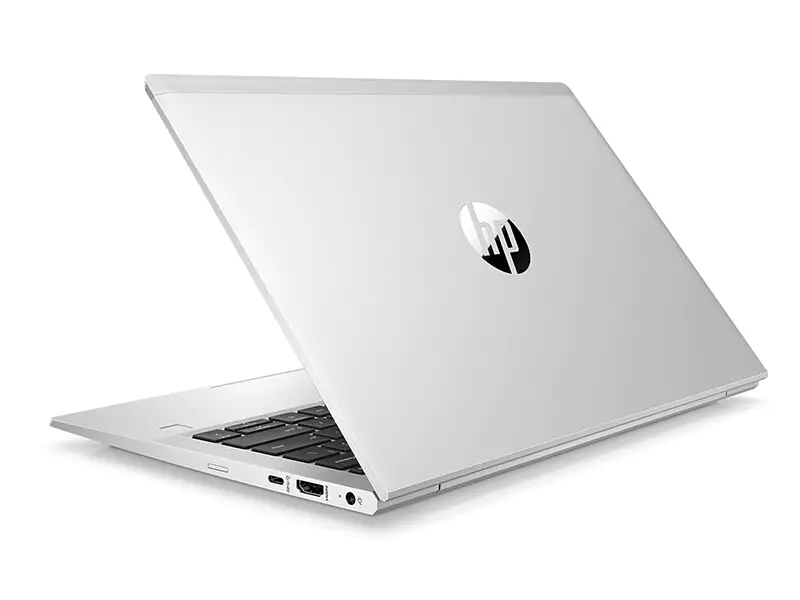
To enhance the overall aesthetic of this device, HP has meticulously polished this laptop using diamond cutting techniques. This enhances its aesthetic and also gives it a smooth and comfortable feel. However, it has a drawback that users have to be careful when handling this device, as it can slip easily, especially when their hands are wet. Still, the silver design gives this business laptop an understated yet premium, elegant, and stylish finish.
Despite the use of silver metal, the diamond-cutting technology ensures that the weight of the laptop is controlled to around 1 kg. In fact, the actual weight we measured was around 0.9945 kg. The dimensions of the device are 30.75 x 20.44 x 1.80 cm. This indicates that the device is only 1.80 cm thick. Obviously, this laptop is easy to grab with one hand. Weight and thickness are the significant advantages of the HP ProBook 635 Aero G8 as a business laptop, which meets the thin and light needs of business people.
Screen
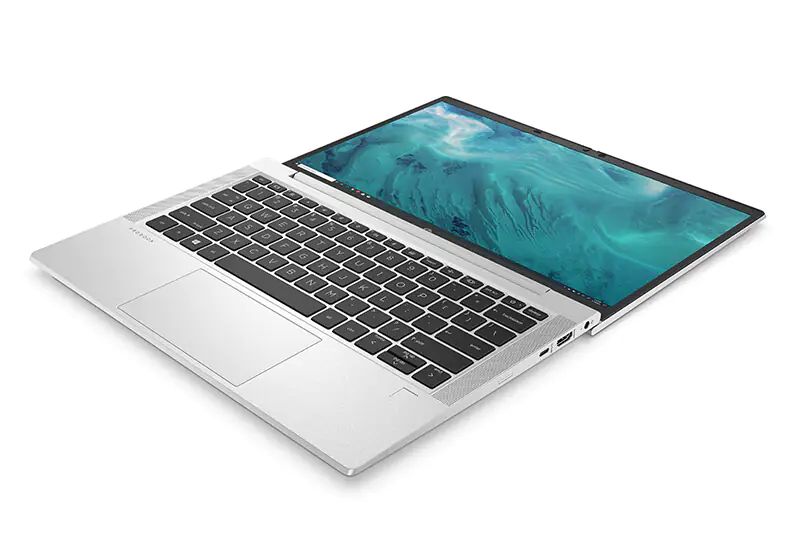
The first good impression I got from the HP ProBook 635 Aero G8 was its portable 13.3-inch anti-glare IPS screen. Of course, no business laptop needs a huge 16-inch display, as this will only add weight and carriage burden, but will not significantly increase productivity, which is a major concern for business people.
According to HP’s official information, the 13.3-inch anti-glare IPS screen supports 1920 x 1080 resolution, 400 nits brightness, and a high color gamut of 100% sRGB. These specifications show that users don’t have to worry about the lighting conditions in the office. Whether you’re in a bright office or in direct sunlight when going out, this laptop is definitely usable. In addition, its ambient light sensor can automatically adjust the screen brightness to suit the visual experience in different environments.
The laptop has an AUO AUO6888 screen. We tested it with SpyderXElite 5.6. The color gamut of this screen is 98% sRGB, 77% Adobe RGB, 77% DCI-P3, 71% NTSC, and a DeltaE of 1.24. In other words, this screen can provide excellent performance. In addition, its screen brightness was measured at 390.4 nits.
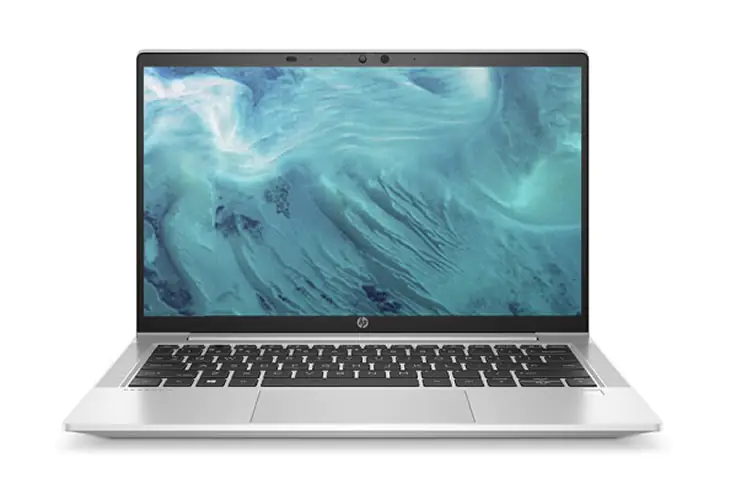
To improve the display ratio, the HP ProBook 635 Aero G8 significantly reduces the bezels. Thanks to its narrow bezel design, the laptop has an 86.2% screen-to-body ratio, providing a larger viewing area for more immersive visual effects. However, we can see that the top and bottom borders are thicker than the side bezels. The bottom bezel has the HP logo, while the top bezel houses a wide-angle camera with built-in facial recognition technology. In addition, the camera comes with an adjustable toggle switch that users can slide to block the camera.
Face recognition technology is a very important feature of business notebooks. All you have to do is turn on your laptop, and it will automatically recognize your face and turn on the device. You can easily log in to the system by swiping your face when you turn on the device and start a video conference at any time.
Keyboard
The keyboard area (some call it a palm rest) is just as interesting as the entire notebook. First of all, it has small holes on the side of the keyboard. These holes are for its high-quality speakers. I particularly like this design because it gives users direct access to the sound coming out of the speakers. It makes video conferencing and home audiovisual entertainment much easier when it comes to sound. When the sound is coming from the rear or bottom, it can sometimes be hectic to have a video conference without the handset.
The keyboard uses a one-piece mold design, and the company has done a lot of work on the keyboard design. The device comes with full-size keycaps that provide 1.5mm key travel. This premium spill-resistant keyboard features a two-stage backlit design. This means that users can adjust the backlight brightness to suit their needs based on the lighting in the environment.
In addition, the keycaps feature a rubber dome and shock-resistant hook technology. This effectively reduces button noise during typing and provides a quieter typing experience. In a public office space, tap the keyboard as much as you want, and it won’t disturb your colleagues in the office.
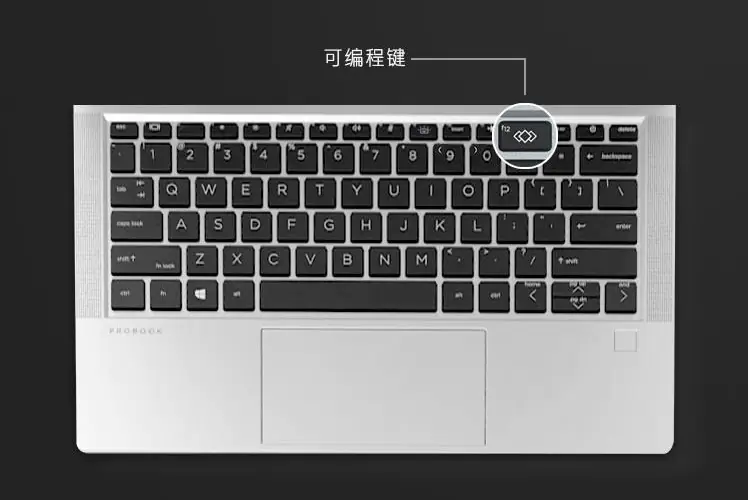
High efficiency is a major feature of business office notebooks, and the HP ProBook 635 Aero G8 is just that. The F12 button on the keyboard provides programmable shortcuts. This makes it easy for users to customize their keyboards. Users can set function keys through the HP Programmable Key APP. In addition, a combination of Shift, Ctrl, and Alt can add apps, websites, files, or folders for easy access. This provides users with one-key direct access to these custom areas (apps, folders, etc.).
The touchpad supports multi-touch gestures. This feature allows users to access various features with a single touch. It’s important to note that most of these touches aren’t available on regular notebooks. In addition, the all-in-one touchpad is very smooth and large. If you prefer a rough touchpad, this touchpad may take some getting used to. The hidden left and right buttons are comfortable to press, and the feedback is simple. It can be a perfect replacement for the mouse in most business offices or meetings.
On the right side of the touchpad, there is a fingerprint sensor that provides additional security. If you’re not satisfied with the face recognition feature, you can use a fingerprint sensor to improve security.
Ports
The ports of the HP ProBook 635 Aero G8 are not the most comprehensive in the industry. However, they are just sufficient for a business notebook. The device offers improved connectivity and scalability compared to its predecessor.
On the right side of the notebook, we have a circular power port, an HDMI 2.0 port, a USB Type-C port, and a spare Nano SIM card slot. There are two USB Type-A ports on the left side (one of which supports charging) and a 3.5mm audio port.
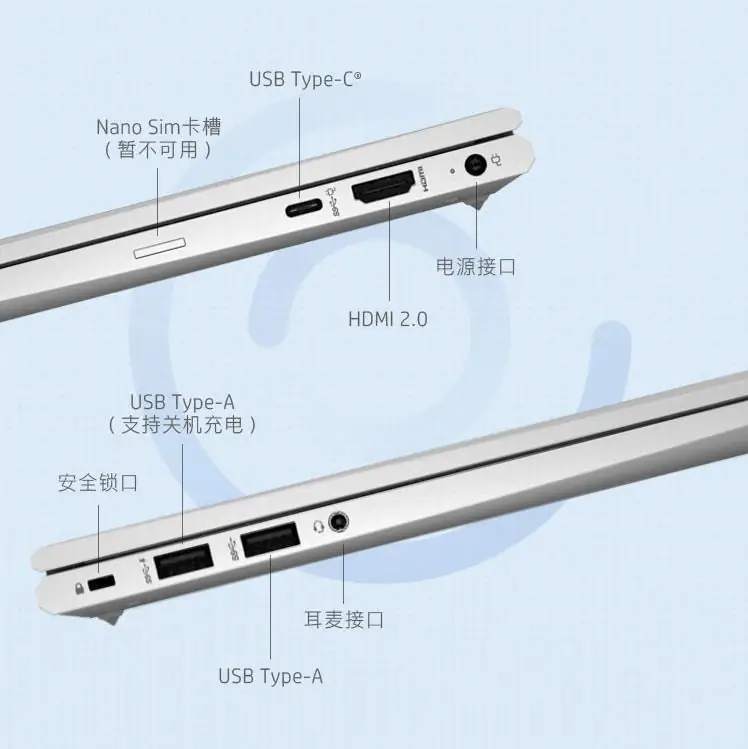
The ports on this device can meet the peripheral connection requirements of daily business office operations. Users can connect larger monitors, mobile phones, USB flash drives, and more without carrying a docking station.
Hardware Tests
The HP ProBook 635 Aero G8 we reviewed comes with an AMD Ryzen 7U processor with integrated AMD Radeon 5800 Graphics. The device also comes with two 8GB (16GB) DDR4 3200MHz RAM, a 512GB NVMe SSD, and Wi-Fi 6 high-speed wireless support. It also supports Bluetooth 5.0 and comes pre-installed with Microsoft Windows 10 Pro, Office Home Student Edition, and Kingsoft WPS Office. Its software packages also include HP Connection Optimizer, HP Hotkey Support, HP Noise Cancellation Software, HP Support Assistant, HP Power Manager, myHP, HP Privacy Settings, Touchpoint Customizer for Commercial, HP Notifications, and HP QuickDrop.
Before the test commenced, we had to update the system to the latest version with version number 19042.1151. The motherboard BIOS version number is T83 Ver.01.02.00, and the office environment temperature is 26°C. Also, the notebook was charged to 100% and set to “performance mode” for all tests except the battery test.
CPU
Earlier this year, AMD launched its Ryzen 5000U series for mobile devices. The biggest upgrade in this chip is its use of the Zen 3 architecture, which brings a significant increase in IPC. The AMD Ryzen 7 5800U uses 7nm process technology, 8 cores, and 16 threads. It hits a single-core maximum frequency of 4.40 GHz. It also integrates the AMD Radeon 8 GPU and 16MB L3 cache, with a design power consumption of 15-25W.
CPU-Z
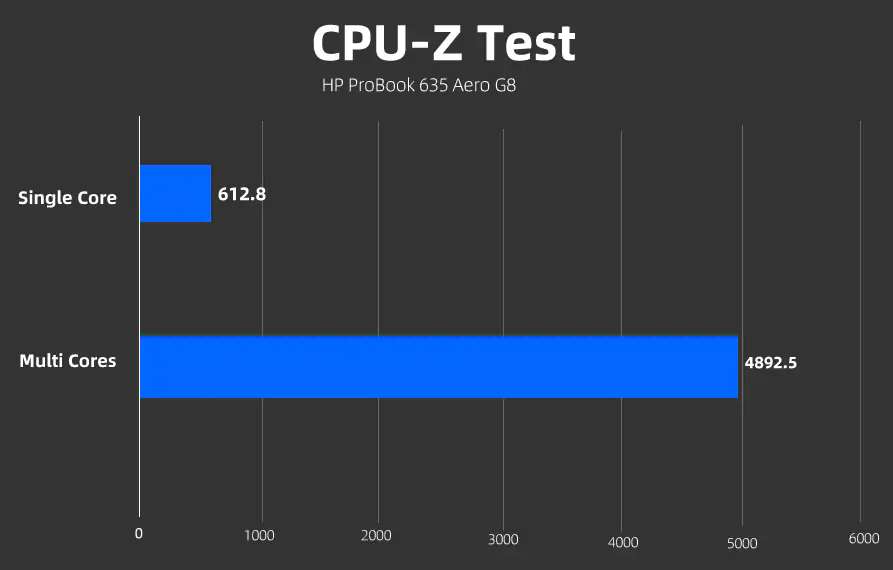
In the CPU-Z benchmark test, the single-core score was 612.8 while the multi-core score was 4892.5. This score is very impressive for a business notebook.
CineBench
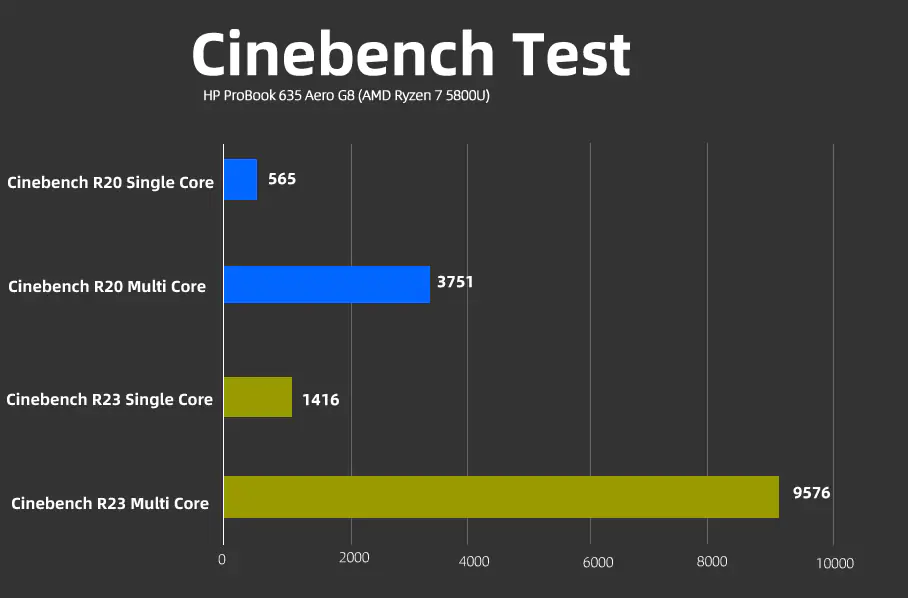
In Cinebench R20, the Ryzen 7 5800U was tested with equally satisfying results. The single-core score was 565, and the multi-core score was 3751.
In CineBench R23, the single-core score was 1,416, and the multi-core score was 9,576.
3DMark
In the 3DMark test, the Time Spy score reached 1295, the graphics card score was 1128, and the CPU score was 6395.
On the Fire Strike tests, this chip scored 3136. The graphics card scored 3378, and the physical score was 18,482.
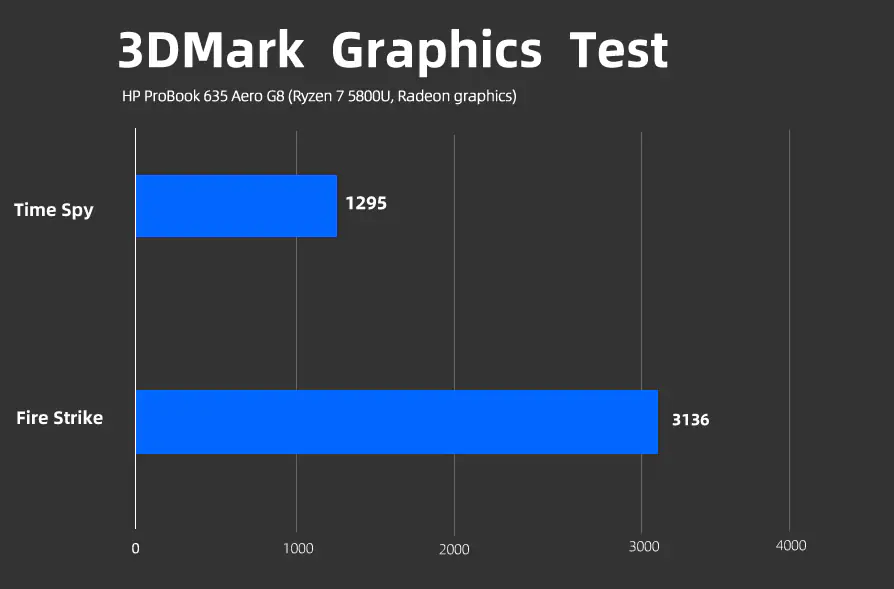
From the above test scores, it is clear that the HP ProBook 635 Aero G8 can seamlessly handle daily office graphics, audio, and video entertainment needs. In fact, for office users who like to play games, this device will also meet their needs. However, please do not use it for heavy-duty games and expect high results.
SSD
This notebook uses an SK Hynix 512GB NVMe SSD. We tested with CrystalDiskMark 8, and the read speed of the test sequence is 3596.26 MB/s, while the write speed is 3228.65 MB/s.
RAM
The laptop comes with two 8GB DDR4 3200MHz dual-channel RAM. The memory read speed is 39198 MB/s, while the write speed is 33208 MB/s.
Battery Life
As we said earlier, business laptops require long-lasting batteries because their users usually take them on trips far away. Battery life is important for business meetings at any time. The HP ProBook 635 Aero G8 has a built-in 53Wh 3-cell Li-ion battery.
According to HP’s official website, it lasted 20 hours in the Windows 10 MM18 battery life test, making it perfectly suited for short-term business trips.
However, in the PCMark 10 battery test, the laptop had a longer battery life. We set the screen brightness to 80% and turned on wireless connectivity, Bluetooth, and GPS. After running the notebook for 30 minutes (100% fully charged), the remaining time shown is 19 hours and 35 minutes. Another implication of this test result is that the battery life is a little longer when the screen is less bright and doesn’t require wireless connectivity, Bluetooth, and GPS.
The laptop also supports fast charging, which can charge up to 50% in 30 minutes. According to HP, this device retains more than 65% of its battery capacity after 1,000 charging and discharging cycles. This means that with a 20-hour battery life, you only need to charge your laptop once every two days, without worrying about battery quality issues for three years.
Cooling System
Although this is not a gaming laptop and heat dissipation is not a major concern, we also examined the heat dissipation of the Ryzen 7 5800U processor on the HP ProBook 635 Aero 8. One of the best features of this chip is its high performance and low power consumption. This means that we do not have to worry about heat dissipation.
This laptop is designed with a single fan and a single heat pipe. The distance between the heat pipe and the CPU is very short, so the heat can be dissipated quickly. The heat is concentrated mainly on the rear hinges of the body. This will protect the user from direct heat output, and the keyboard surface will barely feel the heat.
We used AIDA64 FPU to test the heat dissipation performance. The room temperature was 27°C, and we ran the laptop for about 30 minutes. After testing, the CPU temperature was 86.5°C, the power consumption was 23W, and the frequency was slightly reduced but stabilized at 2.75GHz. We can say that a little frequency is sacrificed in exchange for a balance with temperature.
Summary
The HP ProBook 635 Aero 8 weighs only about 1kg, which left me deeply impressed. At this time, there are not many notebooks with such weight. This means that the device can be easily picked up with one hand, allowing users to participate freely in business meetings at any time. It really reduces the burden on the backpack. In addition, the HP ProBook 635 Aero 8’s facial recognition technology and fingerprint sensor help prevent personal privacy leakage, providing users with secure personal privacy protection.
This laptop has passed 19 rigorous MIL-STD-810 military-standard tests, including drop, high temperature, low temperature, humidity, vibration, dustproof, and shock tests. Thus, in terms of strength, business personnel can be confident that this device is designed to withstand complex and harsh environments.
As a business laptop, the ProBook 635 Aero 8 not only meets performance requirements but also achieves simple design and portability, making it a highly appealing device.
Finally, let’s talk about the price. This laptop costs less than $1,200, which is its most appealing aspect. Those who want to buy a thin and light business laptop should not miss the HP ProBook 635 Aero 8.